7 Invoice Mistakes That Delay Payments and Hurt Cash Flow
By ALFAA Team
Stay in the loop
Get finance tips delivered to your inbox.
Most businesses don't lose money through one big financial mistake. They lose it slowly, through small invoicing errors that repeat every month: a missing PO number, a total that doesn't match the quote, and an invoice sent to someone who left.
Each one looks minor. But an invoice error rarely costs a day or two. It often costs a full payment cycle because of how clients process invoices. As one billing guide puts it, restarted approvals can miss scheduled payment cycles and push payment to the next cycle or later, and clients who meet errors often start checking every future invoice more slowly.
This guide ranks the 7 invoice mistakes that delay payments by how much time each one costs, shows how to fix each, and covers what to do when a mistake has already gone out.
How an invoice gets paid, and where mistakes stop it
Unless your client is a one-person business, your invoice doesn't go straight to someone with a bank login. It travels through accounts payable (AP), and each step is a checkpoint.
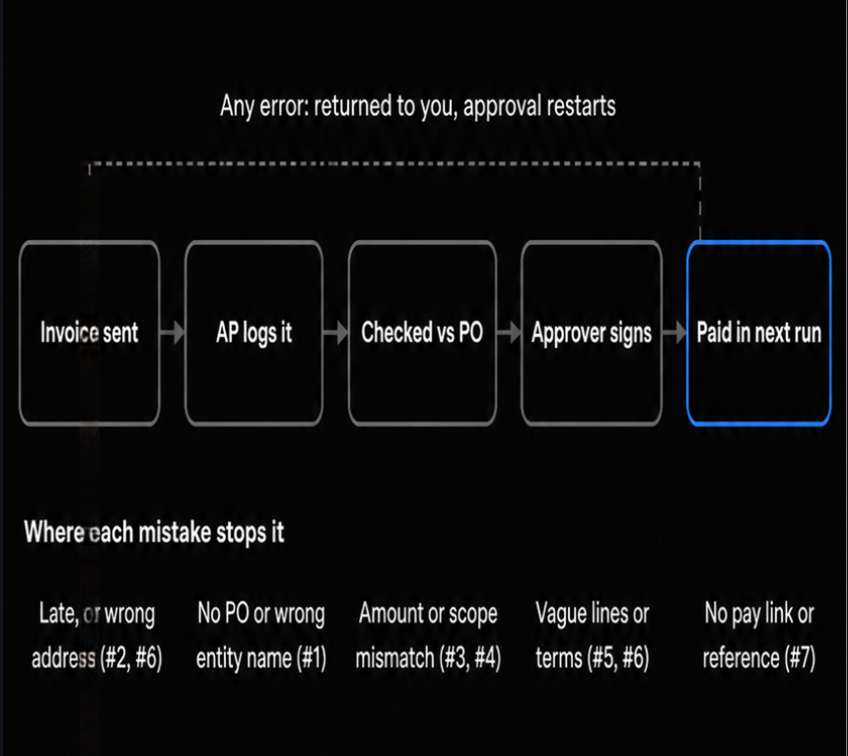
If AP finds a problem at any step, the invoice comes back to you. You fix it, resend it, and it starts again at the first step. Many companies pay suppliers in scheduled batches, sometimes only twice a month, so an invoice that misses one run waits for the next. That's why a 10-minute fix can turn into a 2 to 4 week delay.
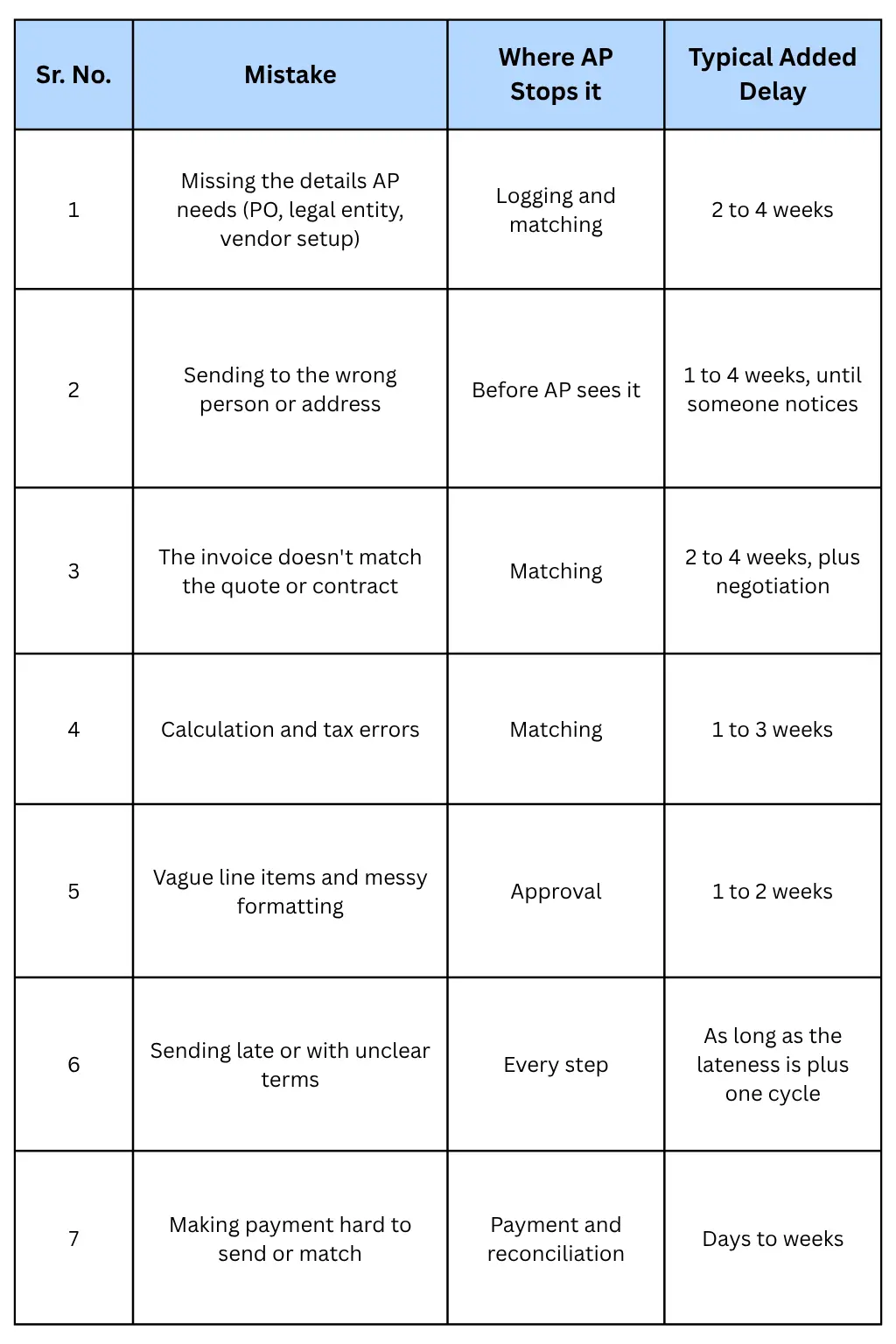
The mistakes below are ranked by that logic: the ones that stop an invoice earliest or send it back furthest come first.
The 7 invoice mistakes that delay payments, ranked by impact
Delay ranges below are our working estimates for a client that pays in twice-monthly runs on Net 30 terms. Your numbers will vary by client, so treat them as a guide to priority, not a promise.
1. Missing the details of accounts payable needs
This is the most expensive mistake because it stops the invoice at the first checkpoint. Many mid-size and large companies won't process an invoice without a purchase order (PO) number, and some won't pay a supplier who hasn't completed vendor setup.
Common gaps:
No PO number, or an expired one
Your business name doesn't match the vendor record (a brand name instead of the legal entity)
The client's legal entity is wrong, such as the parent company instead of the subsidiary that hired you
Vendor forms not completed: in the US, a W-9; elsewhere, a VAT or tax ID and bank details on file
No contract or project reference AP can match
Fix it: before the first invoice, ask your contact for the AP email, the PO number and its expiry date, the exact legal entity to bill, and the vendor forms they need. Save these once in client management so every invoice carries them automatically.
2. Sending the invoice to the wrong person or address
One wrong email address can delay payment for weeks, and nobody tells you. The invoice sits in the inbox of a project manager who's on leave or a contact who left the company.
Common problems:
Sending to your day-to-day contact instead of the AP inbox
Outdated email addresses after staff changes
Incorrect company names or billing addresses
Invoices caught by spam filters because they arrive as a link with no attachment
Fix it: send it to the AP inbox and copy your contact so finance has it and your contact knows it's coming. Attach a PDF as well as a payment link. Confirm the billing contact every quarter for regular clients. Our guide on how to send an invoice covers delivery details that keep invoices out of spam.
3. Invoicing an amount that doesn't match the quote or contract
AP compares your invoice with what was approved: the PO, the quote or the contract. If the numbers differ, the invoice stops while someone finds out why. Projectworks notes that an invoice 20% above the original quote is likely to be flagged by the client's finance team. Scope creep is usually the cause: the client asked for extra work in a meeting, but the PO still shows the original amount.
Fix it:
Get extra work approved in writing as a change order before you do it, with its own amount
Ask the client to raise or update the PO for the change
Invoice the original scope and the change order on separate lines, each referencing its approval
If an invoice will exceed the quote, tell your contact before you send it
4. Calculation and tax errors
A wrong total doesn't just get corrected; it makes the client distrust the whole invoice. Projectworks points out that a small calculation error can trigger an audit of every line item.
Watch for:
Totals that don't add up, often after editing one line in a spreadsheet
Missing, wrong, or double-counted tax
Discounts applied twice or not at all
Duplicate line items copied from last month's invoice
Missing tax IDs or no reverse-charge note on cross-border business invoices where one applies
Fix it: use software that calculates line totals, tax, and discounts for you, and use a saved template per client. For international clients, confirm with your accountant which tax wording each invoice needs.
5. Vague line items and messy formatting
The approver who signs your invoice is often not in your meetings. If a line says "Consulting services: $8,000", they have to ask someone what it covers before approving, and the invoice waits. Projectworks calls missing line-item detail the most common cause of disputed or delayed invoices.
Poor formatting adds to it: inconsistent layouts, missing branding, no invoice number, or an invoice that looks so unlike a business document it gets mistaken for spam.
Fix it: describe each line so a stranger could approve it.
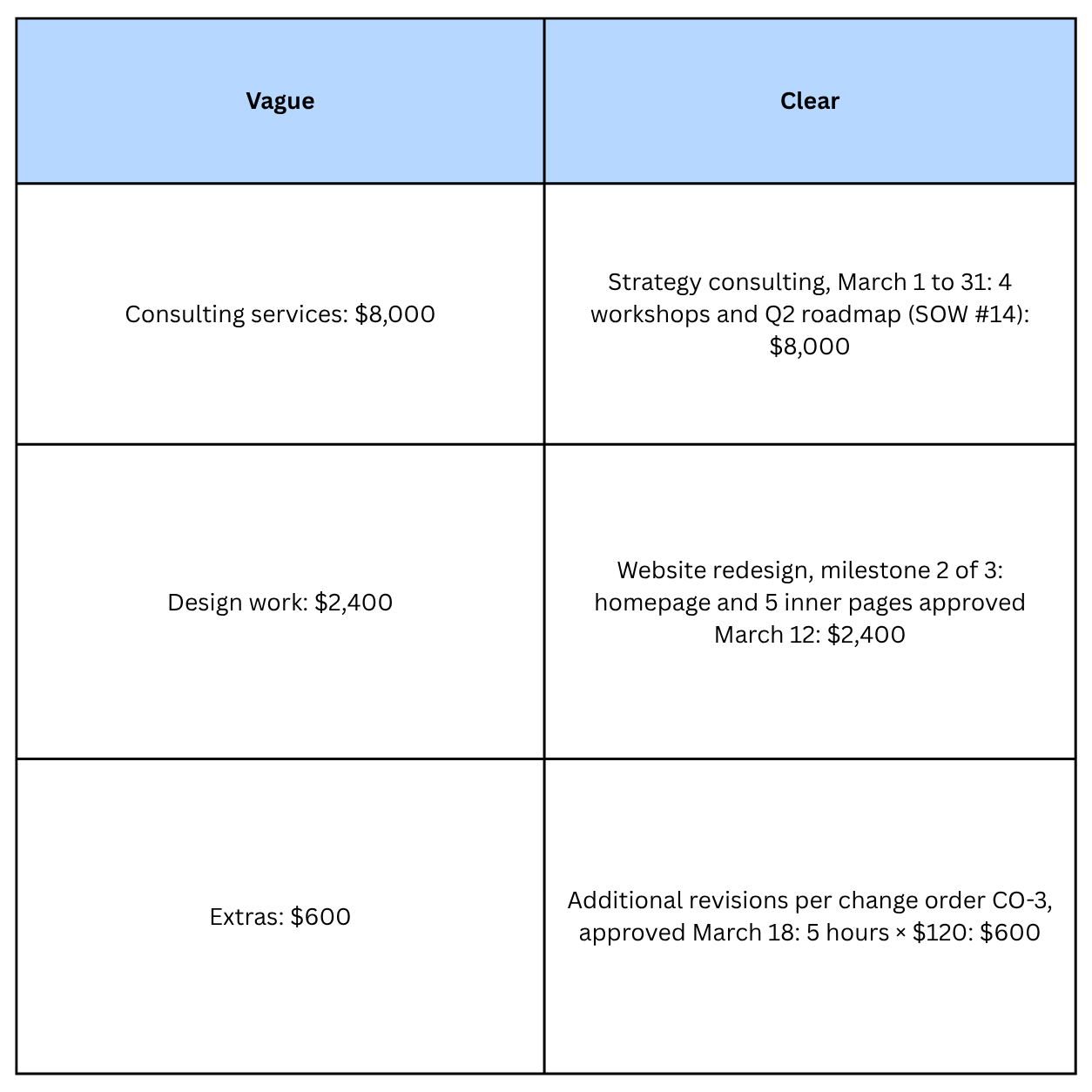
Use a standard, branded template with a unique sequential invoice number, your legal name and contact details, and the client's legal entity.
6. Sending late or with unclear terms
Late invoices create late payments. If you finish work on the 3rd and invoice on the 30th, your Net 30 clock starts four weeks late, and you may miss the client's next payment run too. Batching invoices at month end is convenient for you and expensive for your cash flow.
Unclear terms cause the same problem from the other side. Without a due date, accepted payment methods and late-payment terms, the client's AP team applies its own default, which is often slower than yours.
Fix it:
Invoice when work or a milestone is delivered, not at month end
For retainers, use recurring billing so the invoice goes out on the same date every cycle (see our guide to recurring invoices)
Show a due date, not just "Net 30": "Due April 15, 2026 (Net 30)"
State accepted payment methods and any late fee your contract allows
Agree on terms before the work starts; see how to negotiate payment terms
7. Making payment hard to send or match
Clients pay faster when paying takes seconds. But difficulty also shows up after the money moves: payments that arrive with no reference or the wrong amount take time to match, and you may chase a client who has already paid.
Common problems:
No payment link, or only one payment method
No instruction to quote the invoice number in the payment reference
One transfer covering several invoices with no breakdown
Short payments when bank or transfer fees are deducted, common on international payments
New bank details sent by email without warning, which may trigger a fraud check (see below)
Fix it: add a payment link near the top of the invoice, offer a bank transfer option for business clients, and print "Please quote invoice #[number] as your payment reference." For international clients, agree in advance who pays transfer fees. Our guide to invoice payment methods compares options, and payment tracking shows partial and full payments against each invoice.
How to correct an invoice you've already sent
Mistakes still slip through. How you correct one decides whether the client pays in days or treats the account as messy for months. The core rule: once an invoice has been sent, don't edit it and resend it under the same number. The client's system may already hold the original, and two versions with one number confuse everyone, including your own records.
Choose the right correction
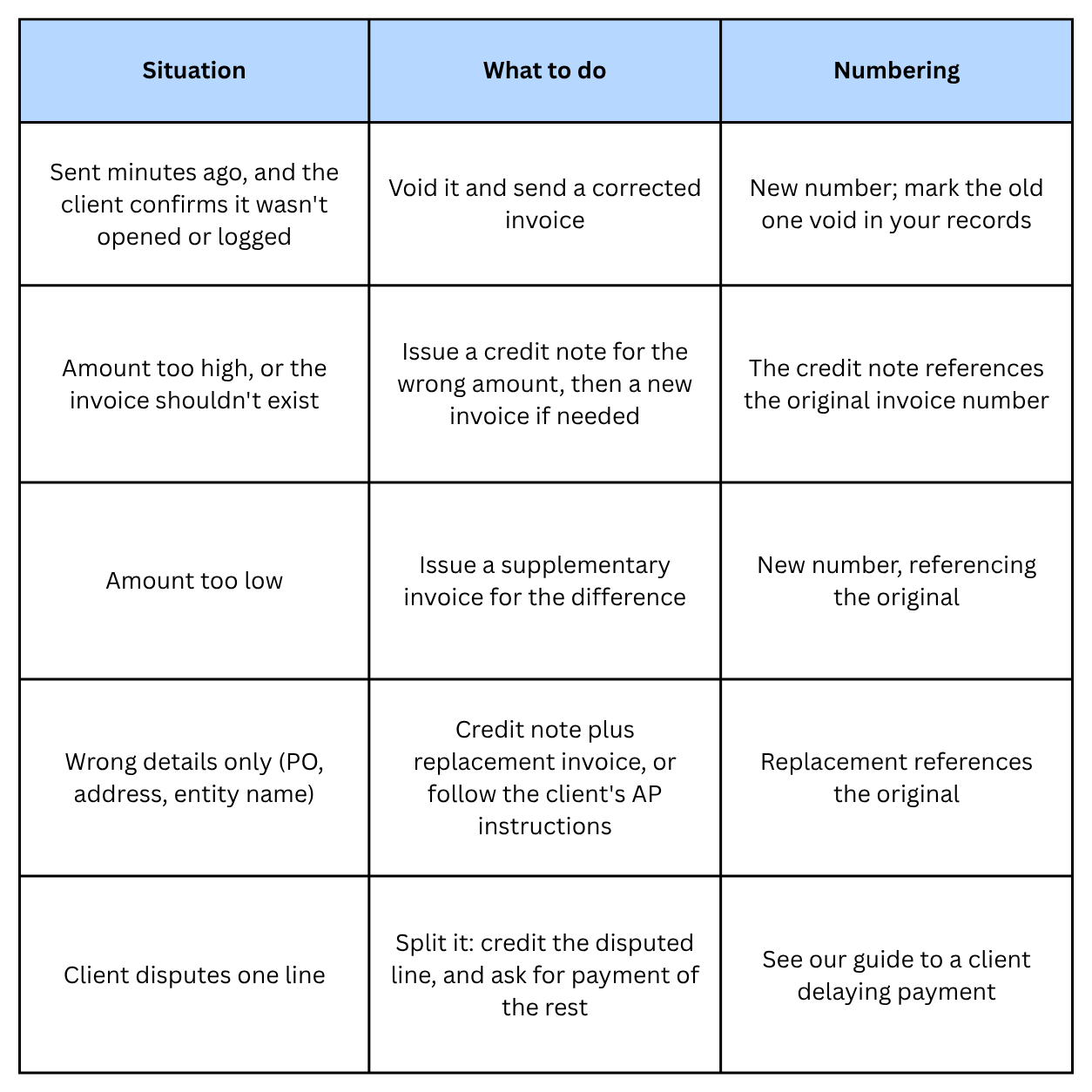
Ask your accountant if you're unsure: tax rules in some countries specify how corrections must be documented.
Send the correction with a clear note
Subject: Corrected invoice #[new number] (replaces #[old number])
Hi [Name], invoice #[old number] had [the wrong PO number / an incorrect total]. I've attached credit note #[number] cancelling it and corrected invoice #[new number] for [amount]. Please process #[new number] and disregard the original. Apologies for the extra step.
Expect the payment clock to restart
Most AP teams treat the corrected invoice's date as the start of the payment terms. If the error was minor and you want the original due date kept, ask for it in the email and get the client's agreement in writing. Otherwise, update your cash-flow forecast to the new due date.
Changing your bank details without triggering a payment hold
An invoice with new bank details looks exactly like a common fraud. In a business email compromise (BEC), criminals impersonate a supplier and ask the client to pay a different account. The FBI's 2025 Internet Crime Report recorded about $3.05 billion in BEC losses from 24,768 complaints. So when your bank details change, a careful AP team will freeze payment until it can verify the change, which is the right call even when it costs you time.
You can shorten that hold by making the change easy to verify:
Give notice before the next invoice, not on it. A separate email or letter 2 to 4 weeks ahead gives AP time to update its records.
Use your usual channel and sender, from your known email address, signed by someone the client knows.
Invite verification by phone. Tell them to call you on the number they already have on file, not one in the email. A fraudster controls any reply address or phone number in a fake request, so only a contact already on record proves the change is real.
Expect paperwork. Many clients require a new vendor form or a bank letter. Send it promptly.
Keep the old account open until all invoices sent with the old details are paid.
Never change bank details mid-invoice. If an invoice is already out, let it pay to the old account.
The same habits protect you: if a client's payment instructions or contact details suddenly change, verify by phone before acting.
Find out which mistake caused a delay
When an invoice is late, ask your contact or the AP team one question: "What's the status of invoice #[number]?" Their answer usually points straight to the mistake.
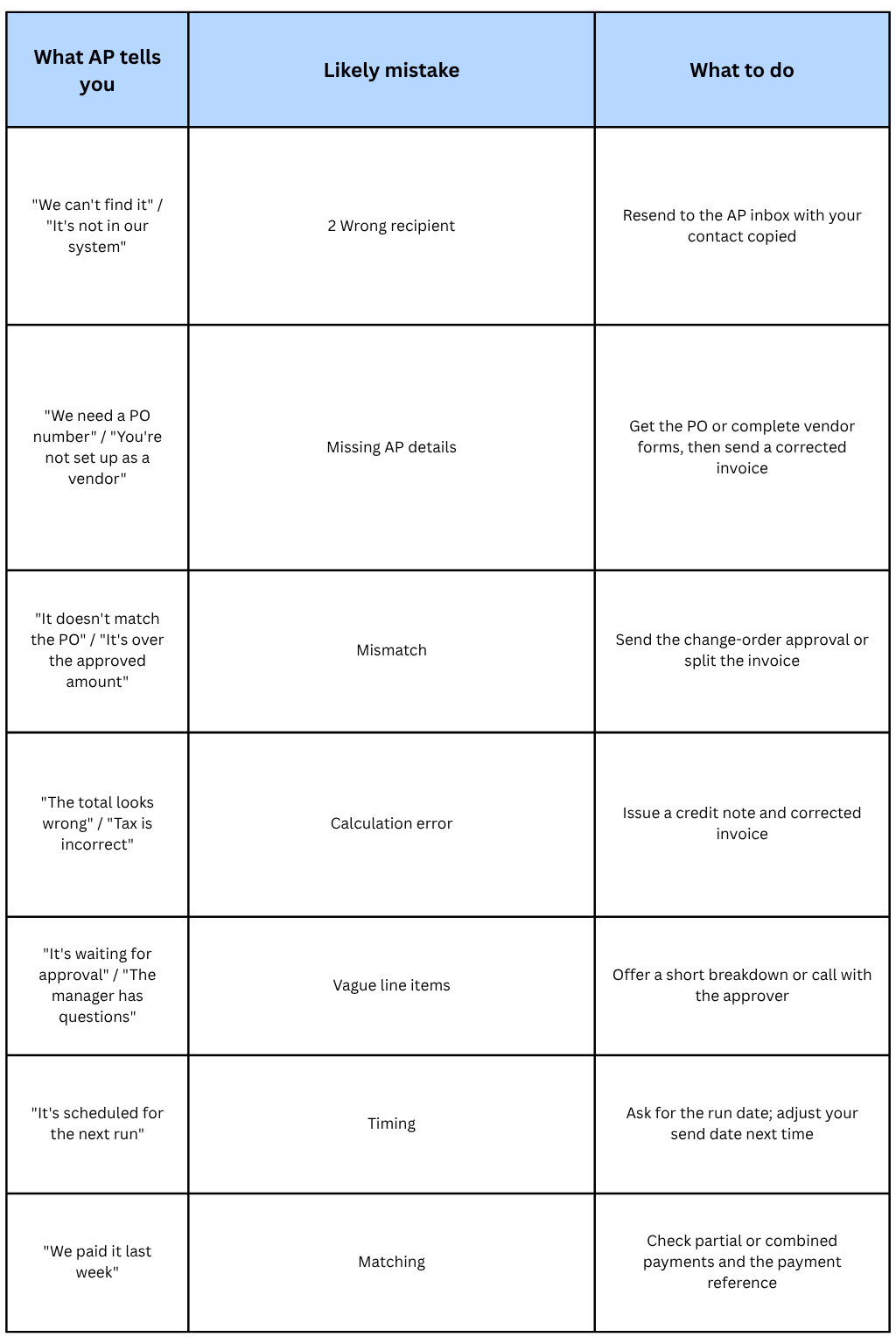
If the client is simply slow rather than blocked, our guide to handling a client delaying payment has a 60-day follow-up plan.
Track invoice status and the numbers that matter
You can't fix a pattern you can't see. If you can't tell at a glance which invoices are overdue, pending, or paid, delays only surface when cash runs low. Payment tracking shows each invoice's status, and automated payment reminders follow up before and after the due date so nothing waits on your memory.
Watch three numbers each month:
First-pass approval rate: The share of invoices paid without a question or correction. Each rejection points to one of the 7 mistakes; log the reason.
Days to pay, per client: A client drifting from 12 days to 30 often has a process issue you can fix, such as a new AP contact or an expired PO. Client analytics shows this per client.
Days sales outstanding (DSO): how long, on average, you wait to collect.
\text{DSO} = \frac{\text{Accounts receivable}}{\text{Revenue for the period}} \times \text{Days in the period}
For example, $30,000 outstanding against $60,000 billed over 90 days gives a DSO of 45 days. If your terms are Net 30, the 15-day gap is the cost of late payments and invoice errors combined. A revenue dashboard shows the receivables and billing figures you need.
Pre-send checklists by client type
One generic checklist misses what each kind of client checks. Run the core list on every invoice, then add the list for that client.
Every invoice
Unique, sequential invoice number
Your legal business name, address, and contact details
Client's correct legal entity and billing address
Invoice date, service period, and a specific due date
Each line describes the work, period, and reference (SOW, milestone, change order)
Totals, tax, and discounts calculated by software, not by hand
Payment link plus accepted payment methods
"Please quote invoice #[number] as your payment reference"
PDF attached
Small business or individual client
Sent to the person who actually pays, usually the owner
Card or online payment option included
Short, friendly cover note with the amount and due date in the first line
Larger company with an AP team
PO number on the invoice, and not expired
Vendor setup complete (W-9 in the US, tax ID, and bank details on file)
Sent to the AP inbox, with your contact copied
Amount matches the PO or approved change order
Sent before the client's payment-run cut-off
International client
Currency stated clearly and matching the contract
Tax IDs for both parties, plus any reverse-charge or export wording your accountant advises
Agreement on who pays transfer fees
Bank details include the codes international transfers need (such as SWIFT/BIC or IBAN)
For receipts after payment, see what a legitimate business receipt needs. For the full process from draft to payment, read how to create an invoice and actually get paid.
How Alfaa helps prevent these mistakes
Alfaa is invoice management software built for consultants, agencies, contractors, and other businesses that bill clients regularly. Software can't fill in a client's vendor forms for you, but it removes most of the repeat errors.
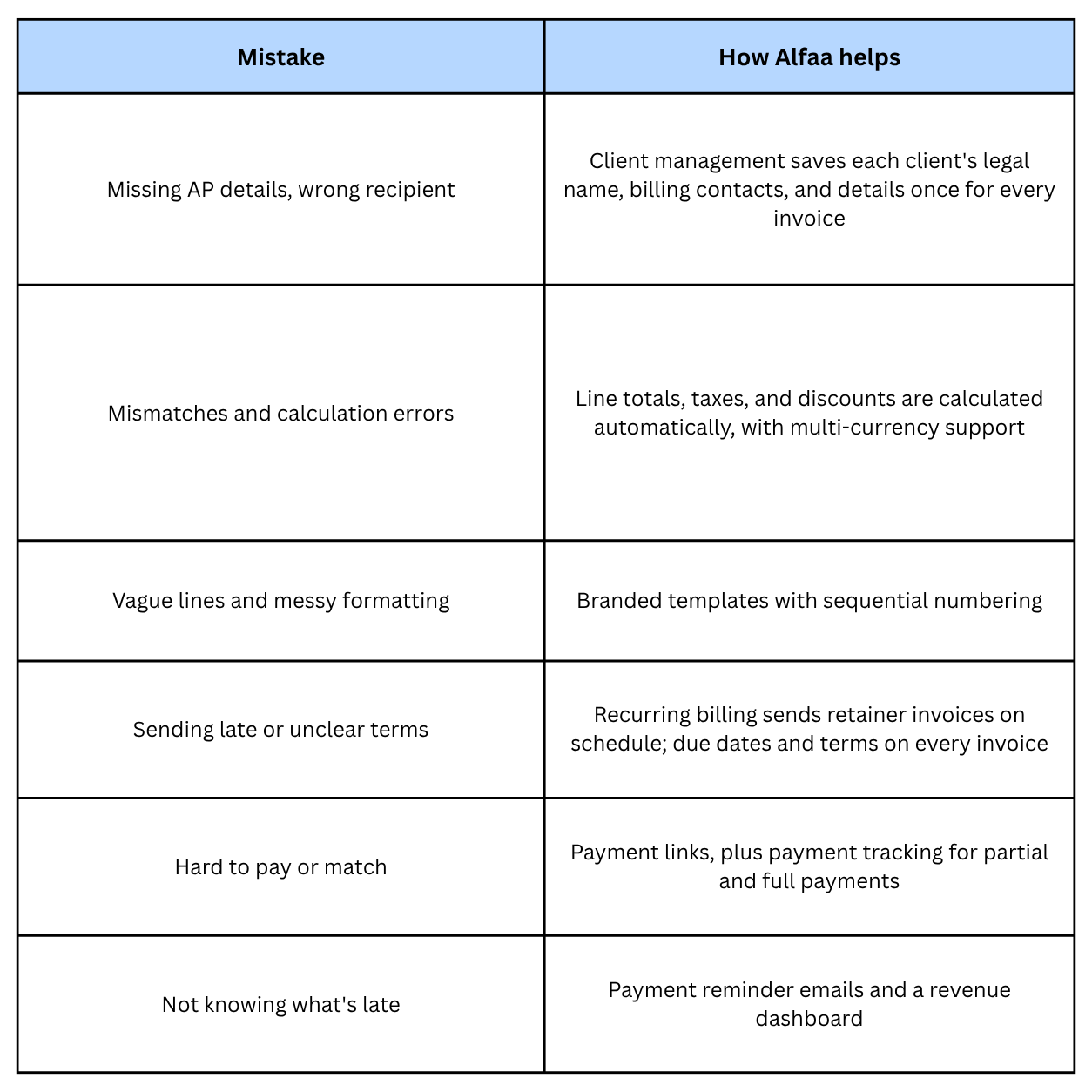
Instead of juggling spreadsheets, email threads, and a separate reminder calendar, you manage billing from one place. If you only invoice occasionally, the free invoice generator covers single invoices with correct structure.
Conclusion
Most invoice mistakes look small, but they rarely cost a day or two. They send the invoice back through the client's approval process and past the next payment run. Fix the ones that stop invoices earliest first: get the AP details right, send to the right inbox, and match the approved amount. Then tighten line items, terms, timing, and payment options.
The answer isn't spending more time on invoicing. It's a workflow where client details are saved once, totals calculate themselves, invoices go out on time, and reminders and tracking run without you.
Alfaa brings that workflow into one place for consultants and agencies, from client management to automated payment reminders and payment tracking. Start your 14-day free trial. No credit card required.
Frequently Asked Questions
Incorrect client details and unclear payment terms are among the most common invoicing mistakes businesses make.
Use invoice automation software, standardized templates, and always review invoices before sending.
Yes. Delayed invoices, incorrect totals, and missing follow ups all slow down payments and disrupt cash flow.
Businesses should send reminders before due dates, on due dates, and consistently after invoices become overdue.
Yes. Invoice management software reduces manual errors through automation, templates, payment tracking, and automated calculations.
Any mistake that sends the invoice back to you after AP has started processing it. You fix it and resend, approval restarts, and if the client pays in scheduled runs, the invoice can miss one and wait for the next.
Don't edit it and resend it under the same number. Issue a credit note cancelling the wrong invoice and send a new invoice with a new number, referencing the original. For an undercharge, send a supplementary invoice for the difference.
Usually, yes. Most AP teams count terms from the corrected invoice's date. If you want the original due date kept, ask for it in writing.
The most common reasons are a missing or expired PO number, an amount that doesn't match the PO or contract, incomplete vendor setup, or a mismatched business name. Ask AP for the exact reason and fix that item.
Give notice before the next invoice, from your usual email address, and invite the client to verify by calling a number they already have on file. Expect them to request a form or bank letter, and keep your old account open until existing invoices are paid.

Olivia Bennett
Content Writer @ ALFAA
Olivia is a content writer at ALFAA who specializes in invoicing, small business, and productivity topics. She enjoys simplifying complex ideas into clear, practical insights that help business owners save time, get paid faster, and stay organized.