Invoice Software for Multiple Businesses: A Practical Guide for Founders and Agencies
By ALFAA Team
Stay in the loop
Get finance tips delivered to your inbox.
Before you compare dashboards, ask which type of multi-business setup you actually have. A freelancer with a side project, a holding company with two LLCs, and an agency running white-label sub-brands all need different things from the same "multiple businesses" label. Here's how to evaluate what actually fits before you commit to invoice software for multiple businesses that solves the wrong problem.
Who Actually Needs Multi-Business Invoicing
The label "multi-business" covers at least four different buyers, and they have different requirements from the same feature:
Solo freelancer with a side project: wants one login, minimal setup, doesn't need legal separation to be airtight
Serial entrepreneur running unrelated ventures: needs a consolidated view of cash flow but often needs each entity's records to stand alone for tax and liability purposes
Agency managing distinct client-facing sub-brands: cares more about branding separation (logo, sending domain) than legal separation, since sub-brands often aren't separate legal entities
Bookkeeper or accountant managing multiple clients' books: needs strict access control, since they're working inside other people's businesses, not their own
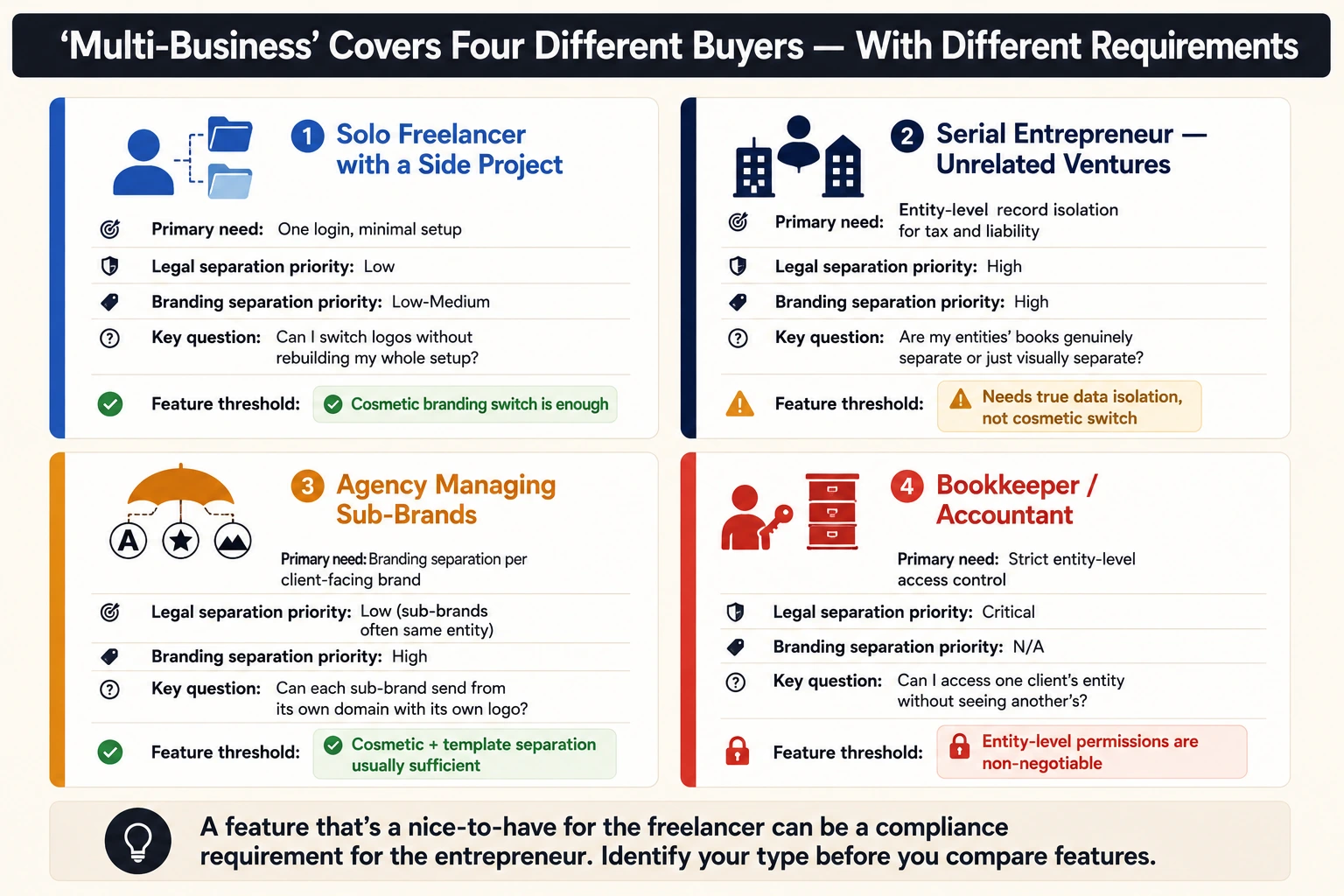
Keep this segmentation in mind through the rest of this guide. A feature that's a nice-to-have for the freelancer can be a compliance requirement for the entrepreneur, and vice versa.
What "Multiple Businesses in One Account" Actually Means
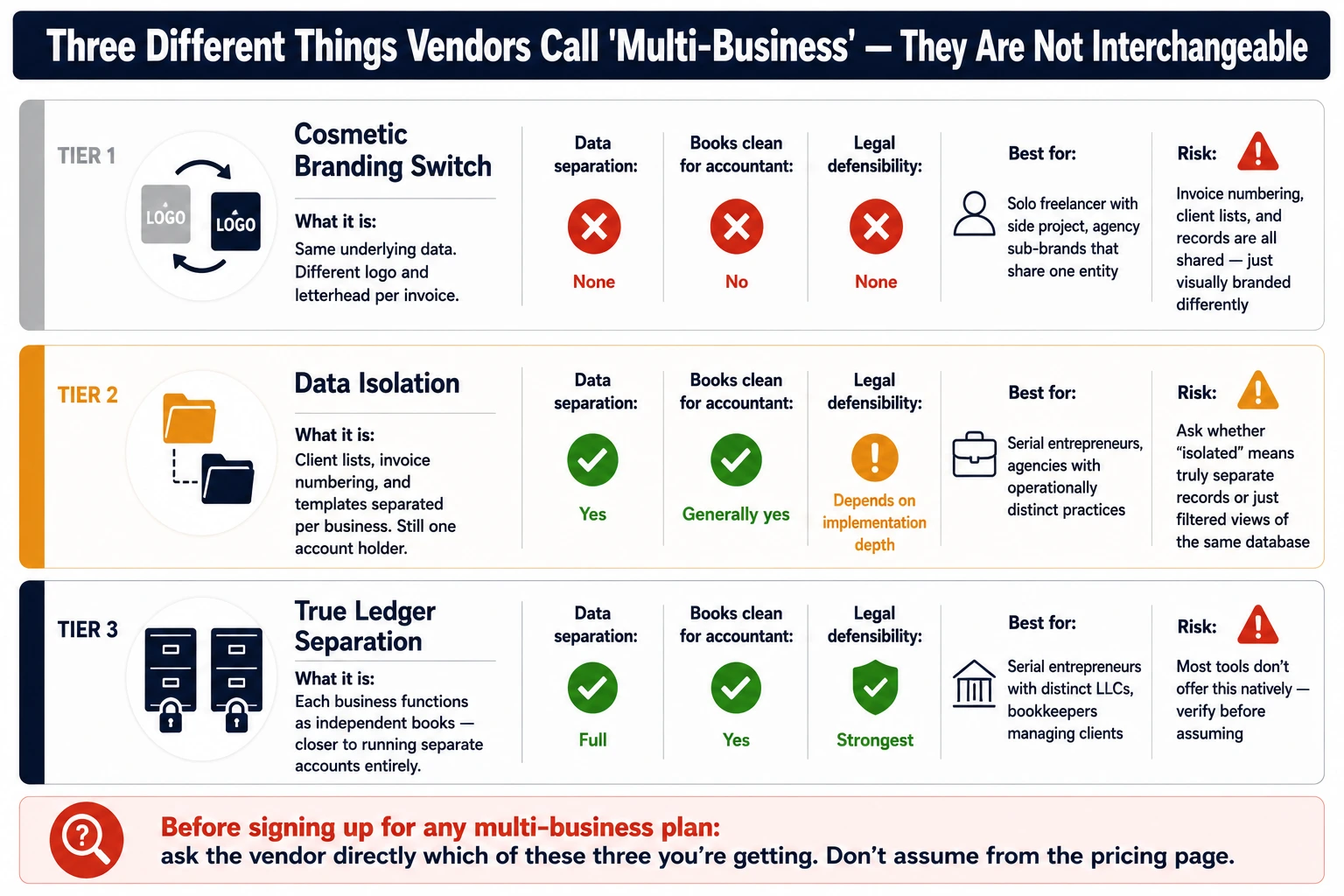
Vendors use "multi-business" to describe three fairly different things, and it matters which one you're buying:
Cosmetic branding switch: same underlying data, different logo/letterhead per invoice
Data isolation: client lists, invoice numbering, and templates are separated per business, but you're still one account holder
True ledger separation: each business functions as an independent set of books, closer to running separate accounts entirely
For the serial entrepreneur segment, the difference between data isolation and true ledger separation isn't cosmetic — it can affect how clean your books look to an accountant or auditor. For the freelancer with a side project, cosmetic separation is often genuinely enough.
Before signing up for any multi-business plan, ask the vendor directly which of these three you're getting. Don't assume "multiple businesses" on a pricing page means full ledger isolation.
When to Consolidate — and When Not To
Consolidating billing into one system has real upside, but it's not a universal win.
The case for consolidating:
One login instead of juggling credentials across tools
A unified view of total revenue across ventures
Less duplicated setup work (templates, client records, payment integrations)
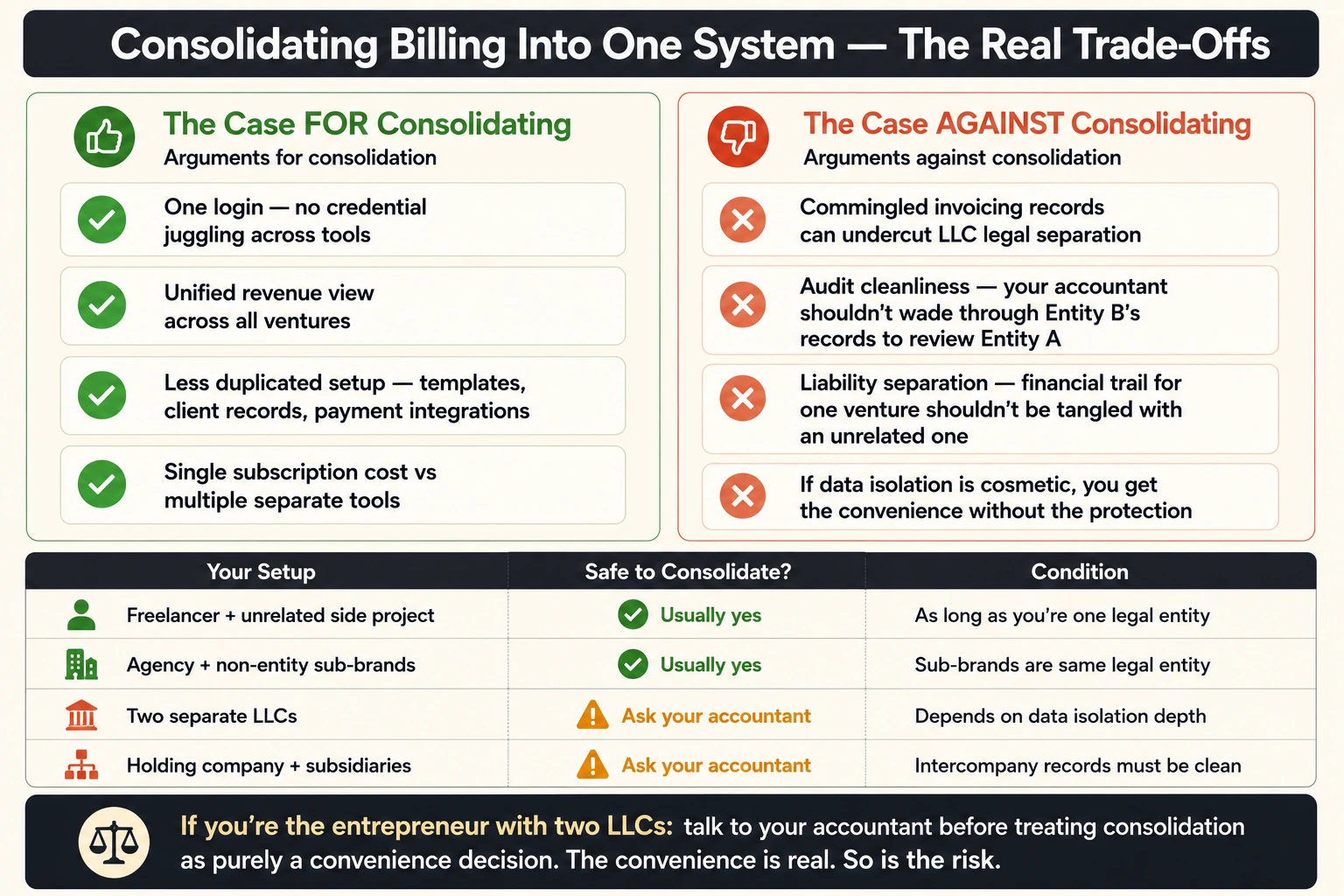
The case against consolidating:
If your ventures are separate LLCs, commingled invoicing records can undercut the legal separation you set the LLCs up for in the first place
Audit cleanliness: a bookkeeper or accountant reviewing one entity's records doesn't want to sift through another entity's invoices to get there
Liability separation: if one venture faces legal exposure, you generally don't want its financial trail tangled with an unrelated business
If you're the agency with sub-brands and those sub-brands aren't separate legal entities, consolidation is usually low-risk. If you're the entrepreneur with two LLCs, talk to your accountant before treating consolidation as purely a convenience decision — the convenience is real, but so is the risk if data isolation turns out to be cosmetic rather than structural.
Team Access and Permissions
This matters most for the bookkeeper/accountant segment, but it's relevant to anyone bringing on a VA or contractor.
What granular access should look like, ideally:
A bookkeeper can be granted access to one entity only, without visibility into your other businesses
Permission levels distinguish between view, edit, and send actions
Access can be revoked per-entity without affecting the person's access to other entities they legitimately work on
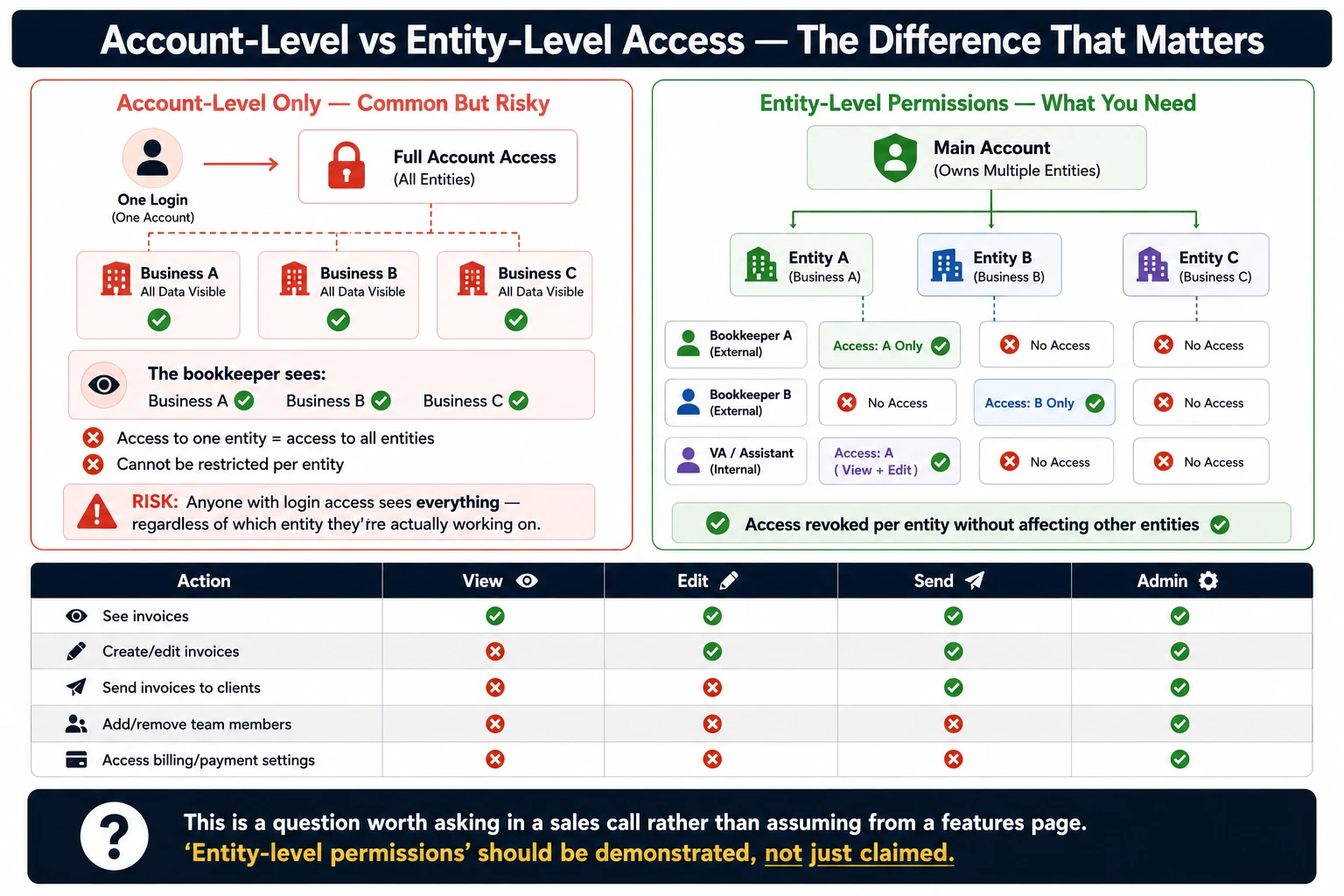
Not every tool offers this. Some multi-business plans grant access at the account level, meaning anyone with login access sees everything, regardless of which entity they're actually working on. If you're handing bookkeeping access to someone outside your core team, you should confirm whether the tool offers entity-level permissions or only account-level access before you rely on it. This is a question worth asking directly in a sales call rather than assuming from a features page.
Billing Between Your Own Businesses (Intercompany Invoicing)
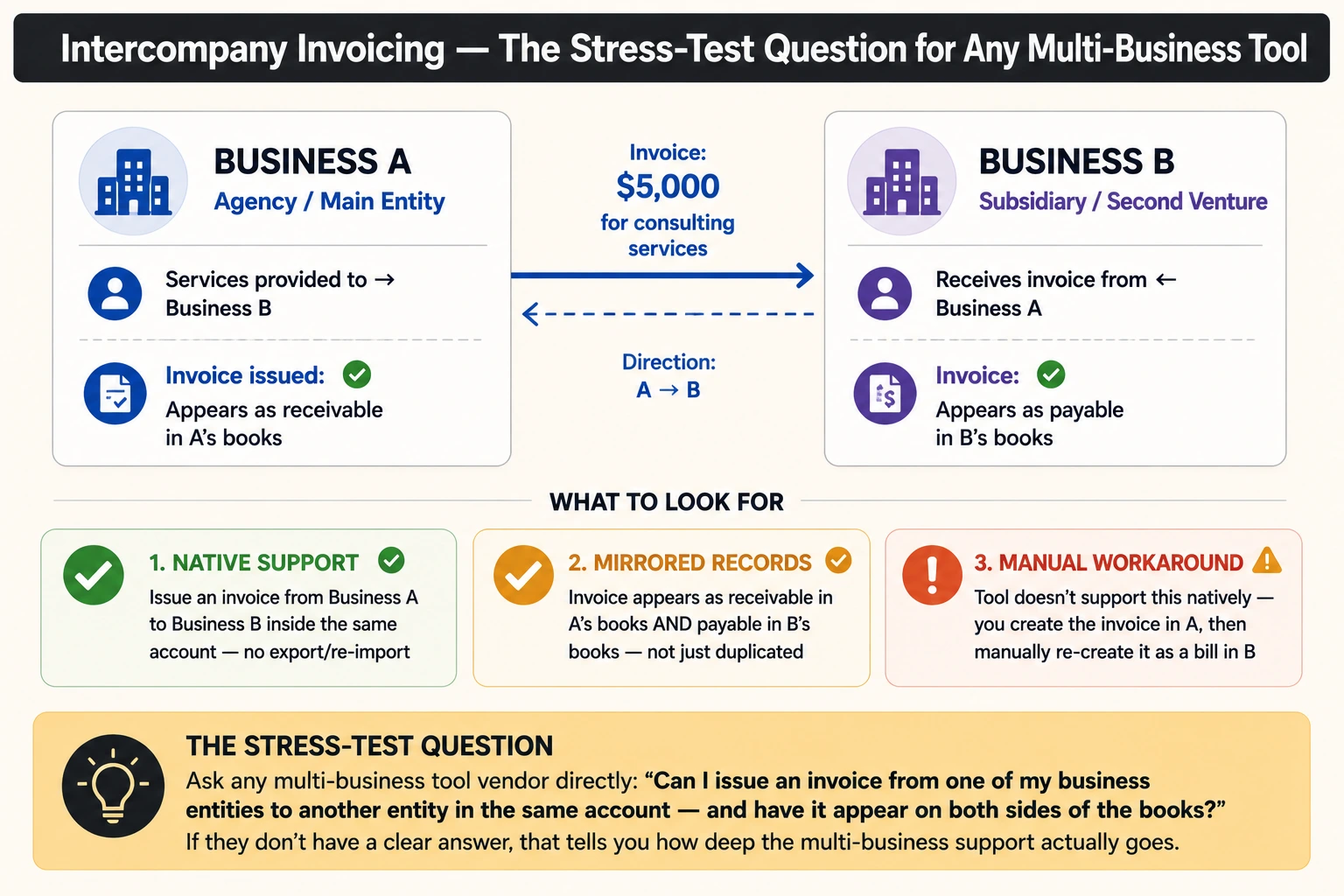
A less obvious use case: billing yourself. If you run an agency that also owns a second venture or a holding company that bills its own subsidiaries for services rendered, you need to issue invoices from one of your own businesses to another.
What to look for if this applies to you:
The software should let you issue an invoice from Business A directly to Business B, both inside the same account, without exporting and re-importing
Ideally, that invoice should appear as payable in one entity's records and receivable in the other's, not just as a duplicated line item
Confirm whether the tool handles this natively, or whether you'll be manually creating a mirrored invoice on each side
Intercompany invoicing is a niche need, but it's a good stress test question for any multi-business tool—if the vendor doesn't have a clear answer, that's useful information about how deep the "multi-business" support actually goes.
Payments and Reporting Across Entities
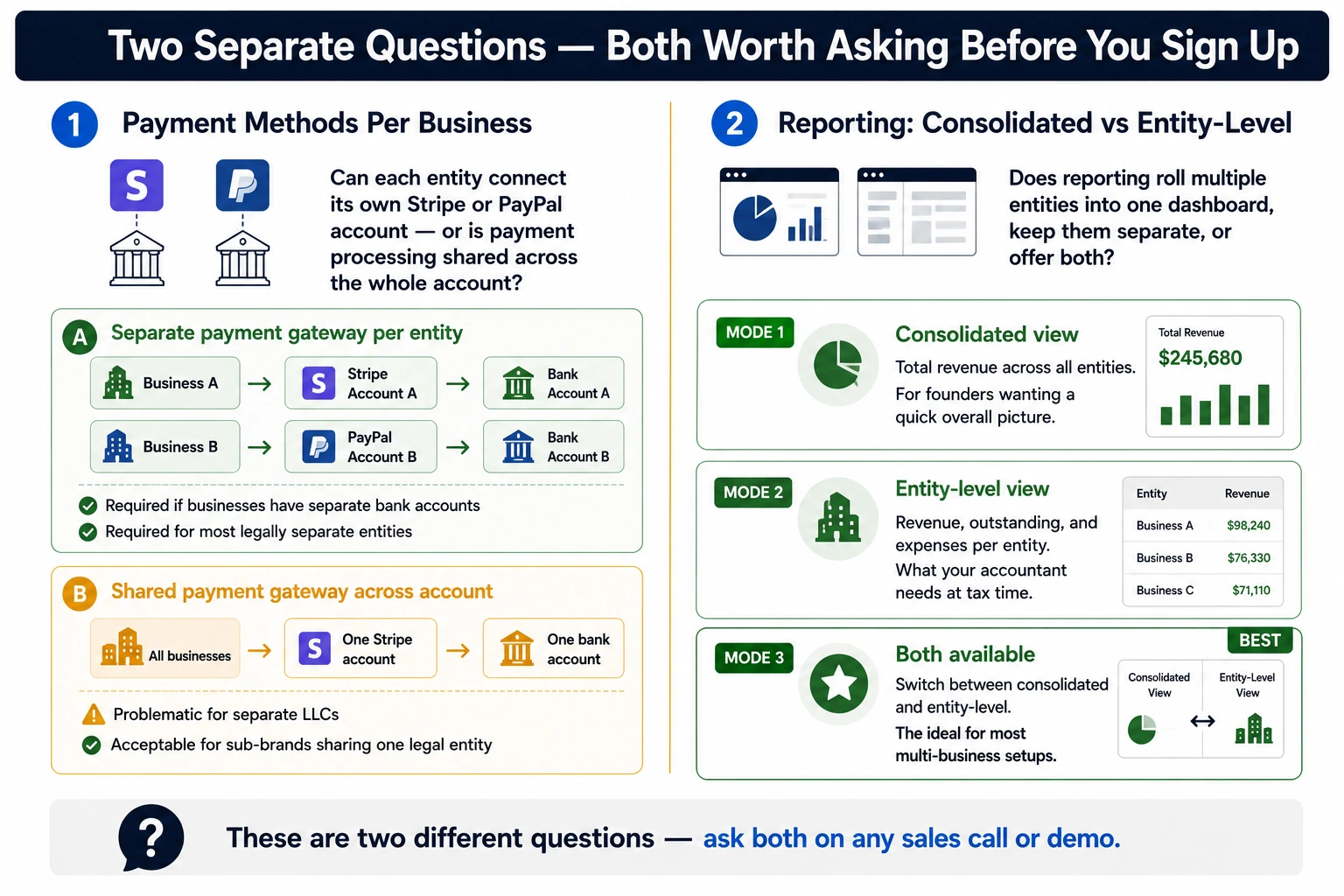
Two separate questions live here, and it's worth asking both:
Payment methods per business: Can each entity connect its own Stripe or PayPal account, or is payment processing shared across the whole account? This matters if your businesses have separate bank accounts, which most legally separate entities do.
Reporting: consolidated vs. entity-level. A consolidated revenue view is useful for the entrepreneur who wants a quick answer to "How am I doing overall this quarter?" Entity-level reporting is what your accountant actually needs at tax time. You should confirm whether the reporting view rolls multiple entities into one dashboard, keeps them fully separate, or offers both — this varies significantly between tools marketed as "multi-business".
What "Unlimited Businesses" Really Means in Pricing
"Unlimited businesses" on a pricing page rarely means unlimited everything. The gates usually show up elsewhere:
Free tiers typically cap you at a single business entity, which is useful for testing the product but not for running multiple ventures
Mid tiers often still limit you to one entity, with multi-business support reserved for the top plan
Even on plans that unlock multiple business entities, there may be separate caps on active clients or invoice volume per entity
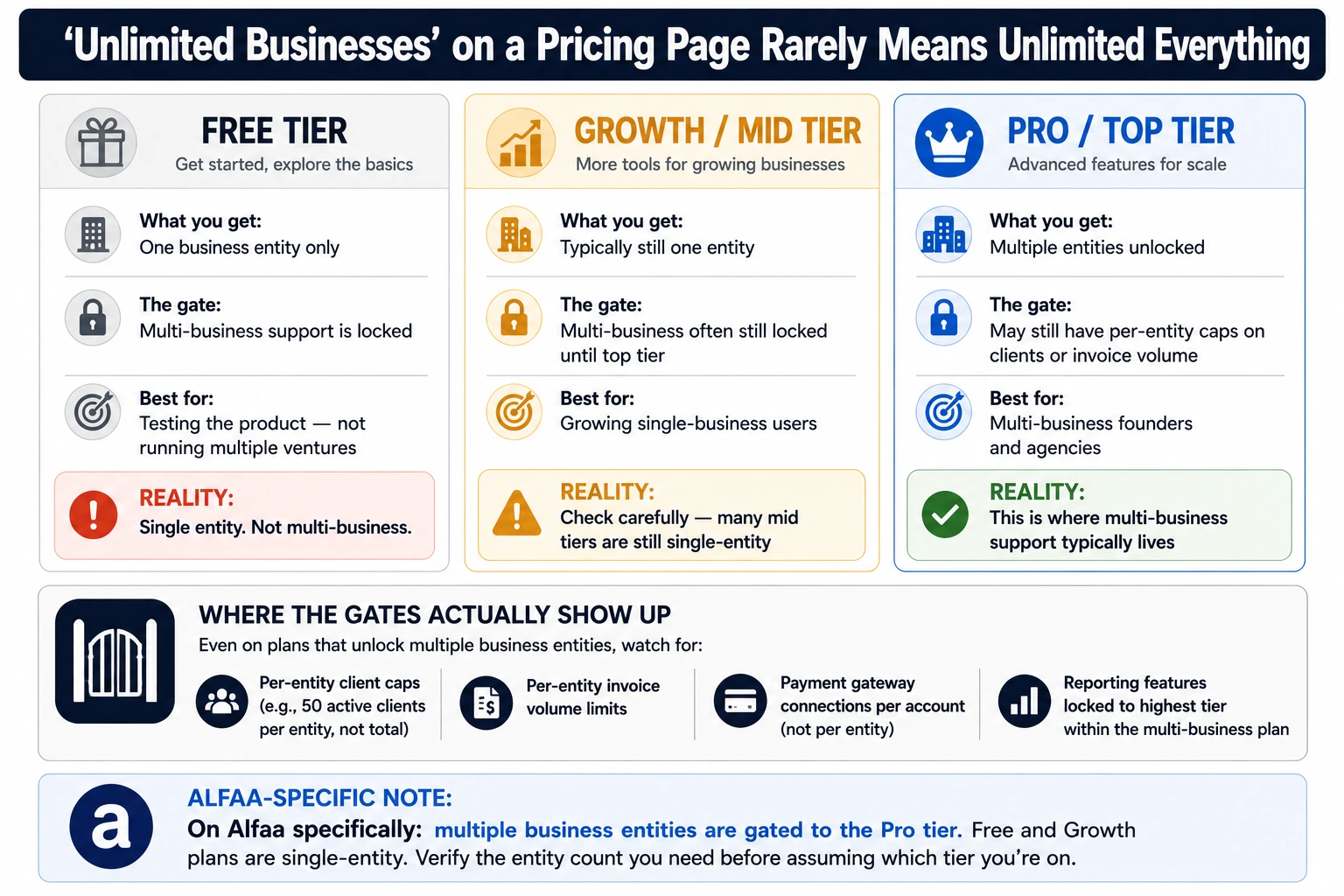
On Alfaa specifically, multiple business entities are gated to the Pro tier; the Free and Growth plans are single-entity. If you're the entrepreneur or agency evaluating invoice software for multiple businesses, that gate is worth checking on any vendor's pricing page before you assume "unlimited businesses" means what it sounds like. Comparing plan by plan on Alfaa's pricing breakdown is a reasonable next step once you know which tier actually unlocks the entity count you need.
Switching from Spreadsheets or Multiple Tools to One System
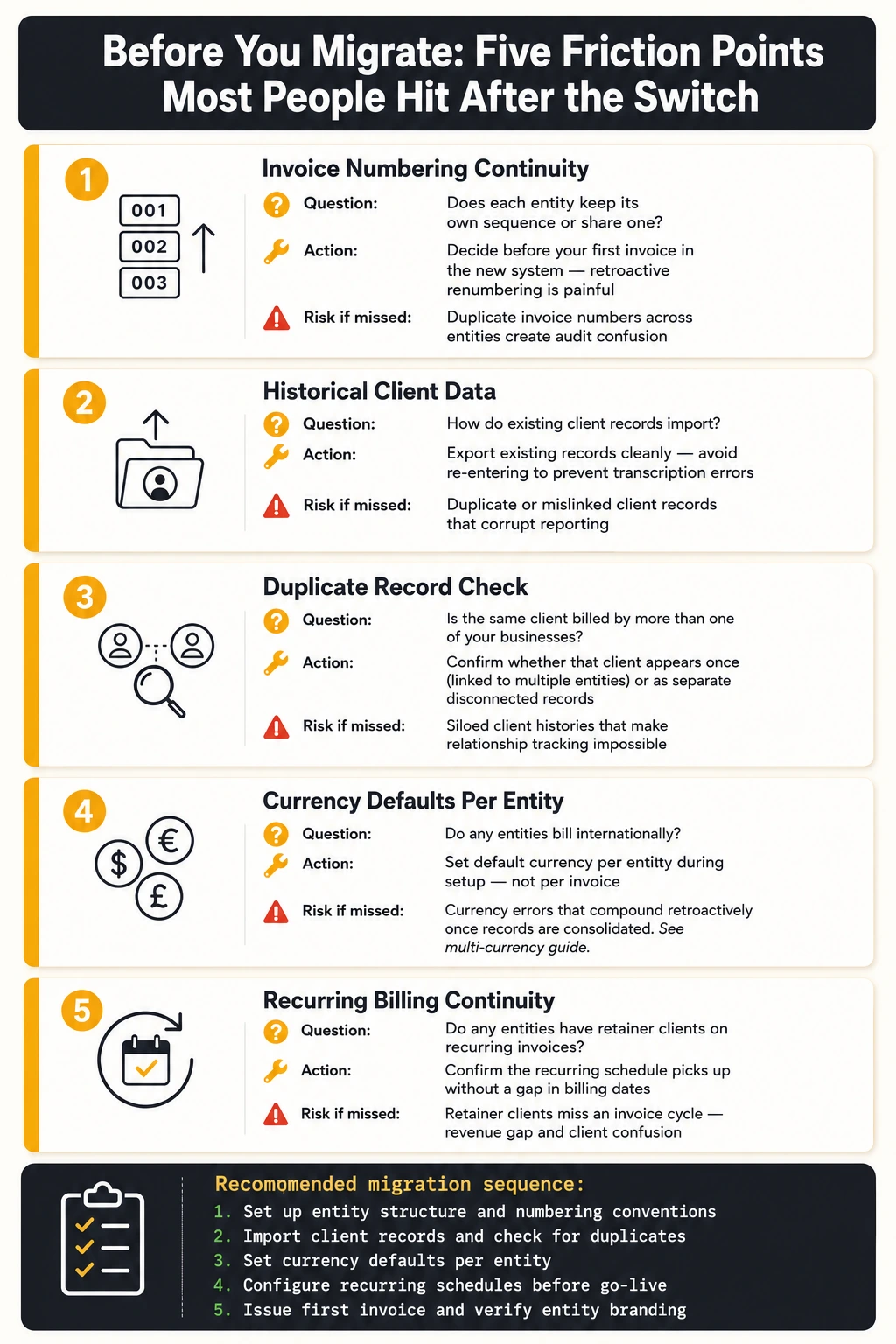
Migrating into a single multi-business system is where most of the actual friction shows up, not in day-to-day use afterwards. Run through this before migrating:
Invoice numbering continuity: decide whether each entity keeps its own sequence or shares one, and set this before your first invoice in the new system
Historical client data: export existing client records cleanly rather than re-entering them, to avoid transcription errors
Duplicate record checks: if the same client is billed by more than one of your businesses, confirm they're not created as separate, disconnected records
Currency defaults per entity: if any of your businesses bill internationally, set default currency handling per entity during setup rather than per invoice; our multi-currency guide covers the mechanics if any of your entities bill across currencies
Recurring billing continuity: if you're moving retainer clients over, confirm the new recurring invoice feature can pick up the existing schedule without a gap in billing dates
If any of your entities bill clients outside your home country, it's worth reading how to invoice international clients correctly before you migrate; currency and tax-form handling get harder to fix retroactively once records are consolidated.
A Simple Checklist Before You Choose
Data isolation confirmed: cosmetic, data-level, or true ledger separation, and which one you actually need
Permission granularity checked: entity-level access for bookkeepers/VAs, not just account-level
Payment gateway mapping supported: separate Stripe/PayPal per entity if your businesses have separate bank accounts
Pricing scales predictably: confirm what "unlimited businesses" actually gates before you hit a paywall mid-year
Reporting rolls up or separates as needed: consolidated view for your own overview, entity-level view for your accountant
This is the same checklist a careful buyer runs through for invoice software for multiple businesses regardless of which vendor they're evaluating—it's not specific to any one tool.
Frequently Asked Questions
Most invoicing platforms that support this gate it to a specific pricing tier — confirm the entity limit on the plan you're actually considering, not just the marketing page.
It depends on the tool. Some offer only a cosmetic branding switch, others separate client lists and invoice numbering per entity. Ask the vendor directly which level of separation you're getting.
Some tools support entity-level permissions, others only account-level access where anyone logged in sees everything. Confirm this before granting access to anyone outside your core team.
Not necessarily, but if your entities are separate LLCs, check whether the consolidated system offers true data isolation rather than just cosmetic separation before you consolidate their records.
Usually yes, in the sense that multi-entity support is typically reserved for higher pricing tiers rather than offered free. Check whether the tier also caps clients or invoice volume per entity, not just the entity count.

Olivia Bennett
Content Writer @ ALFAA
Olivia is a content writer at ALFAA who specializes in invoicing, small business, and productivity topics. She enjoys simplifying complex ideas into clear, practical insights that help business owners save time, get paid faster, and stay organized.