Do You Need a Full CRM or Just Better Client Billing Management?
By ALFAA Team
Stay in the loop
Get finance tips delivered to your inbox.
Most independent contractors do not wake up thinking they need a CRM. They wake up wondering which client still owes them money, where the last invoice was saved, or why their billing history is scattered across three email threads, two spreadsheets, and a bank statement they downloaded six weeks ago.
That distinction matters.
A full CRM is built to manage leads, qualify prospects, track proposals through sales stages, and coordinate a team around a shared pipeline. If your core challenge is tracking invoices, confirming payment status, and keeping a clean record of what each repeat client has paid, invoice-based client management for independent contractors is likely the more practical fit.
The two tools solve different problems. This guide helps you figure out which problem you actually have.
Quick answer: Most solo independent contractors do not need a full CRM if their main challenge is tracking invoices, payment status, client billing history, and recurring work. Invoice-based client management is often the simpler and more practical option. A full CRM becomes more useful when you manage a high volume of leads, complex proposals, sales stages, or client delivery workflows.
The Real Problem Most Independent Contractors Have
The billing problem usually looks like one of these:
You cannot remember which client paid last month and which one did not
You rebuilt a client's invoice details from scratch because you could not find the original
You have three separate tools open when you want to check a single client's payment history
You sent a follow-up email to a client and then realized you had already marked the invoice as paid
These are billing organization problems. They are not sales pipeline problems.

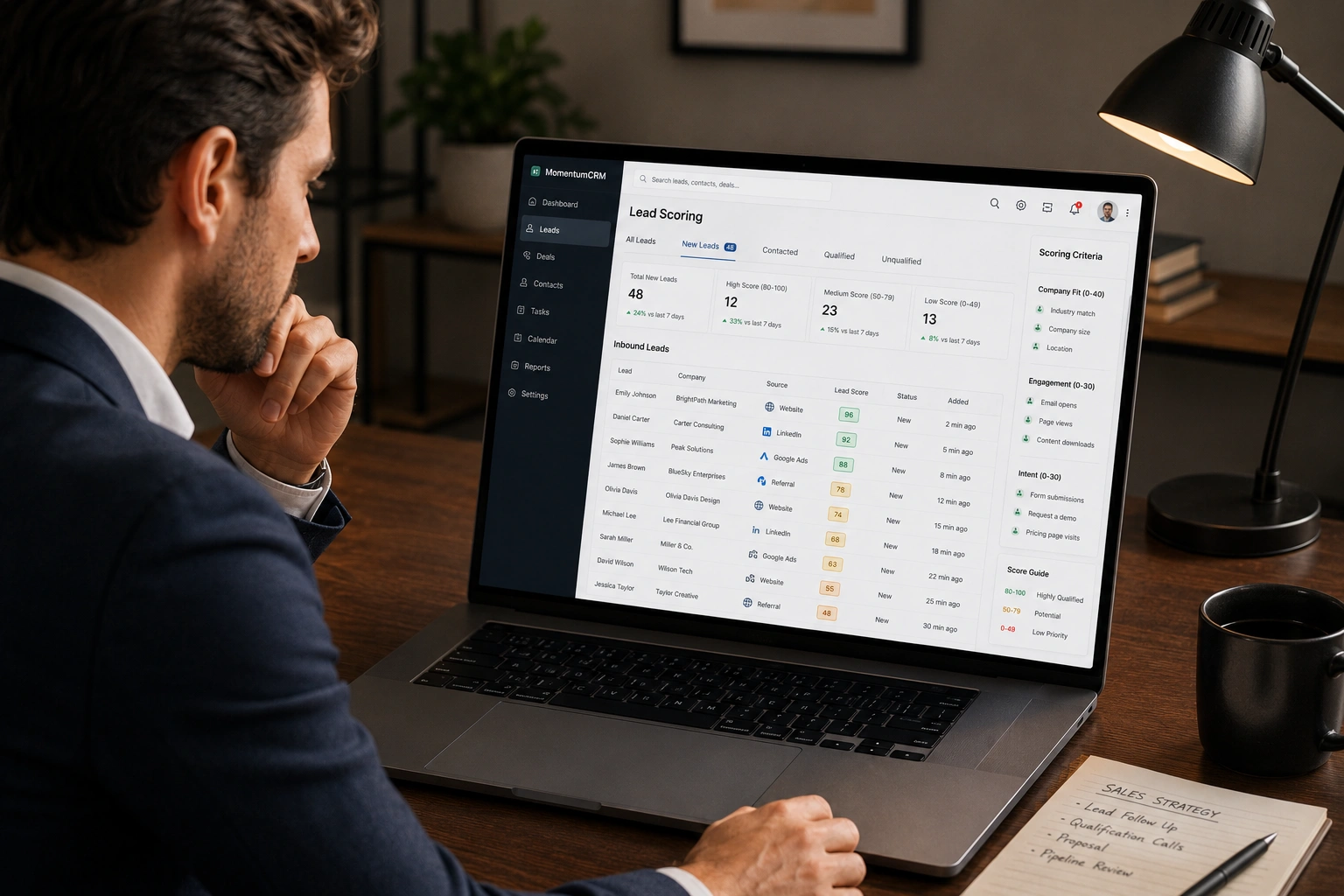
Full CRM platforms are designed around different concerns: Lead scoring, opportunity management, proposal workflows, deal stages, team-based sales reporting, and forecasting. Those features are the right tools for businesses managing a high volume of inbound leads across a multi-person sales team. For an independent contractors with 5 to 20 active clients, they add complexity without solving the actual issue.
Most solo operators can manage client billing history without a CRM by using an invoicing-centric platform that keeps client records connected to financial activity. The goal is clarity: who owes you money, when it is due, and what a client has paid across your entire relationship.
What "Client Management" Actually Means for an Independent Contractor
Client management covers three distinct layers of work. Understanding which layer causes your biggest headaches points you toward the right tool.
1. Relationship and communication management Contact information, email history, conversation notes, and follow-up reminders. This is the CRM's native territory.
2. Project delivery management Tasks, deadlines, file approvals, project timelines, and client-facing deliverables. Project management tools cover this layer.
3. Billing and payment history management Past invoices, outstanding balances, payment status, recurring invoices, transaction records, and client billing history. This is where invoicing platforms operate.
Many independent contractors assume one large platform can handle all three layers. In practice, most solo operators experience the greatest friction in layer three. Invoices go out, but tracking whether they were paid, when they were paid, and how much a client has paid across 18 months of work becomes a manual job that grows with every new engagement.

Invoice-based client management is a way of organizing client details around invoices, payment history, outstanding balances, and recurring billing, rather than around sales pipelines or project boards. For independent contractors whose main operational challenge sits in layer three, this approach often solves the problem more directly than a full CRM.
Full CRM vs. Invoicing-Centric Client Management
This comparison table reflects both tools as they actually work, not as their marketing describes them.
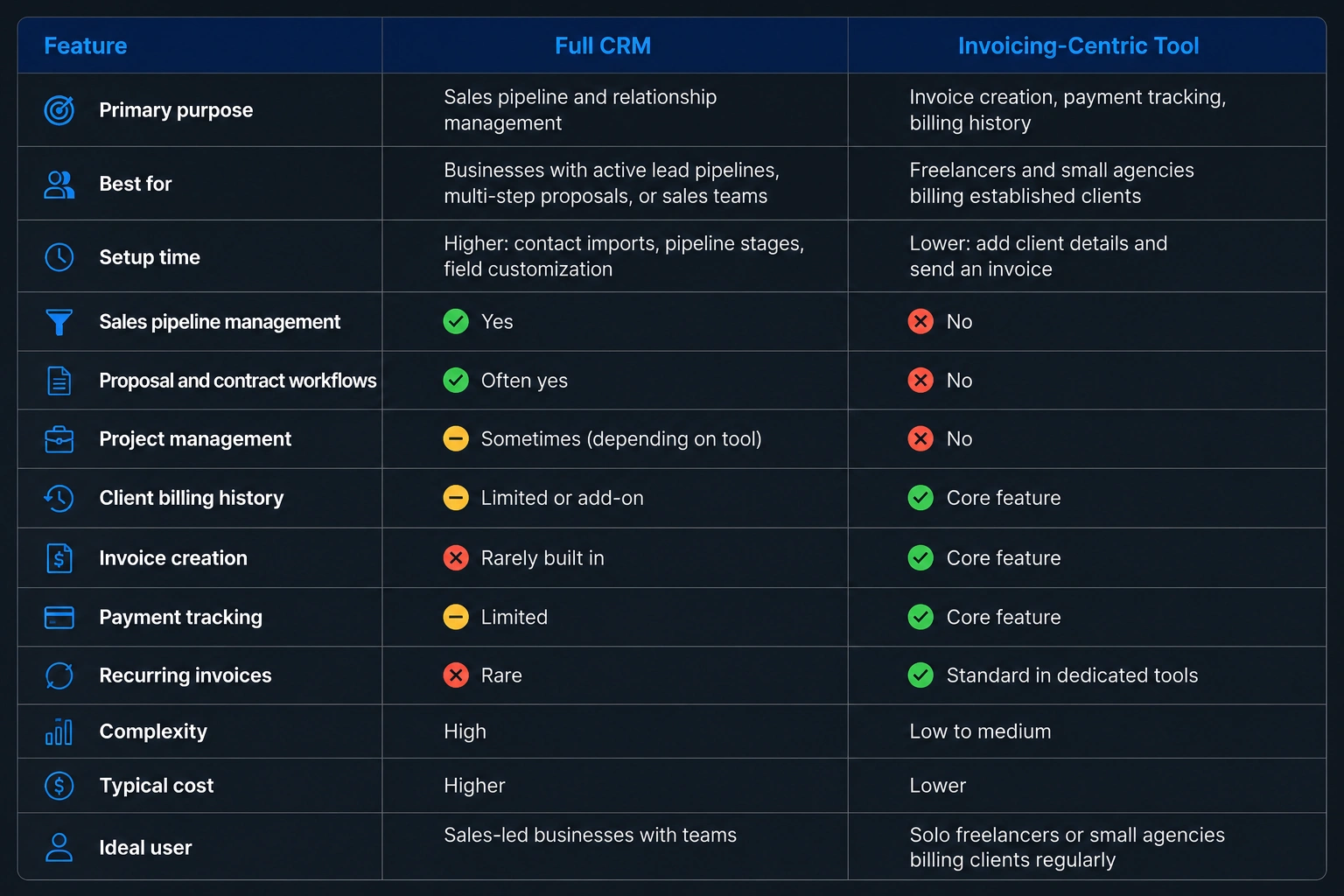
Choose a full CRM if you manage a high volume of incoming leads, run multi-stage proposals, need contract workflows, or have a team sharing sales responsibility for the same clients.
Choose invoice-based client management if your clients are already established and your biggest challenge is sending invoices, tracking payment status, following up on overdue amounts, and keeping clean billing records per client.
This is a genuine fork. Neither choice is universally right.
What Good Invoice-Based Client Records Look Like
A useful client record built around billing contains these elements:
Legal name and business details
Contact information and billing address
Full invoice history with dates and amounts
Paid vs. outstanding balance status
Payment dates and confirmation records
Recurring billing schedule for retainers
Tax details where applicable
Notes tied to billing context (payment preferences, late-payment history, agreed rates)
Reusable details that populate new invoices automatically
The value of this setup is speed and accuracy. You open a client record and see everything you need to create a new invoice, check the current balance, or answer a client's query about a past payment. You do not search email threads or cross-reference a spreadsheet.
Alfaa's client workspace keeps client information connected to invoices and payment history. When you create a new invoice for a returning client, the platform pulls in their details automatically. Recurring invoice functionality supports retainer-based work by automating billing on a fixed schedule, so a monthly retainer client receives consistent invoices without manual recreation each time. Payment tracking shows what is paid, what is pending, and what is overdue at a glance.
These are the specific capabilities that reduce administrative work for independent contractors. They sit at the billing layer, not the CRM layer.
Managing the Full Client Relationship: Onboarding Through Offboarding
Invoice-based client management supports the financial side of a client relationship across its full lifecycle. It does not replace project management or sales tools, but it handles the billing thread from first invoice to final payment.
Onboarding: Capture Client Details Once
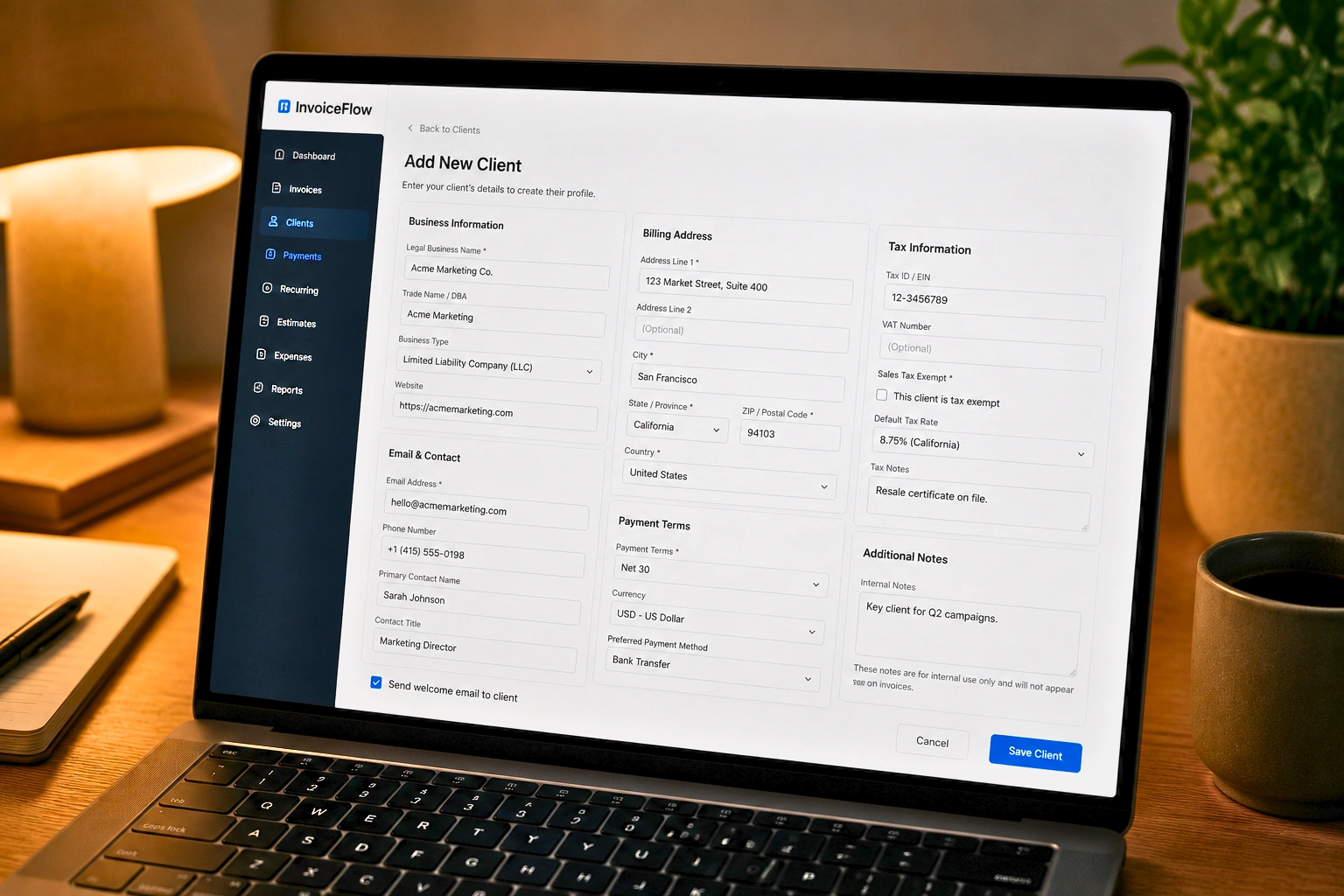
At the start of a client relationship, add the client's legal name, billing address, contact details, tax information, and agreed payment terms to the platform. Every future invoice for that client pulls from those details automatically. You reduce manual entry and remove the risk of sending an invoice with a wrong address or outdated rate.
For independent contractors who currently retype client information into each new invoice, this single step saves a meaningful amount of time across dozens of invoices per year.
Active Client Relationship: Keep Billing Consistent

Consistency in billing builds professional credibility. Clients notice when invoices arrive on time, look the same each month, and match what was agreed.
Branded invoices sent through your own Gmail account or custom domain look like they come from your business, not a generic billing system. Alfaa supports sending via Gmail, Google Workspace, and custom domains, so clients receive invoices from your address. Recurring invoice schedules handle retainer clients without requiring you to recreate the same document every month. Payment tracking makes follow-up straightforward: you can see which invoices are overdue without manually checking each one.
If you work with international clients, mobile invoicing lets you send and track invoices from anywhere without needing a desktop session.
Offboarding: End the Financial Relationship Cleanly
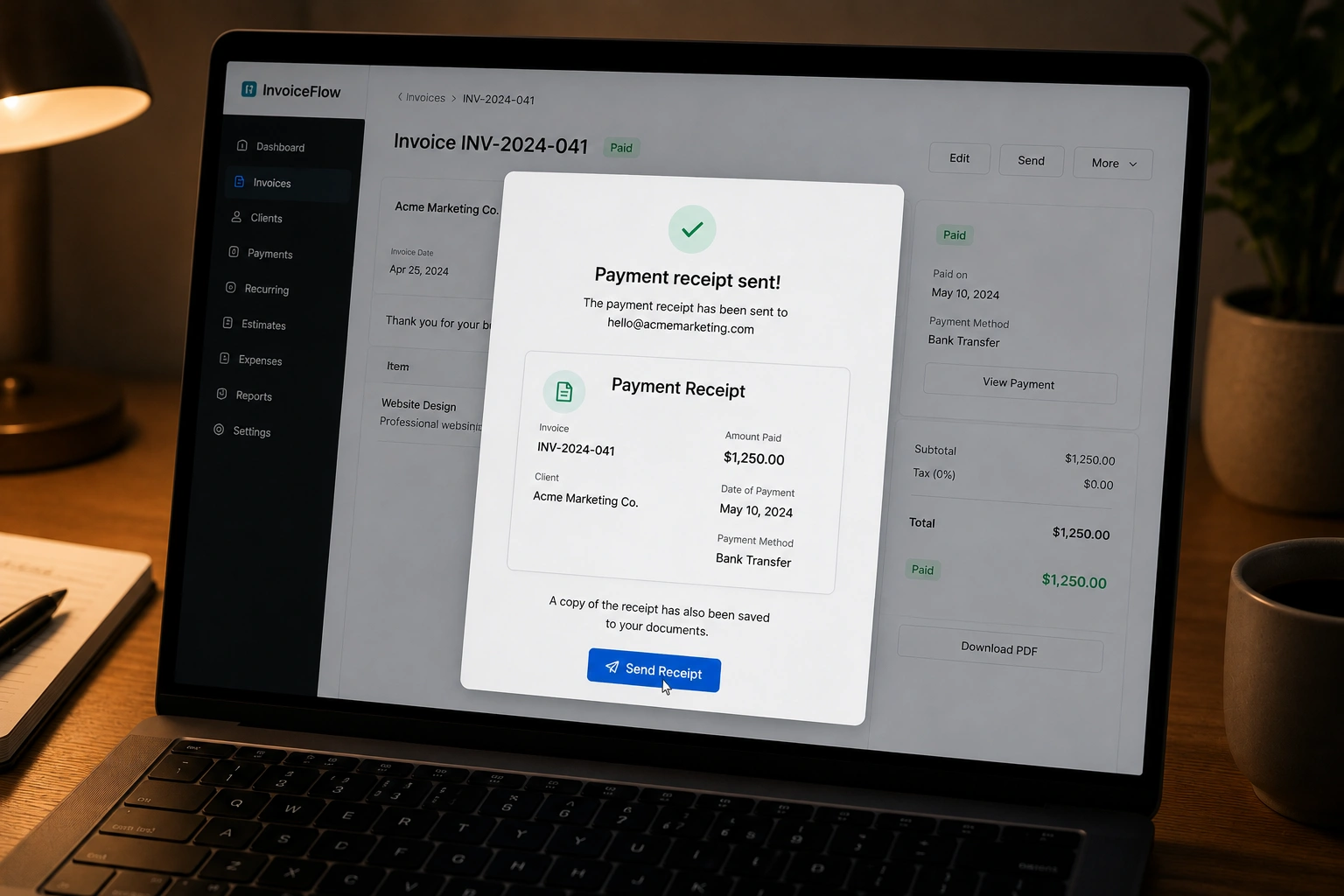
The final invoice in a client relationship matters as much as the first. Send it promptly once the engagement ends. Confirm payment status before closing out the client record. Issue a receipt or payment confirmation when relevant. Document any remaining balances, agreed credits, or refund arrangements.
Keep invoice records accessible after offboarding. Tax filing, future references, and proof of payment disputes all require historical invoice data. An invoicing-centric platform stores this automatically. You can retrieve the full billing history for a client from two years ago in seconds, which matters more than most independent contractors expect until they need it. For clarity on what records to issue at each stage, the invoice vs. receipt guide covers the differences between the documents you send clients and the confirmations you provide once they pay.
What to Check Before You Commit to Any Client Management Tool
This checklist applies to any platform you evaluate, not only Alfaa. Use it before you commit billing records to a system you have not examined properly.
Can you export client and invoice data if you switch platforms later?
Can you view a client's full billing history in one place?
What happens to your data if you downgrade your plan?
What happens to your records if you cancel your subscription?
Does the tool support the payment methods your clients use?
Can you set up recurring invoices for ongoing retainer work?
Does the platform separate paid, unpaid, overdue, and draft invoices clearly?
Do invoices look professional and represent your brand?
Is the tool simple enough that you will actually use it consistently?
Does it solve your specific problem, rather than adding features you will never touch?
Before choosing any client management software for independent contractors, confirm that you can retrieve your client and billing data without being locked into the platform.
Data portability is not a minor feature. It determines whether you can switch tools in the future without losing your history. Check the export policy before you start using any billing system for client records. Review Alfaa's pricing plans to understand what is included at each tier and what happens if your needs change.
When You Will Outgrow Invoicing-Centric Tools and Need a Full CRM
An invoicing-centric platform is not the right answer for every independent contractors at every stage.
A full CRM may fit better if you need the following:
Lead capture forms and lead scoring
Multi-stage sales pipelines with deal tracking
Proposal and contract workflow management
Automated sales email sequences
Shared contact notes across a sales team
Client-facing project portals
Complex onboarding workflows across multiple team members
Account management for a large enterprise client base
If your bottleneck is turning cold leads into paying clients through a defined sales process, a CRM gives you the infrastructure to manage that. Invoicing tools do not.
If your main bottleneck is getting paid and keeping client billing history organized, start with invoice-based client management. If your main bottleneck is turning leads into clients through a complex sales process, invest in a full CRM.
This is the honest answer. Start with the tool that solves your actual problem today. You can add a CRM when your sales process demands one.
Frequently Asked Questions
A CRM is one type of client management software, focused on leads, sales activity, and relationship workflows. Client management software is a broader category that also includes project management tools, communication platforms, and billing-focused tools. Invoice-based tools manage the financial side of the client relationship: invoices, payment history, balances, and recurring billing.
It depends on the provider. Some platforms restrict data export on lower plans or after cancellation. Before you commit, confirm what data you can export (client details, invoice records, payment history), in what format, and what happens to your records after downgrade or cancellation. Checking this before you upload years of client data is much easier than trying to retrieve it later.
Invoicing software is enough for most independent contractors who already have clients and need payment tracking, billing history, and recurring invoicing. A CRM is more useful when you actively manage a large lead pipeline or run a complex multi-step sales process. If your main challenge is getting invoices out and tracking who has paid, invoicing software handles that directly.
Yes. An invoicing platform with per-client records gives you a full billing history, payment status, outstanding balances, and recurring invoice schedules without the sales pipeline features a CRM provides. For independent contractors whose clients are already established, this setup covers the billing layer without adding the complexity of a full CRM.
Prioritize ease of use, clear billing history per client, invoice creation, payment tracking, recurring billing support, data export options, transparent pricing, and compatibility with payment methods your clients use. The right tool is one you will use consistently, not the one with the longest feature list.

Olivia Bennett
Content Writer @ ALFAA
Olivia is a content writer at ALFAA who specializes in invoicing, small business, and productivity topics. She enjoys simplifying complex ideas into clear, practical insights that help business owners save time, get paid faster, and stay organized.