Invoicing Software Pricing in 2026: What Consultants and Agencies Actually Pay
By ALFAA Team
Stay in the loop
Get finance tips delivered to your inbox.
Invoicing software pricing pages are designed to show you the smallest number. The plan you actually need depends on how many clients you bill, how many people need access, and which features (recurring invoices, automated reminders, removing the vendor's branding) sit behind a higher tier.
This guide compares eight popular tools on what consultants and agencies really pay in 2026, including the costs that don't appear in the headline price. We make Alfaa, one of the tools compared; every price links to a source so you can check it.
How much does invoicing software cost?
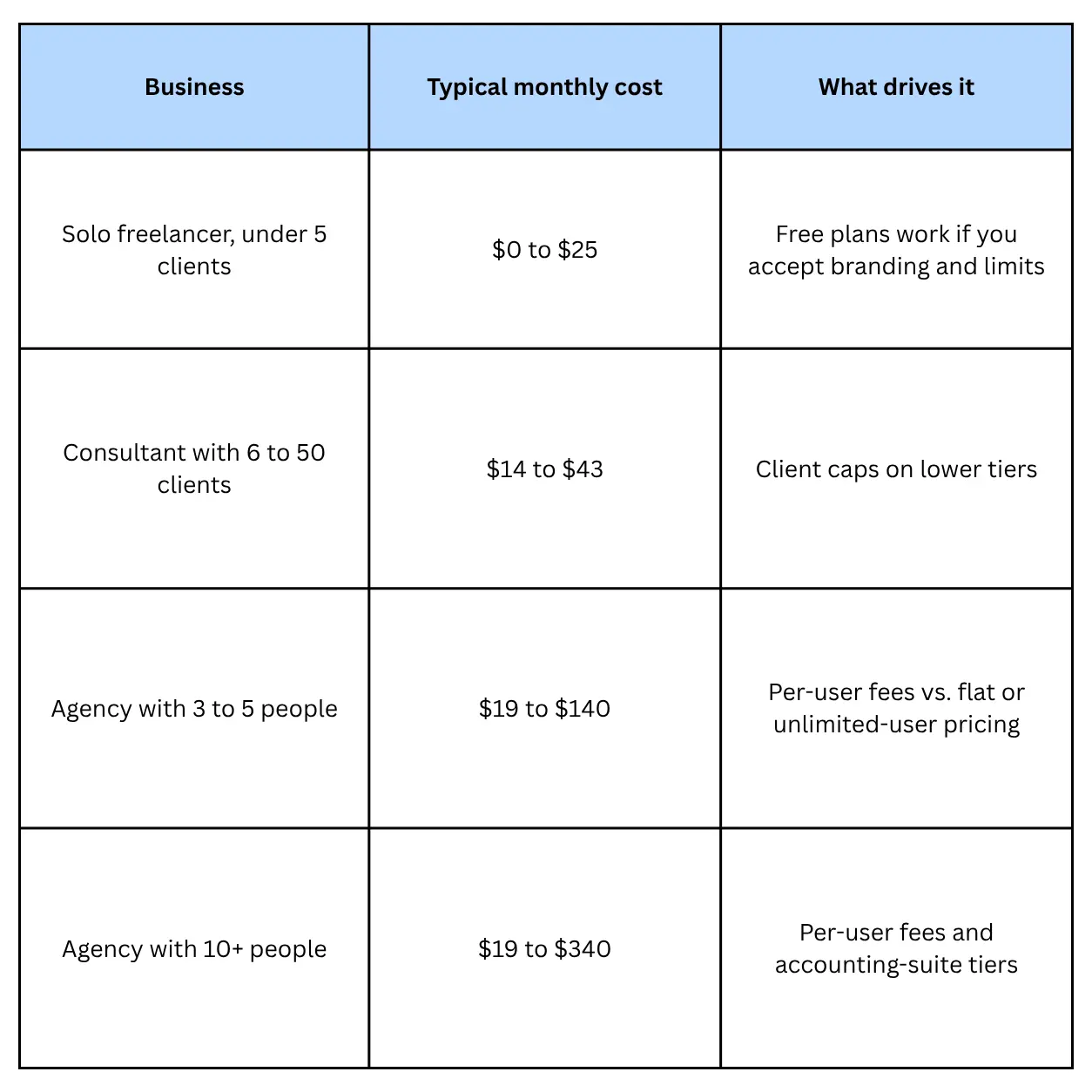
On top of the subscription, card payment fees of around 2.9% plus a fixed fee per transaction apply with almost every tool, and at moderate volume they can cost more than the software itself.
The four ways invoicing software is priced
Knowing the pricing model tells you which number will grow as your business does.
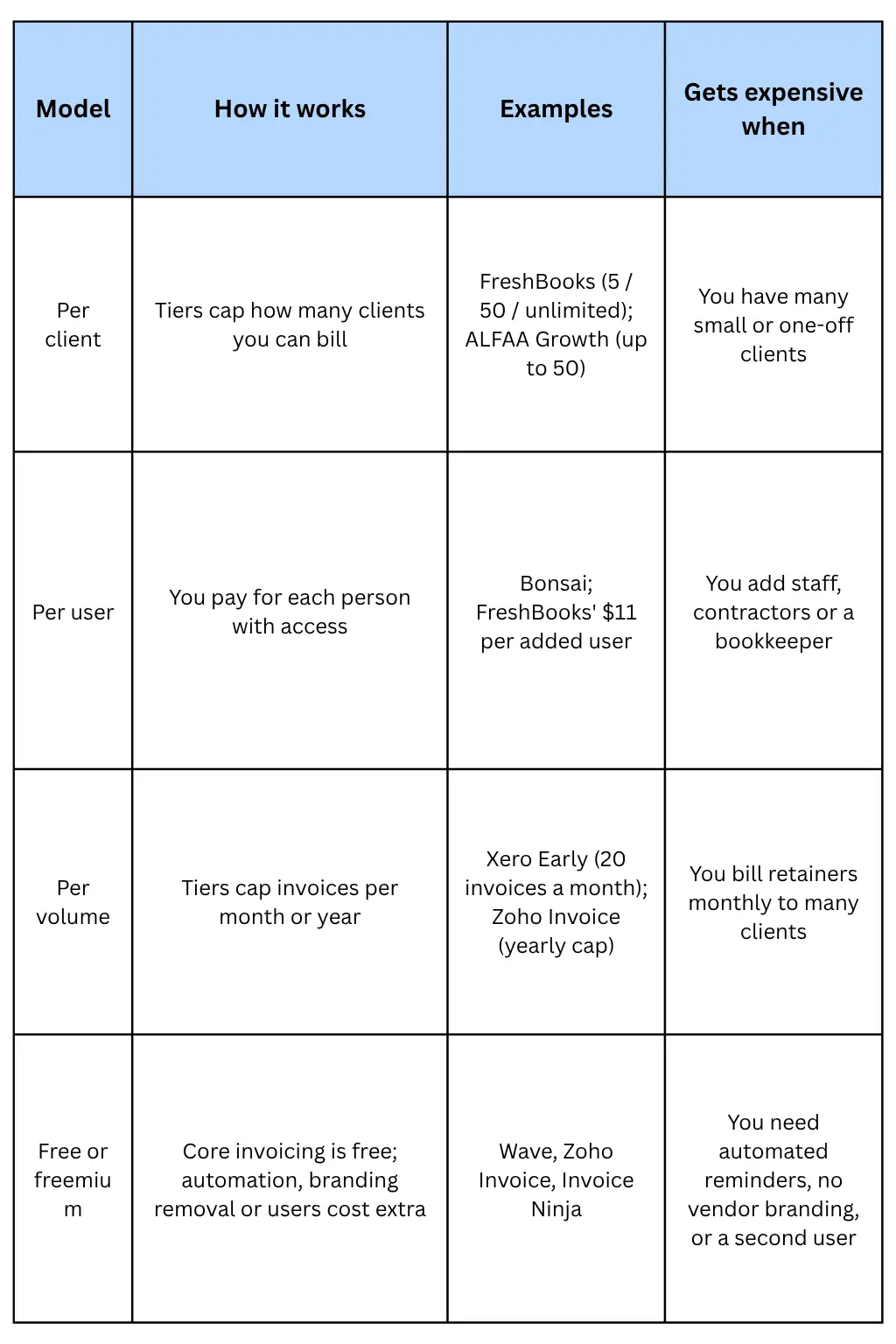
Most tools combine models. QuickBooks Online, for example, ties users to tiers: Simple Start covers 1 user and Essentials 3. Xero and Wave Pro go the other way, with unlimited users at a flat price.
The practical rule: estimate your client count, team size, and monthly invoice volume a year from now, then check which limit each tool hits first.
Invoicing software prices compared: 8 tools
US list prices per month, billed monthly, as of October 2026. Intro discounts are excluded because they end; annual billing is cheaper for most tools.
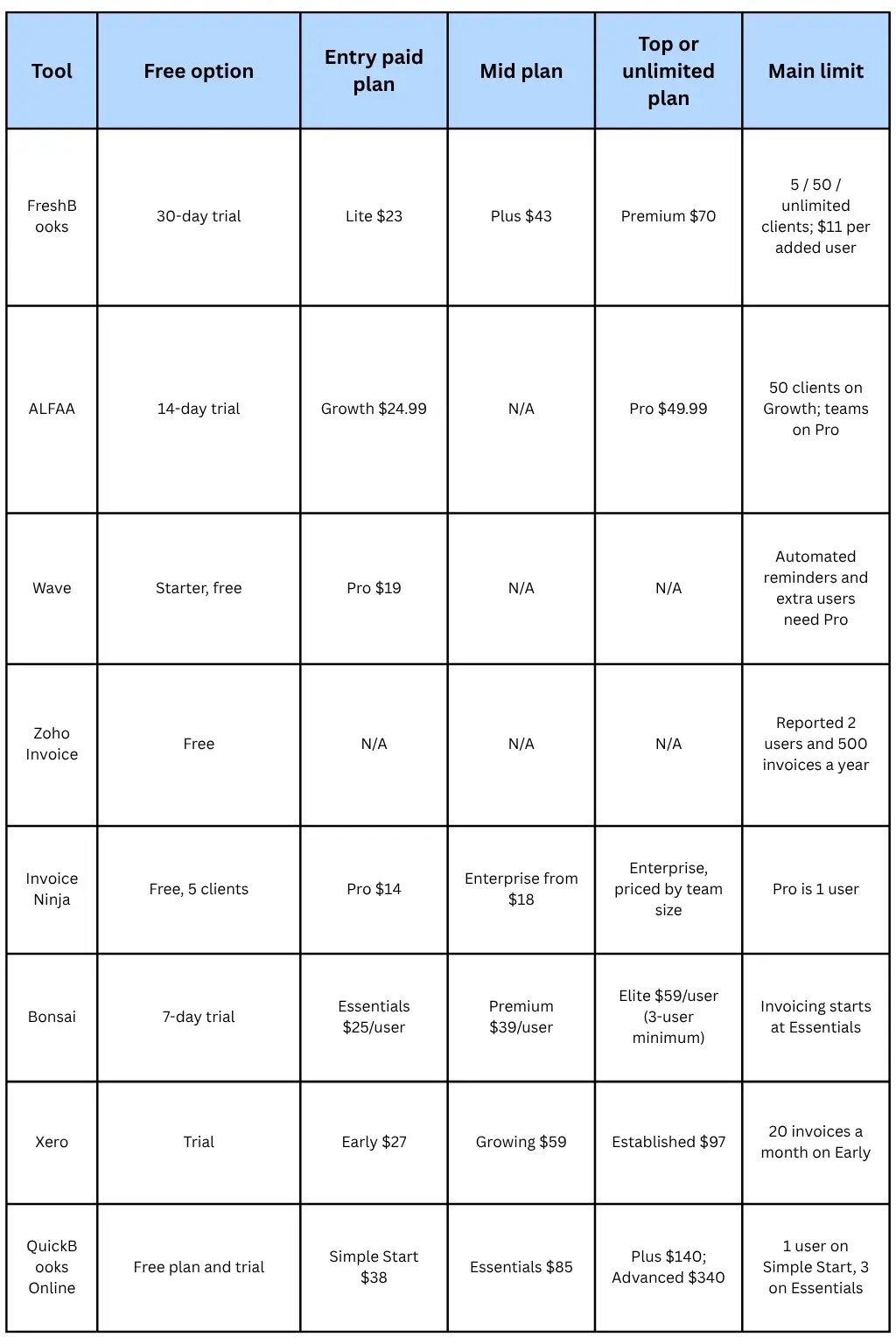
Two of these are invoicing tools (Alfaa and Invoice Ninja), one is a freelance all-in-one (Bonsai), and five include accounting (FreshBooks, Wave, Xero, QuickBooks Online, and Zoho's upgrade path through Zoho Books). If someone else does your books, paying for accounting you don't use is the most common source of overspending.
For head-to-head detail, see Alfaa compared with FreshBooks, QuickBooks, Wave, and Zoho Invoice.
The hidden costs on top of the subscription
1. Payment processing fees
Card payments carry a percentage fee plus a fixed amount per transaction, and the rate depends on the tool's payment processor. Some published examples:
FreshBooks: About 2.9% + 30¢ per card payment
Wave: 2.9% + $0.60 for Visa, Mastercard, and Discover; Pro subscribers pay 2.9% + $0 on their first 10 transactions each month
Bonsai: Around 3% on cards, plus currency conversion fees
Xero: Standard ACH bank payments are included on all US plans; other methods carry fees
Alfaa: Clients pay through Stripe or PayPal, so those processors' standard rates apply
At $10,000 a month in card payments, a 2.9% fee is $290, many times the price of any plan here. Offering bank transfer or ACH for large invoices usually saves more than switching software. Our guide to invoice payment methods compares the options.
2. Add-ons
Extra users: $11/month each on FreshBooks; per-user pricing throughout Bonsai
Payroll: FreshBooks charges $40/month plus $6 per person, via Gusto
Receipt scanning: $8/month on Wave's free Starter plan
3. Vendor branding
Free and entry plans often put the vendor's name on your invoices. Removing it requires Wave Pro, Invoice Ninja Pro, or Bonsai Premium; Zoho Invoice's free plan keeps "Powered by Zoho Invoice" on documents. If invoices are part of your client experience, budget for this.
4. Intro discounts and annual increases
Discounts are deep but temporary. In October 2026, FreshBooks offered 80% off for 4 months, Xero 90% off for 6 months, and QuickBooks Online 50% off for 3 months. Budget on the full price.
Prices also rise. QuickBooks Online raised Essentials, Plus, and Advanced from August 1, 2026, Xero raised all US plans on October 1, and FreshBooks raised prices earlier in the year. QuickBooks Plus has doubled since early 2021, from $70 to $140 a month.
5. Monthly vs. annual billing
Annual billing cuts costs noticeably: Bonsai Essentials drops from $25 to $19 per user per month, and Wave Pro is $190 a year instead of $228. Commit annually only after the trial confirms the tool fits.
What three sample businesses would pay
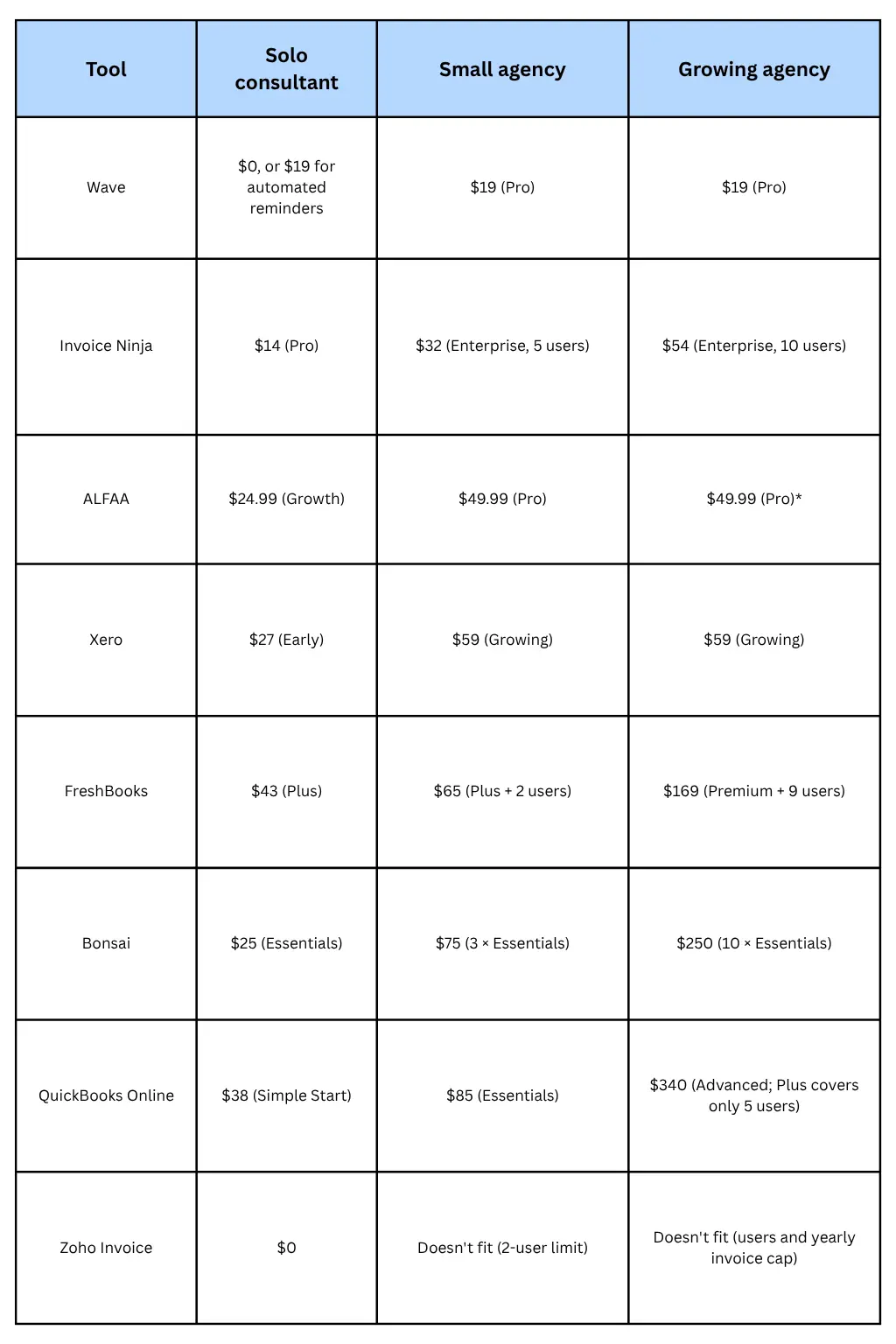
Each figure is the cheapest plan that fits, at US monthly list prices, assuming one invoice per client per month and that the business needs recurring invoices.
Solo consultant: 1 user, 8 clients
Small agency: 3 users, 30 clients
Growing agency: 10 users, 120 clients
What the numbers show
Per-user pricing is the biggest cost driver as you grow: For a 10-person agency, Bonsai and FreshBooks cost about 3 to 5 times more than ALFAA or Xero, and far more than Wave.
The cheapest tool isn't always the cheapest setup: Wave and Xero include bookkeeping; invoicing-only tools (ALFAA, Invoice Ninja) don't. If you need both, add the cost of an accounting tool or bookkeeper to the invoicing-only rows, or subtract it from the accounting rows.
For a solo consultant, all paid options are within about $30 a month of each other: Choose fit, not price: how well each handles your retainers, reminders, and client experience.
For a 10-person agency, the difference between Bonsai (250) and Alfaa (49.99) is about $2,400 a year, before payment fees.
Is paid invoicing software worth it?
When free is enough
Stay on a free plan or a free invoice generator if all of these are true:
You send fewer than about 10 invoices a month
You're the only person who needs access
Clients don't mind the vendor's branding on invoices
You're happy to send payment reminders by hand
Our guide to what a free invoice generator gives you covers the trade-offs in detail.
When paying, pay for itself
The subscription is rarely the biggest number. Two others usually matter more.
Your Time: Price the hours you spend creating invoices, chasing payments, and checking who has paid.
\text{Monthly value of time saved} = \text {Hours saved per month} \times \text {Your hourly rate}
If automation saves 4 hours a month and you bill $75 an hour, that's $300 of time against a $25 to $50 subscription. Use your own estimate; Alfaa's figure for businesses moving to automated recurring billing is 4 to 6 hours a month. Our posts on the true cost of manual invoicing and an invoice automation tool that saves 5 hours a week walk through the calculation.
Faster Payment: Recurring billing sends retainer invoices on time every cycle, and automated payment reminders follow up without you. Getting paid even a week earlier on a few large invoices can matter more to cash flow than the software's monthly price.
If you're seeing these warning signs, it's time to pay for a tool: missed billing cycles, reminders you forget to send, or a spreadsheet you no longer trust. See 5 signs it's time to move off free invoice templates.
How to avoid overpaying
Estimate client count, team size, and monthly invoices for 12 months from now.
Shortlist tools whose limits fit that estimate on one plan.
Check that recurring invoices and automated reminders are on that plan, not the next one up.
Add payment fees at your typical invoice size.
Don't pay for accounting if someone else keeps your books.
Trial before committing to annual billing.
If you're currently on FreshBooks, our FreshBooks alternatives guide compares switching options at 5, 15 and 50 clients.
The Bottom Line
Invoicing software costs anywhere from $0 to $340 a month, but the headline price rarely decides what you pay. Client caps, per-user fees, payment processing, and accounting features you may not need make the real difference. Model your business a year ahead, check which limit each tool hits first, and budget on full prices, not intro offers.
If you're a consultant or agency whose main job is billing clients, Alfaa keeps pricing flat: Growth covers up to 50 clients for $24.99 a month, and Pro adds unlimited clients and team accounts for $49.99, with recurring billing and payment reminders on both plans.
Frequently Asked Questions
Most paid plans cost $14 to $70 a month for one user in 2026. Free plans exist from Wave, Zoho Invoice and Invoice Ninja, and full accounting suites such as QuickBooks Online run up to $340 a month.
Wave's Starter plan and Zoho Invoice are free. Among paid plans, Invoice Ninja Pro (14) and Wave Pro (19) are the cheapest. The cheapest fit depends on your client count, team size and whether you need accounting.
Yes. Wave, Invoice Ninja Pro, Bonsai, Xero Growing, QuickBooks Online, and ALFAA Pro don't cap clients. FreshBooks limits clients below Premium, and Alfaa Growth covers up to 50.
Some is. Bonsai charges per user, FreshBooks charges $11 per added user, and QuickBooks Online ties user counts to tiers. Xero and Wave Pro include unlimited users at a flat price.
The main ones are card payment fees (around 2.9% plus a fixed amount per transaction), per-user add-ons, payroll add-ons, paying extra to remove vendor branding, and price increases after intro discounts end.
Annual billing is usually 15% to 40% cheaper. Bonsai Essentials, for example, drops from $25 to $19 per user per month. Use the free trial first, then switch to annual once you're sure the tool fits.
Alfaa Growth is $24.99 a month for up to 50 active clients, and Pro is $49.99 a month for unlimited clients, team accounts, custom-domain sending, and multiple business entities. Both include recurring billing, payment reminders, and multi-currency invoicing, with a 14-day free trial and no card required.

Olivia Bennett
Content Writer @ ALFAA
Olivia is a content writer at ALFAA who specializes in invoicing, small business, and productivity topics. She enjoys simplifying complex ideas into clear, practical insights that help business owners save time, get paid faster, and stay organized.