Free Expense Tracking in 2026: What's Actually Free (and a $0 System That Works)
By ALFAA Team
Stay in the loop
Get finance tips delivered to your inbox.
This guide separates what is free from what only looks free. It then gives you a complete $0 system for small business expense tracking, the IRS records you need to keep, and a step most expense tracker guides skip: turning tracked costs into billable client invoices.
The Short Answer
A spreadsheet plus a monthly bank export is the only expense tracking setup that stays free at any volume.
For free receipt scanning, Zoho's free plans are the closest options in 2026, with monthly scan limits.
QuickBooks, FreshBooks, YNAB, and Shoeboxed offer trials, not free plans.
If you pass costs on to clients, add the Client and Billable columns on day one. Almost no roundup mentions this habit, and it decides whether you get paid back.
What "Free" Means for an Expense Tracker App
Vendors use the word free in four different ways. Know which one you are signing up for.
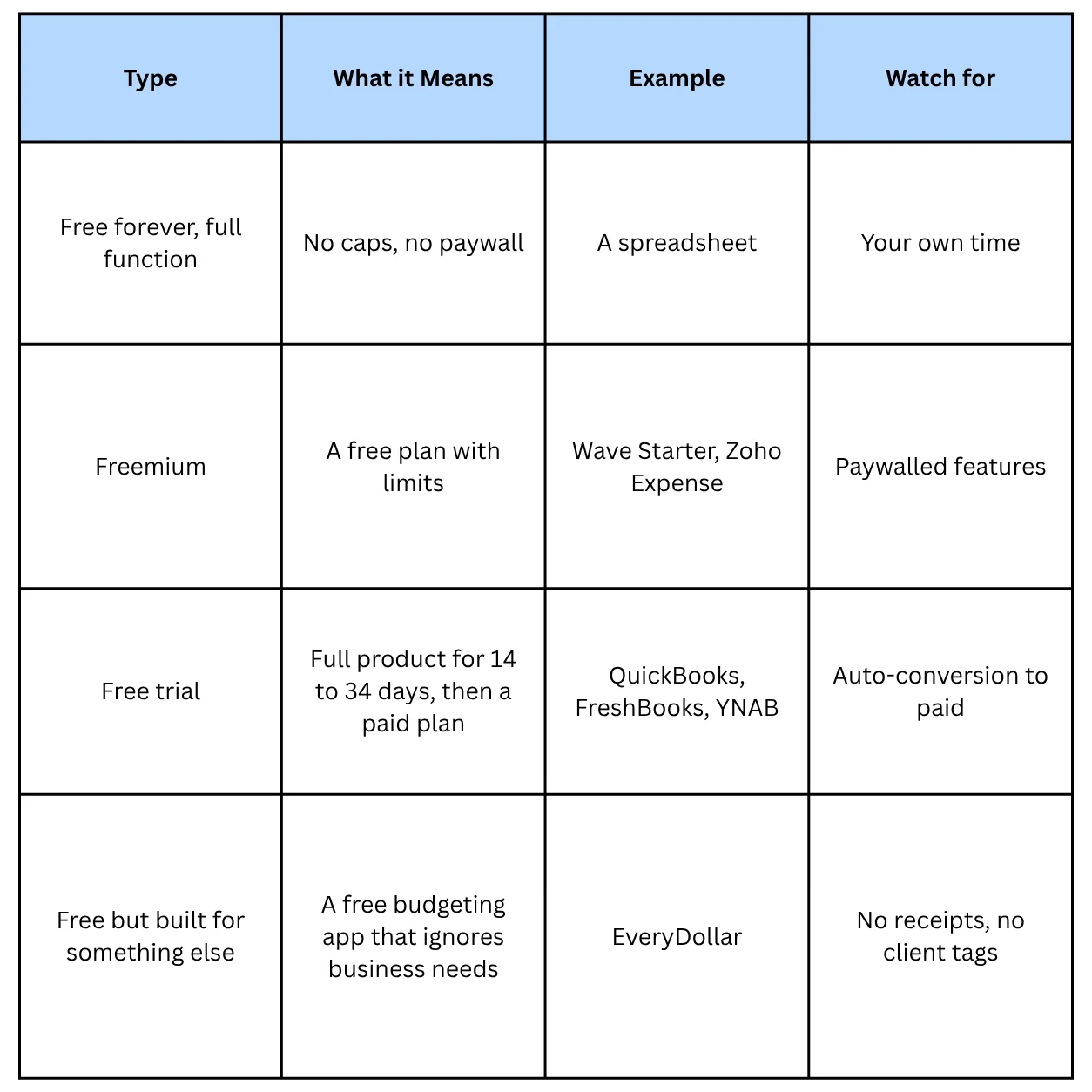
Four features get paywalled first: receipt scanning, bank sync, accountant access, and exports or reports. Check those four before you enter a single expense. Moving data out of a tool you outgrow is the most expensive step, and the free plan will not tell you how hard it is.
Best Free Expense Tracker Apps in 2026: What You Get and What You Pay For
Prices below come from vendor pages as reported by third-party reviews dated March to October 2026. Check the vendor page before you commit.
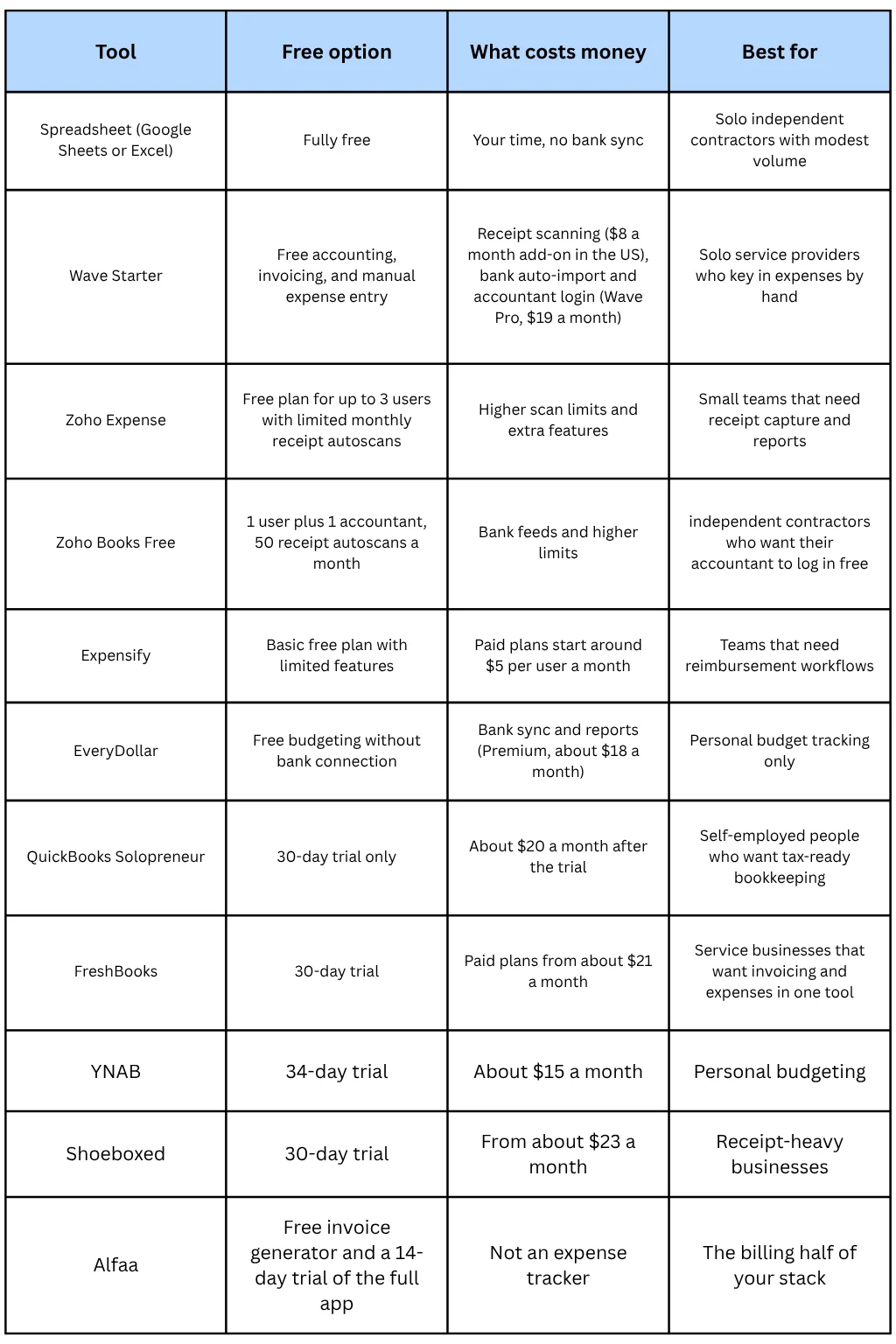
Trial-only tools are fine to test. Put the renewal date in your calendar before you start, because a trial that converts to a paid plan is not free expense tracking.
What Free Plans Skip: Automatic Tracking
Three automations sit behind the paywall on most free plans: live bank and credit card feeds, automatic categorization, and trip or mileage capture. Mileage apps with a free tier usually cap the number of trips per month.
You can copy most of that automation for free. Download a CSV from your bank and each business card once a month, paste it into your sheet, and let a rules tab categorize the rows. Reconciliation then means checking that your sheet total matches the statement total, which takes a minute.
Which Free Setup Fits You
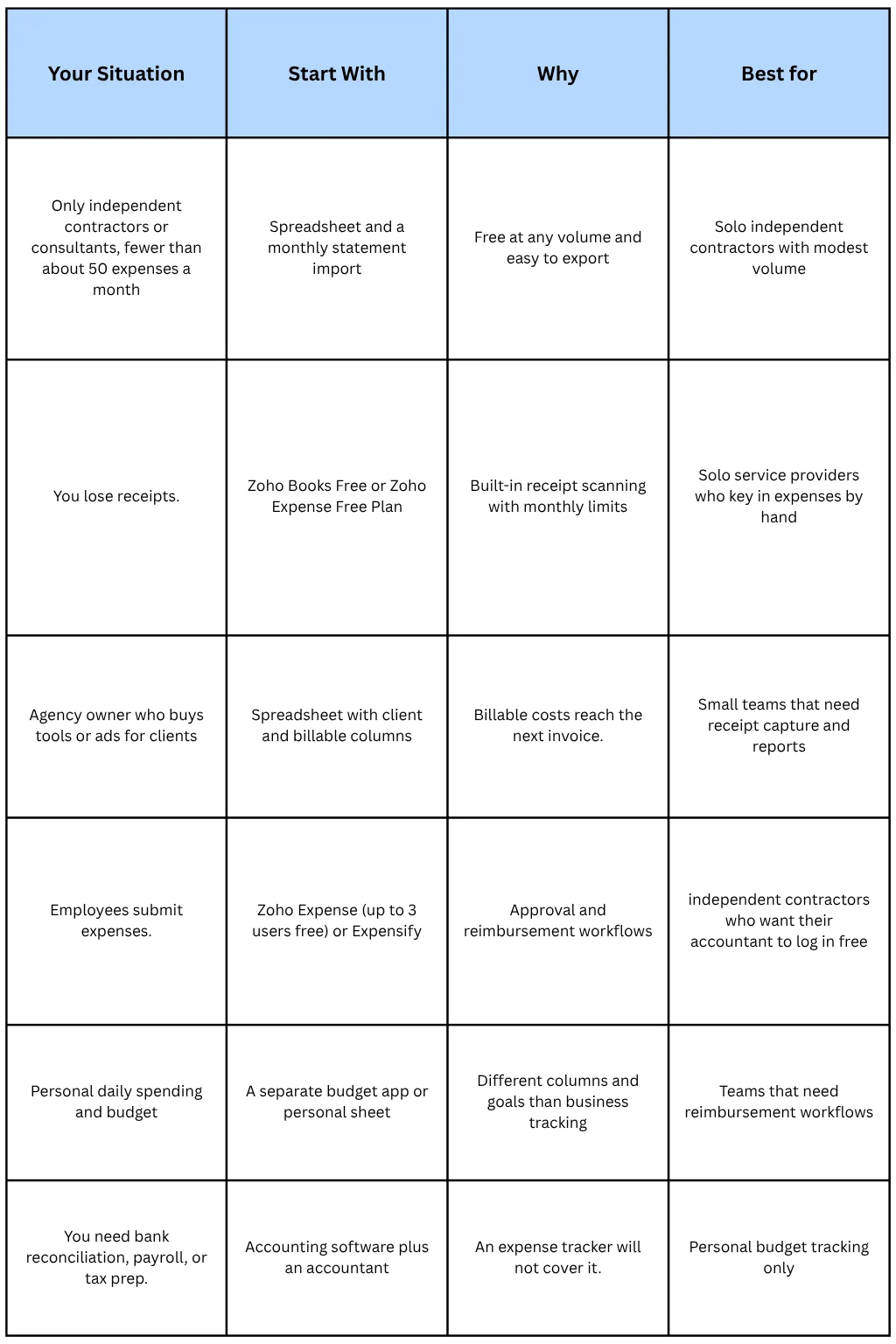
Set Up a $0 Expense Tracking System in 30 Minutes
This setup works on Mac, Windows, and in a browser, and it keeps your data in a file you own.
Separate the money: Use one business checking account and one card for business spending only.
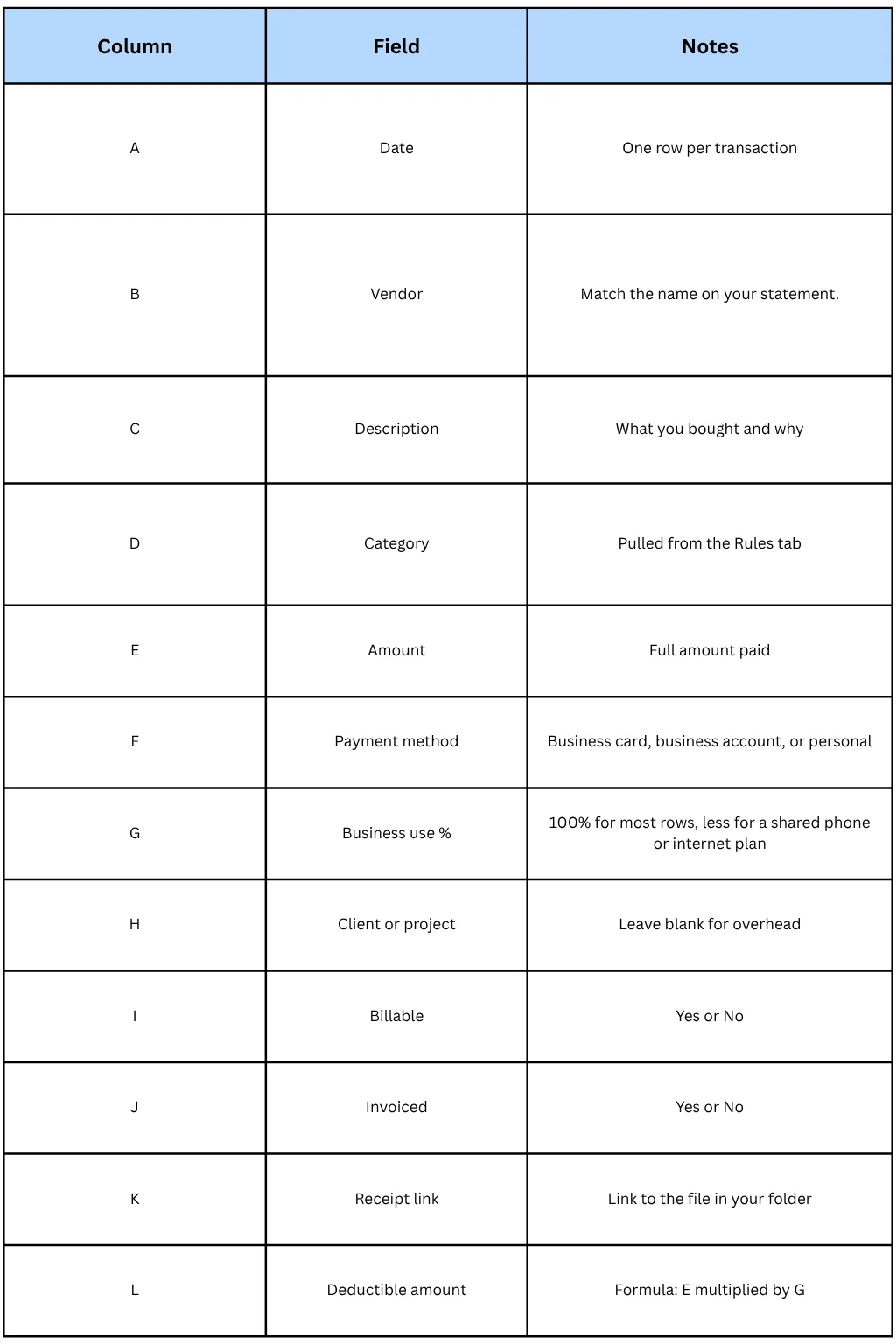
Create the sheet: Add the columns in the table below.
Add a Rules tab: List vendor names in column A and the matching category in column B.
Create a receipt folder: Name each file with the date, vendor, and amount, such as 2026-10-12_adobe_54.99.pdf.
Add a Summary tab: Use the formulas below to total costs by category and by client.
Book the monthly close: Put 20 minutes on your calendar at the same time each month.
Weekly, 5 minutes: photograph new receipts into the folder and forward emailed receipts to one label.
Monthly, 20 minutes:
Paste the bank and card CSV files into the sheet
Check that the sheet total matches each statement total
Tag each row with a client and mark billable costs
Invoice every billable cost not yet invoiced
Review the Recurring tab for renewals
Set aside money for taxes (see the tax section below)
Save a backup copy
Spreadsheets hold up well for expenses. They break down for invoicing first, which is why switching from Excel to invoicing software usually comes before switching expense tools.
Keep Business and Personal Spending Apart
Mixed accounts are the most common reason expense records fall apart at tax time. Three rules fix it:
Use a separate business account and card. Every row in your tracker should come from one of them.
Split shared costs. Put the business share of a phone or internet bill in the Business Use % column.
Reimburse yourself on paper. If you pay a business cost personally, log it and transfer the money to yourself from the business account.
If you also want to track daily spending, keep that in a personal budget app or a separate sheet. A personal budget tracker answers where your money goes. A business expense tracker answers what you can deduct and what you can bill. They need different columns.
What Records the IRS Expects You to Keep
This section covers US sole proprietors and general information, not tax advice. Check irs.gov or ask a tax professional for your situation.
What to record: the amount, date, place, and business purpose of each expense.
Receipts: the IRS generally requires documentary evidence for expenses of $75 or more and for all lodging.
Digital copies: legible electronic copies are generally acceptable.
How long to keep records: generally 3 years from filing. Keep them 6 years if you leave out more than 25% of gross income, and 7 years for bad debt or worthless securities claims.
Expense Categories That Match Schedule C
Category names matter. If your tracker uses the same categories as the tax form, year-end takes minutes instead of hours.
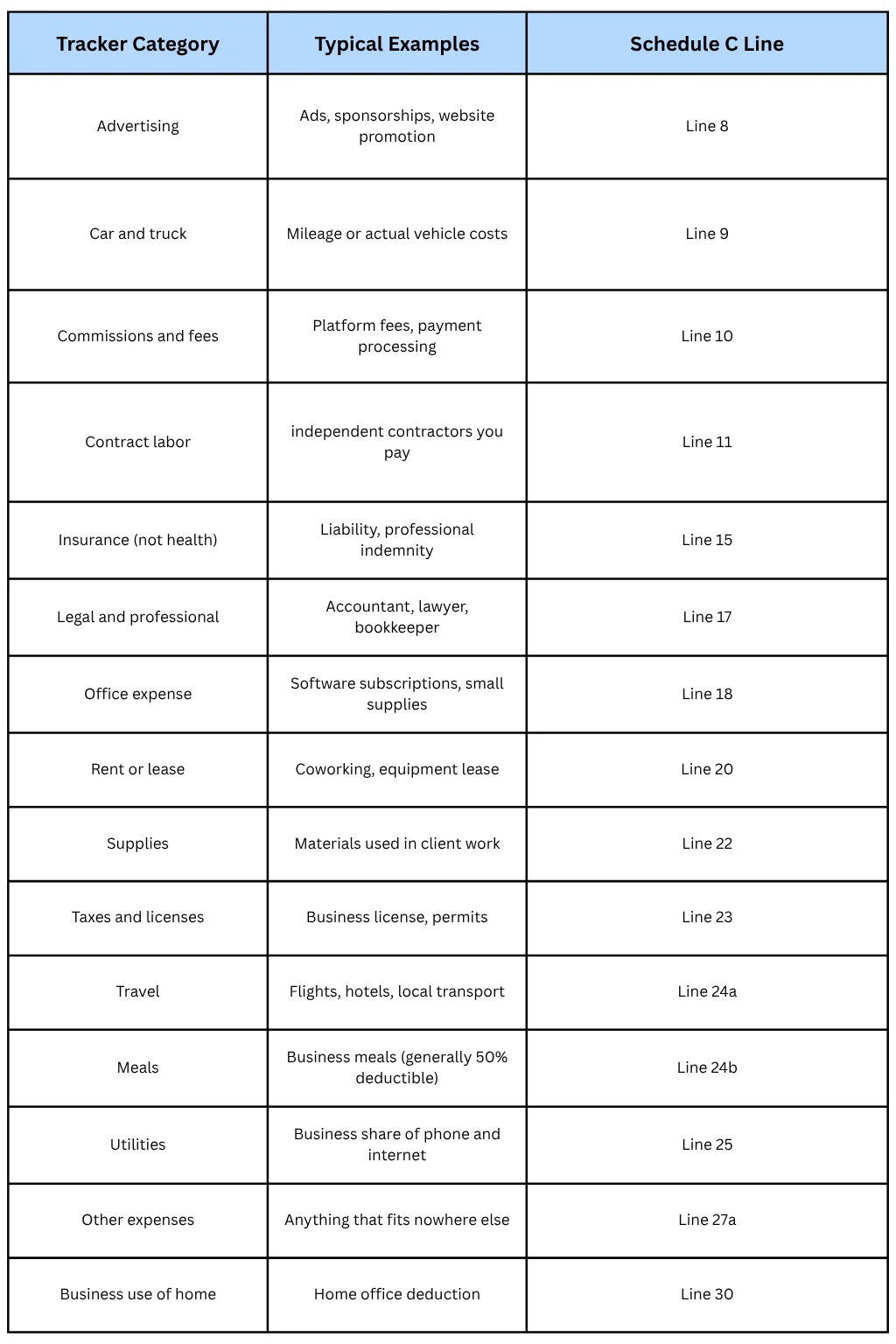
Three deductions deserve their own tracking:
Mileage: the IRS standard mileage rate for 2026 is 72.5 cents per mile. Log the date, start and end, miles, and purpose of each trip.
Home office: the simplified method allows $5 per square foot up to 300 square feet. Record the square footage once.
Meals: log who you met and why. A receipt without a business purpose is a weak record.
Turn Billable Expenses Into Client Invoices
Here is the gap in nearly every expense tracking guide: they stop at logging. If you buy a stock photo license, a paid tool seat, or a plane ticket for a client project, tracking the cost does not get you reimbursed. Billing it does.
The workflow takes four steps:
Tag the cost. Add the client name and set Billable to Yes the day you pay.
Check the contract. State in your agreement which costs you bill and whether you add a markup.
Add a line item. On the next invoice, put each reimbursable cost on its own line with a clear description and keep the receipt link handy.
Mark it invoiced. Set the Invoiced column to Yes so nothing is billed twice or missed.
A retainer invoice with reimbursable costs looks like this:
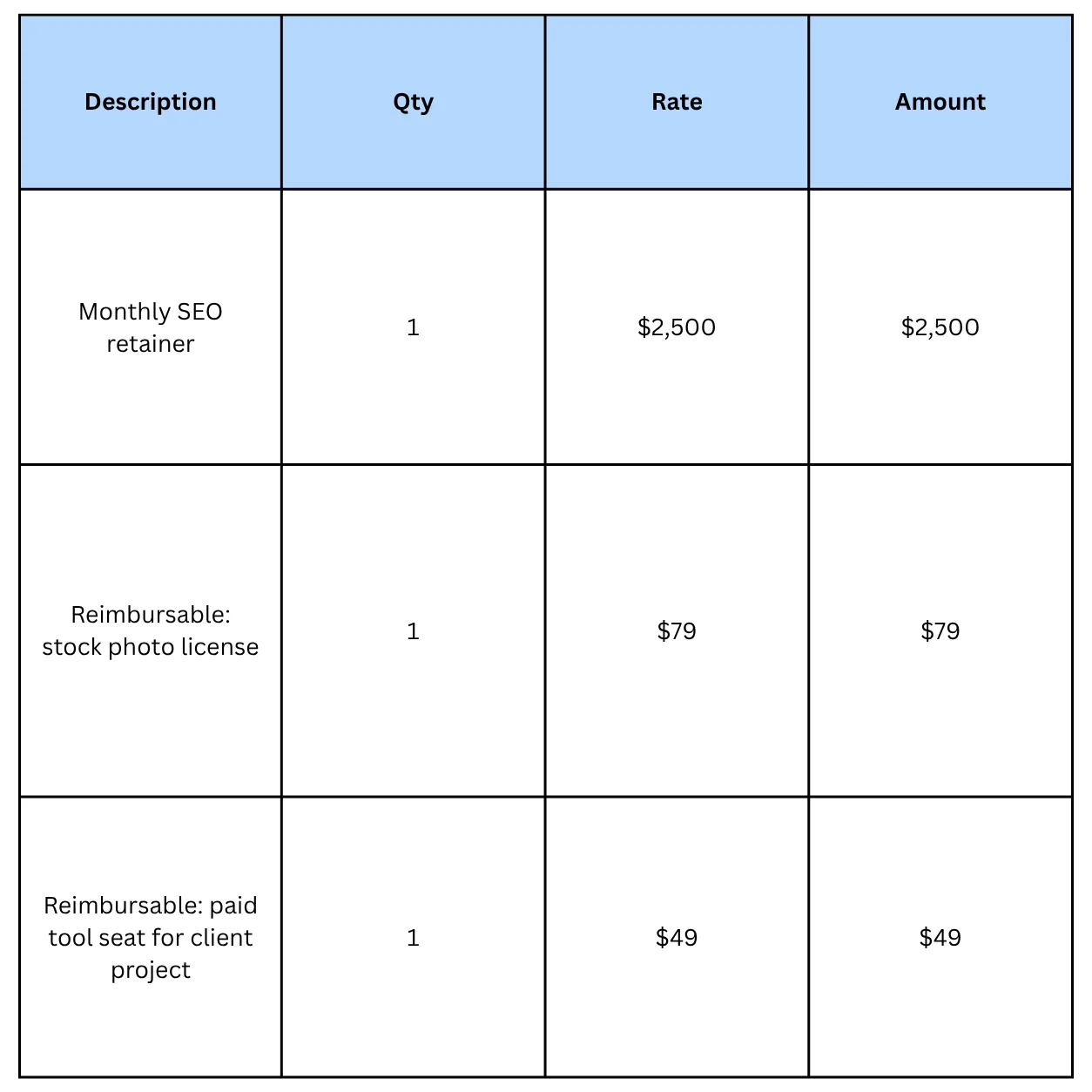
Bill the retainer on a recurring invoice and send reimbursables on a separate invoice, so the retainer never changes. Any free invoice generator that supports custom line items can produce the reimbursable invoice. Clear line items also help you get paid: unclear invoices are a common reason for delays, as the seven invoice mistakes that delay payments explain. When the invoice is ready, how you send it affects how quickly it gets paid.
This matters most for marketing agencies, consultants, virtual assistants, professional services firms, and field services businesses that buy tools, materials, or travel on a client's behalf.
Find Out Which Clients Make Money
Total revenue hides weak clients. Tag costs by client, and the picture changes.
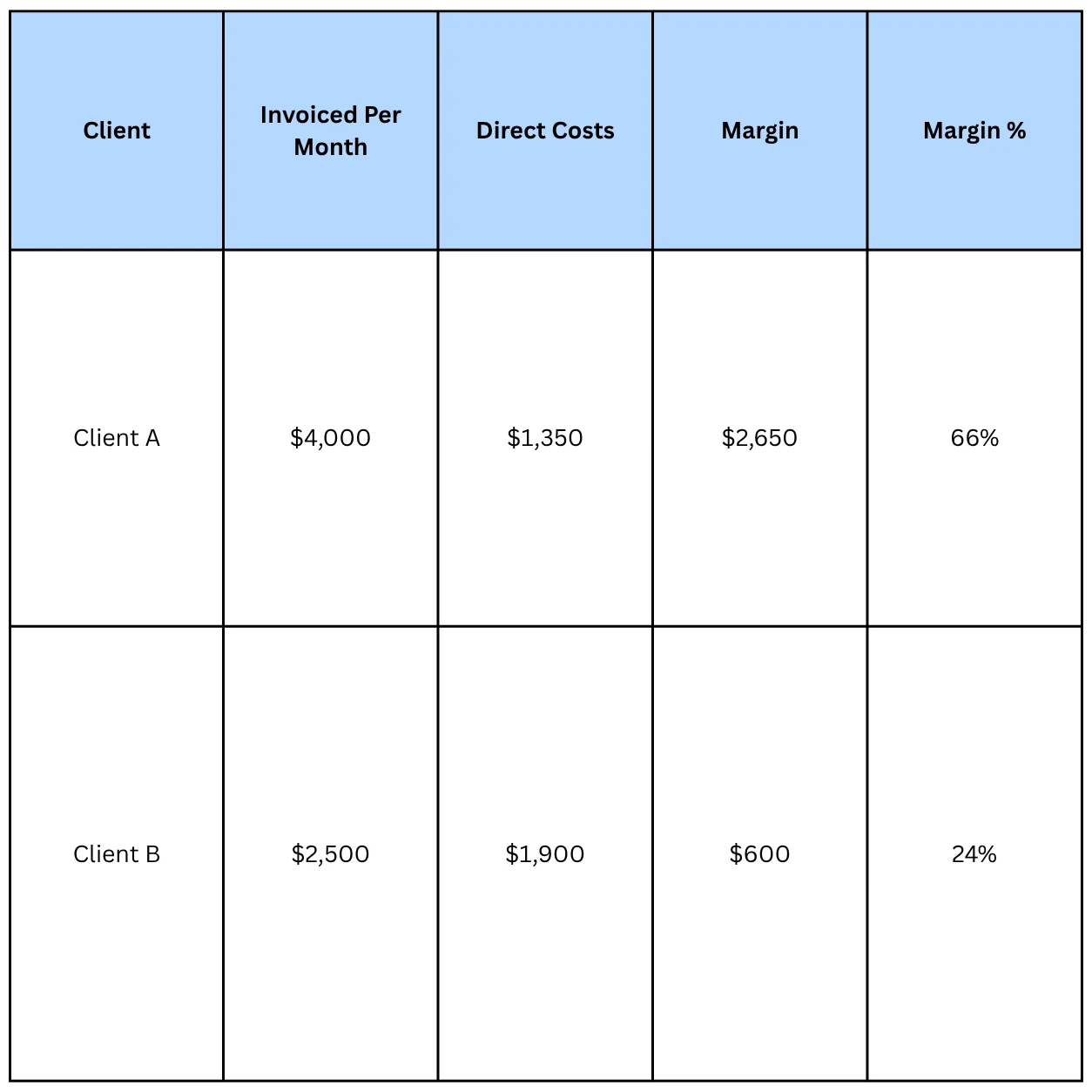
Both clients look healthy on the invoice list. Only the margin column shows that Client B takes nearly as much work and costs for far less profit. Use that data to reprice, trim scope, or reduce reimbursable spending.
For the revenue side, Alfaa's client analytics tool shows revenue and payment insights per client, and client management billing keeps each client's billing history in one place. Subtract the costs from your sheet to get margin.
Use Expense Data to Plan Quarterly Taxes
Tracked expenses lower your taxable profit, and that changes your quarterly payments.
A simple example:
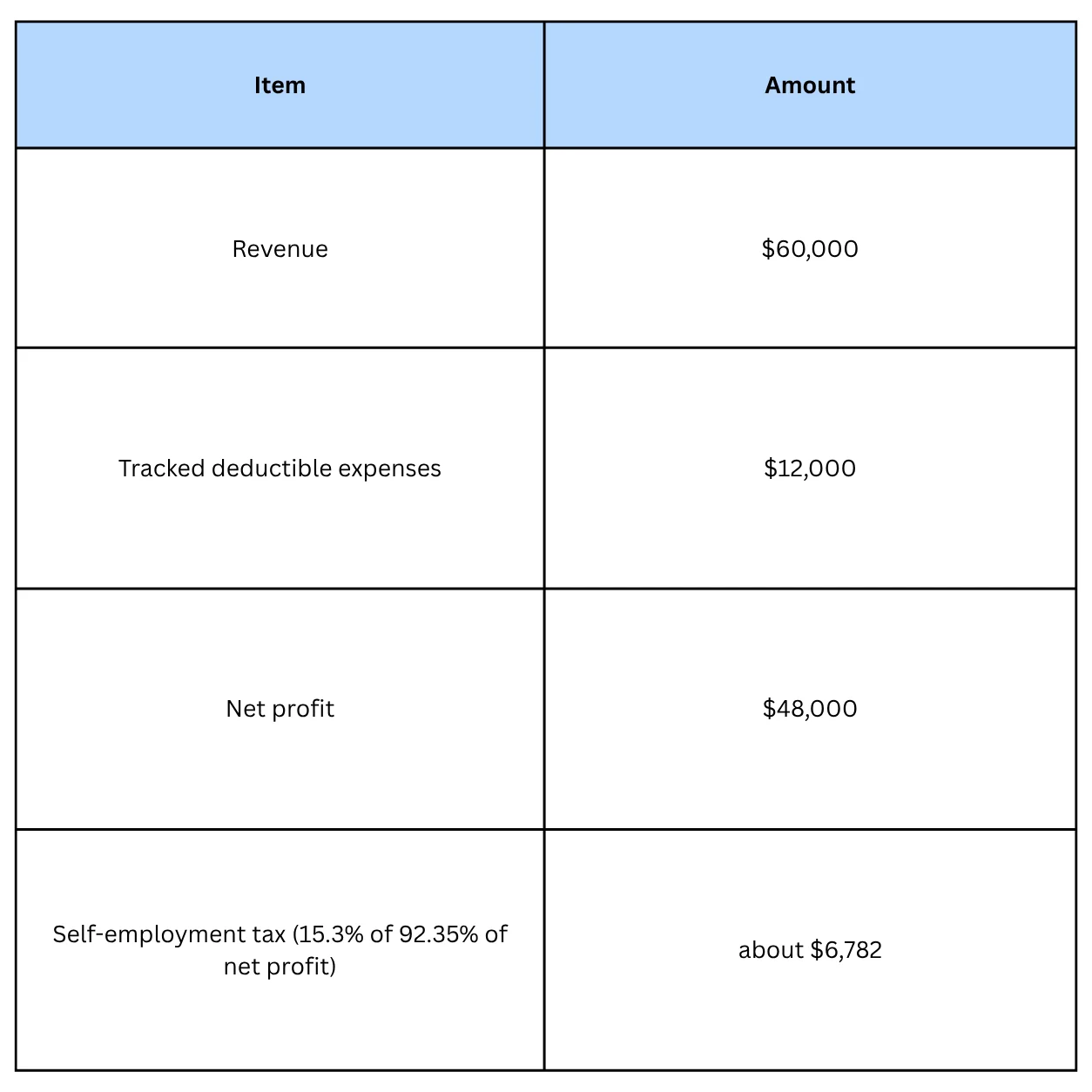
If you miss $9,000 of those expenses, net profit rises to $57,000, and self-employment tax alone rises by about $1,270 before income tax.
Many self-employed people set aside 25% to 30% of net profit as a starting point, then adjust with a tax professional. The 2026 estimated tax installments fall on April 15, June 15, September 15, and January 15, 2027.
Compare your tracked costs to the money you actually receive. Alfaa's revenue dashboard shows invoices raised, payments received, pending amounts, total earnings, and average monthly revenue, so you can see how much cash is available before you pay estimated taxes. Use a payment tracking system and automated payment collection reminders to keep that cash from stalling.
Track Recurring Expenses and Subscriptions
Subscriptions are the expenses people forget. A recurring expense tracker can be one tab in your sheet:
List every subscription from your last three card statements
Record the vendor, monthly cost, annual cost (monthly cost times 12), billing date, and the client it serves, if any
Add annual renewals to your calendar two weeks early
Review the tab every quarter and cancel tools you no longer use
If you automate income with recurring invoices, mirror that discipline on the cost side. Both lists should be short, current, and checked on a schedule.
Track Foreign Currency Expenses
If you buy tools or services in another currency, log the original amount, the currency, the exchange rate, and the converted amount in your home currency. Use one consistent rate source and note it in your sheet. If you also bill in other currencies, the multi-currency invoicing guide covers the billing side.
Employee Expenses and Team Reimbursements
Free plans cap users, scans, or workflows, so teams outgrow them faster than solo independent contractors do. Zoho Expense's free plan covers up to three users, and Expensify has a limited free plan. If employees submit receipts, you need an approval step and a reimbursement record. A shared spreadsheet rarely survives that.
Common Expense Tracking Mistakes
Treating a free trial as a free plan. Set a reminder before it converts.
Mixing business and personal spending. One shared card undoes every other habit.
Catching up once a year. Monthly entries take minutes. Annual cleanup takes days.
Skipping the business purpose. Meals and travel need a reason, not just a receipt.
Leaving billable costs untagged. Unbilled client expenses are a loan you never agreed to make.
Using too many categories. Fifteen categories that match your tax form beat sixty that do not.
Ignoring the exit plan. Confirm that you can export your data before you build a year of history inside any tool.
Where Alfaa Fits (and Where It Does Not)
Alfaa does not track expenses, run bookkeeping, or file taxes. It handles the billing half of the loop:
Create and send branded invoices with the free invoice generator no signup or the full app
Send invoices from your own Gmail, Google Workspace, or custom domain
Bill retainers automatically with automated monthly fee reports
Follow up automatically with payment reminders
See what is paid and pending in one dashboard
The stack for most independent contractors and small agencies is simple: a free tracker or spreadsheet for costs, Alfaa for invoices, and an accountant when you need books and tax prep. If you need full bookkeeping, Alfaa vs QuickBooks explains where each tool fits. If you are weighing "free" invoicing tools, what a free invoice generator actually gives you covers the same honesty test for invoices. Slow-paying clients also distort cash flow, and why you are getting paid late covers the fixes.
Ready to bill the costs you are tracking?
Start with the free invoice generator, no signup needed, or start a free trial of the full app with no credit card.
Conclusion
Free expense tracking is real, but only if you know what you are getting. A spreadsheet stays free at any volume. Freemium apps cap receipts, bank sync, and users. Trials are not free plans.
Pick the setup that matches your volume, keep business and personal money apart, and use Schedule C categories from day one. Then add the step most guides skip: tag billable costs by client and put them on your next invoice. Tracking shows you where the money went. Billing gets it back.
Frequently Asked Questions
There is no single winner. A spreadsheet is the only option that stays fully free at any volume. Zoho Expense and Zoho Books Free offer limited free receipt scanning, and Wave Starter works if you enter expenses by hand. Match the tool to your monthly volume and to whether you need receipts scanned.
Yes, with trade-offs. Spreadsheets cost nothing and have no caps, but you enter the data yourself. Freemium apps such as Wave Starter and Zoho Expense are free with limits on receipt scanning, bank sync, or users. Trials from QuickBooks, FreshBooks, and YNAB are not free plans.
Open a separate business account, log each expense with its date, vendor, amount, category, and client, and photograph the receipt. Review the log monthly. Add a Billable column so reimbursable costs reach your next invoice. The 30-minute setup in this guide covers each step.
Use a spreadsheet with a monthly statement import. Paste your bank and card CSV files, categorize rows with a rules tab, and store receipt photos in a dated folder. The routine takes about 20 minutes a month and costs nothing.
Keep one for every expense you can. The IRS generally requires documentary evidence for expenses of $75 or more and for all lodging, and a bank statement alone does not show what you bought.
Generally three years from the date you file the return. Keep them six years if you leave out more than 25% of your gross income, and seven years for bad debt or worthless securities claims. Many independent contractors keep seven years to be safe.
A tracker is enough when you only need to log costs, tag clients, and report deductions at tax time. Add accounting software when you need bank reconciliation, payroll, or a bookkeeper who works in a specific system. Alfaa vs QuickBooks compares the two jobs.
List every subscription from your card statements on a Recurring tab with its monthly cost, annual cost, and renewal date. Review the tab every quarter and cancel tools you no longer use. Paid trackers can also schedule recurring entries.
Partly. Free plans rarely include live bank feeds, so automation usually means downloading a monthly CSV and categorizing it with rules. Paid tiers add bank sync and auto-categorization.
Tag the expense with the client and mark it billable. Add each cost to the next invoice as its own line item with a receipt reference, and agree on any markup in your contract. Both free invoice generators and invoicing software support line items.
For one person with modest volume, yes. A spreadsheet handles categories, client tags, and totals on Mac, Windows, or in a browser. It cannot scan receipts or sync with your bank, so volume and time decide when to upgrade.
No. Alfaa is invoicing software. It creates and sends invoices, runs recurring billing, sends payment reminders, and tracks who has paid. Use a free expense tracker for costs and Alfaa for billing.

Olivia Bennett
Content Writer @ ALFAA
Olivia is a content writer at ALFAA who specializes in invoicing, small business, and productivity topics. She enjoys simplifying complex ideas into clear, practical insights that help business owners save time, get paid faster, and stay organized.