Multi-Currency Invoice Generator: How to Bill International Clients Correctly
By ALFAA Team
Stay in the loop
Get finance tips delivered to your inbox.
When you send an invoice to a client in London, Singapore, or Dubai, currency is the first thing that can go wrong. Not your rate. Not your scope. The currency itself.
This guide covers what a multi-currency invoice generator does, where FX risk hides between invoice date and payment date, which currency to choose, what tax authorities require by region, and how to make sure $5,000 actually lands as $5,000.
What a Multi-Currency Invoice Generator Actually Does
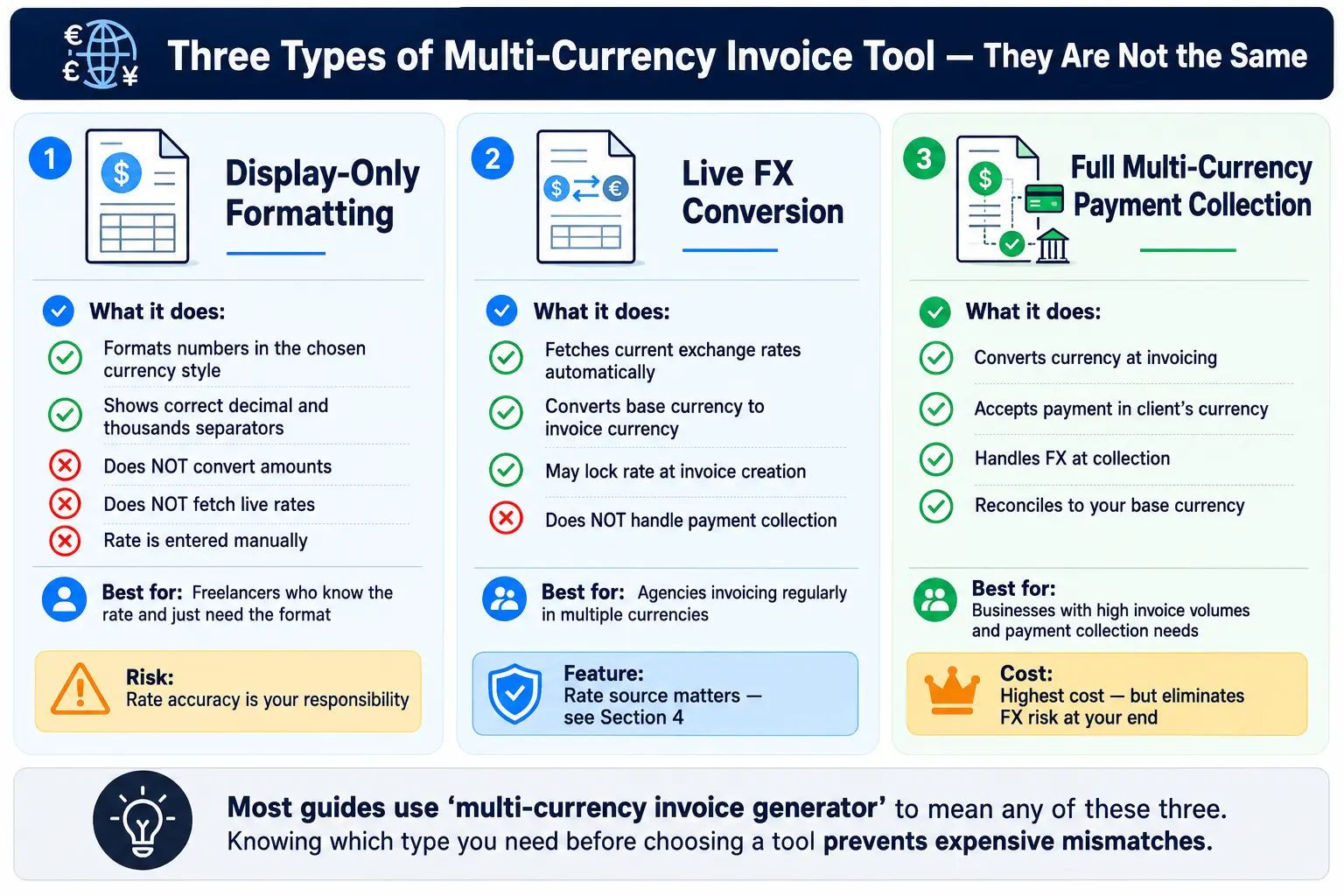
The term "multi-currency invoice generator" covers three different types of tools. Choosing the wrong one creates problems at tax time, at payment time, or at both.
Tool Type What It Does Best For
Display-only formatting Shows a currency symbol and formats numbers correctly (JPY without decimals, USD with two) independent contractors invoicing in a single foreign currency with manual rate entry
Live conversion Fetches a real-time FX rate and converts your base amount at invoice creation
Fetches a real-time FX rate and converts your base amount at invoice creation
Agencies quoting in a client's local currency from a home-currency price list
Full payment collection Handles currency conversion, collects in local currency, and settles in your currency Businesses that need end-to-end FX management with reconciliation
The term "multi-currency invoice generator" covers three different types of tools. Choosing the wrong one creates problems at tax time, at payment time, or at both. Most basic invoicing templates fall into the first category. They let you type "EUR" and drop a euro sign on a PDF. They do not pull a live rate or lock the amount at payment. That gap is where money disappears.
A proper multi-currency invoice generator, like Alfaa's online invoice generator, lets you set the invoice currency per client, handle 200+ currencies with correct formatting, and keep payment records consistent without manual spreadsheet work. Understanding the difference between these tool types is the first step toward choosing correctly.
The Real Problem: Invoice Date vs. Payment Date FX Risk
You send an invoice for $5,000 USD to a UK client who pays in GBP. At the invoice date, the GBP/USD rate is 1.27, so the client owes roughly £3,937. They pay 21 days later. By then, the rate has moved to 1.24. The client sends £3,937. When it lands in your USD account, you receive $4,882.
You lost $118 on rate movement alone before a single bank fee.
At 2% currency movement over three weeks, a $5,000 invoice costs you $100. Scale that across 10 international invoices per month and you lose $1,000 without a billing error in sight.
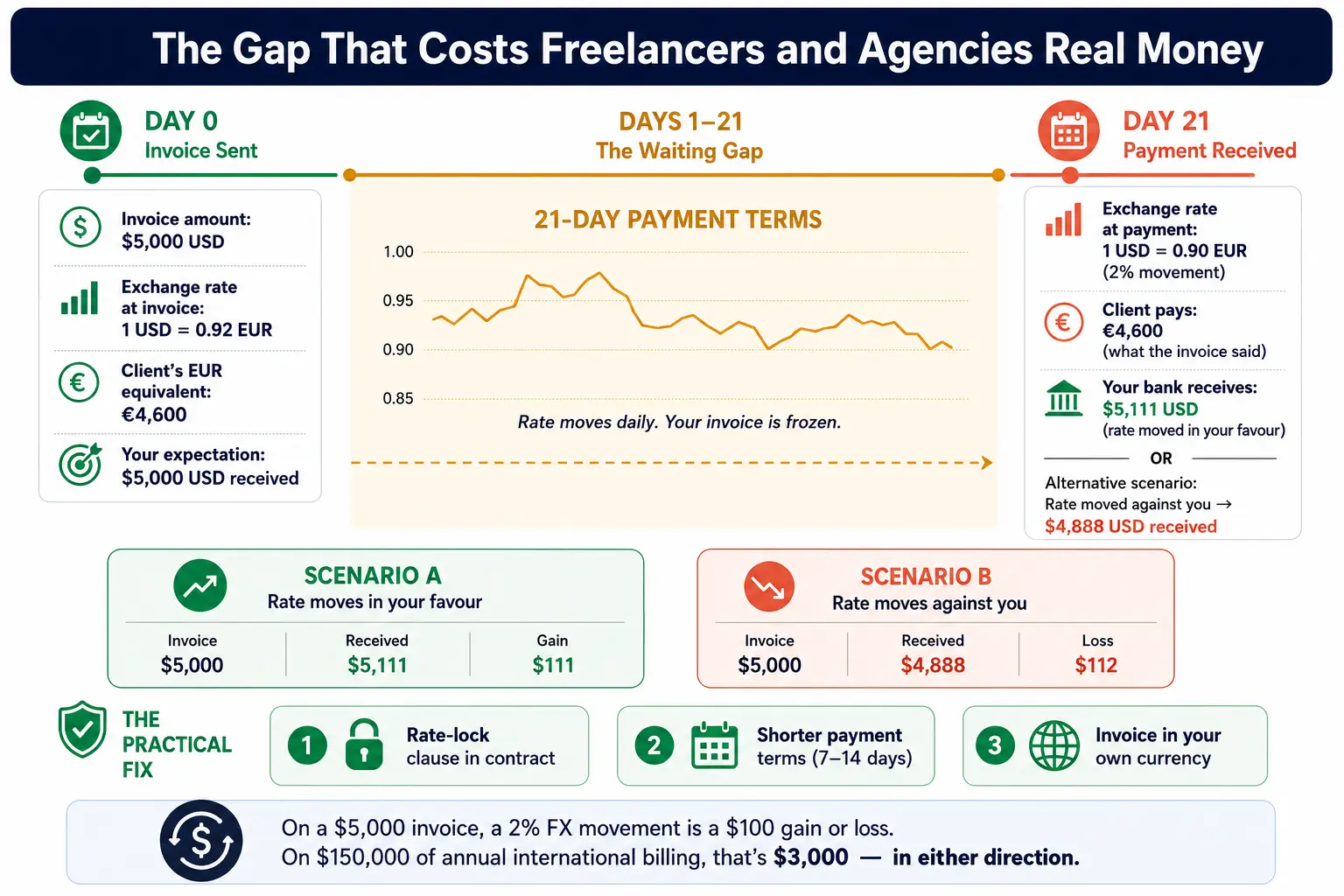
Three ways to close this gap:
Lock the rate in the contract: State the exchange rate in your service agreement. Include a clause specifying that the client pays the USD (or your home currency) equivalent at the rate on invoice date. If the client pays in their own currency, they carry the FX risk.
Shorten your payment terms: Net-30 gives rates 30 days to move against you. Net-7 or Net-14 on international invoices reduces your exposure window. If you use Net-30 across the board, look at how recurring invoices and billing structures affect cash flow before setting terms for long-term clients.
Invoice in your own currency: The simplest fix. If you bill in USD and the client pays in USD, you carry no FX risk. Their bank handles the conversion. This option is not always available, but it is the default worth defending.
Choosing Which Currency to Invoice In
Three options exist for every international engagement: your home currency, your client's currency, or a neutral third currency like USD or EUR.
Option Pros Cons
Your home currency No FX risk for you. Clean accounting. Client carries the conversion cost. May cause friction in price-sensitive markets.
Client's local currency Easier for the client to process and approve internally. You carry full FX risk from invoice to payment date.
Neutral third currency (USD or EUR) Both parties recognize it. USD is accepted globally. Both sides pay conversion. Neither bank rate applies cleanly.
For UAE-based businesses or those with GCC clients, USD is the practical neutral currency because the AED is pegged to the dollar at a fixed rate of 3.6725. Invoicing in USD from the UAE removes FX risk for both sides without asking the client to transact in an unfamiliar currency.
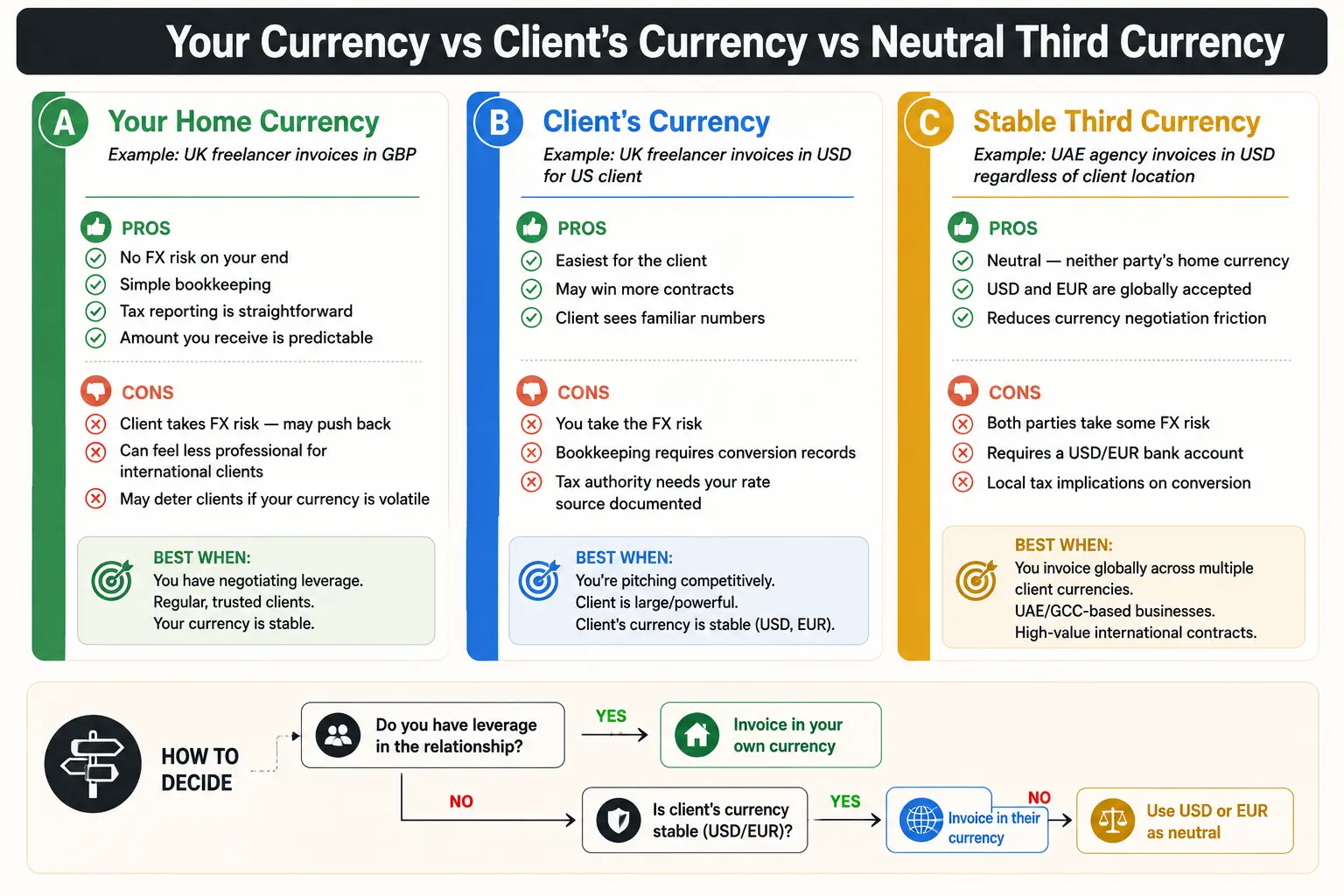
When to let the client choose: When you are competing for a contract and the client has a local-currency procurement policy. Enterprise clients and government contractors often require invoices in their national currency.
When to control it yourself: Set the currency in your proposal before the client sees the first invoice. A client who receives a USD invoice in your proposal rarely pushes back on it later.
Legal and Tax Requirements by Region
Most invoicing guides skip this section. That is a significant gap for businesses with international clients.
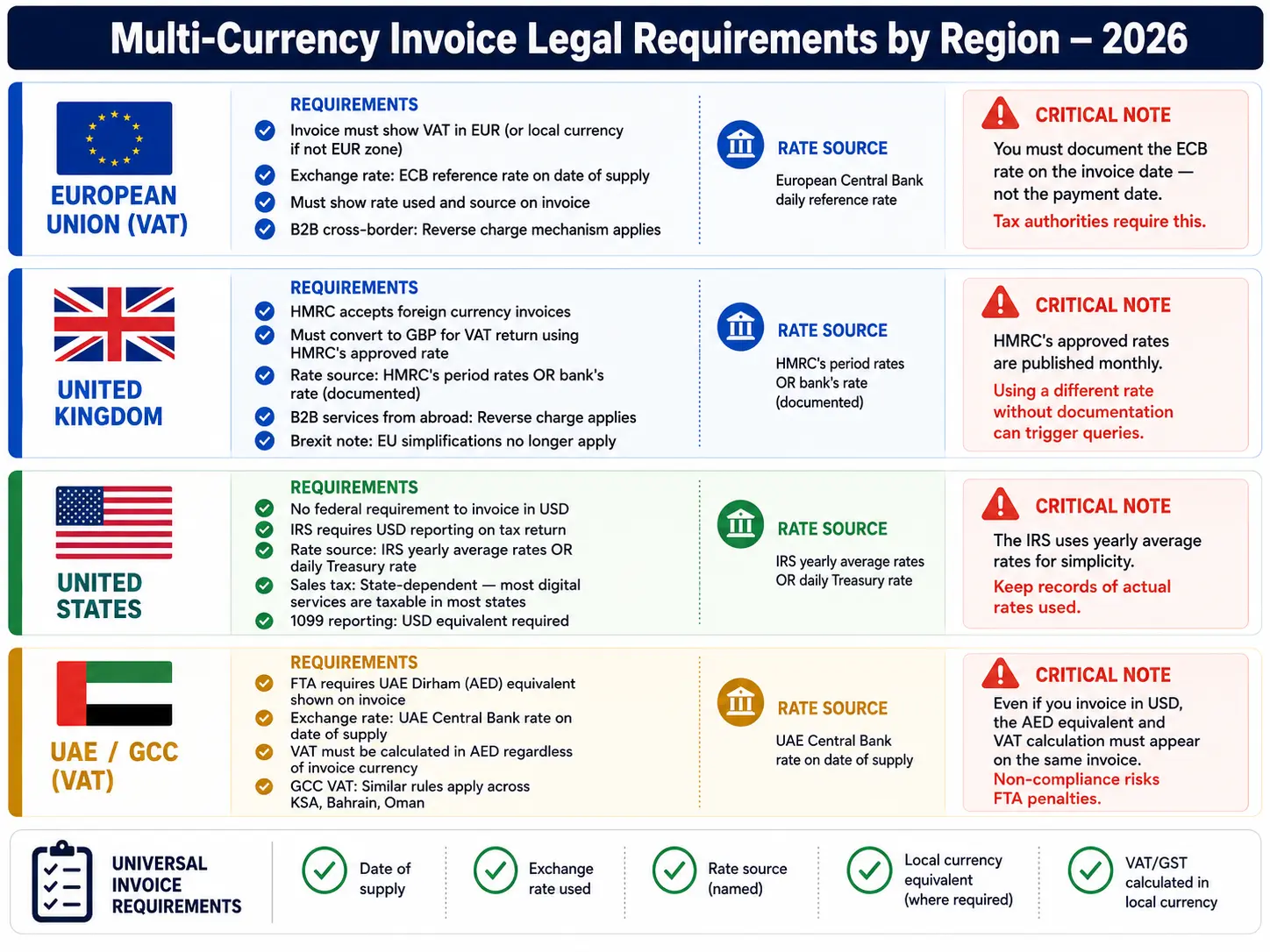
European Union (VAT)
EU businesses invoicing cross-border need to show the total in EUR when the invoice covers EU VAT transactions. The European Central Bank (ECB) daily reference rate is the accepted standard for currency conversion. If you invoice a German client in USD, you may need to show the EUR equivalent at the ECB rate on the invoice date. Keep a record of the rate, the rate source, and the date for every cross-border invoice in your VAT records.
United Kingdom
HMRC requires VAT-registered UK businesses to show amounts in GBP or include a GBP equivalent. The Bank of England daily rate or a commercial rate documented at the time of supply is accepted. Keep rate documentation per invoice.
United States
The IRS does not require foreign currency invoices to show a USD equivalent on the invoice itself, but you must convert foreign income to USD when filing. The IRS accepts the official exchange rate for the relevant country or the yearly average currency exchange rates table it publishes each year. Document the rate source and date regardless.
UAE and GCC
The UAE Federal Tax Authority (FTA) requires VAT amounts on tax invoices to appear in AED. If you issue an invoice in USD or GBP, you must show the AED equivalent of the VAT amount using the Central Bank of the UAE's daily rate. For businesses filing UAE VAT returns, this requirement is not optional. GCC member states, including Saudi Arabia, Bahrain, Kuwait, Oman, and Qatar, follow similar rules under their respective tax authorities.
A clear grasp of invoice terminology and payment terms makes these regional requirements easier to apply correctly from day one.
How Rounding and Decimal Rules Trip People Up
Invoicing software handles decimal precision badly often enough to create genuine reconciliation headaches. The problem sits with currencies that do not follow the standard two-decimal format.
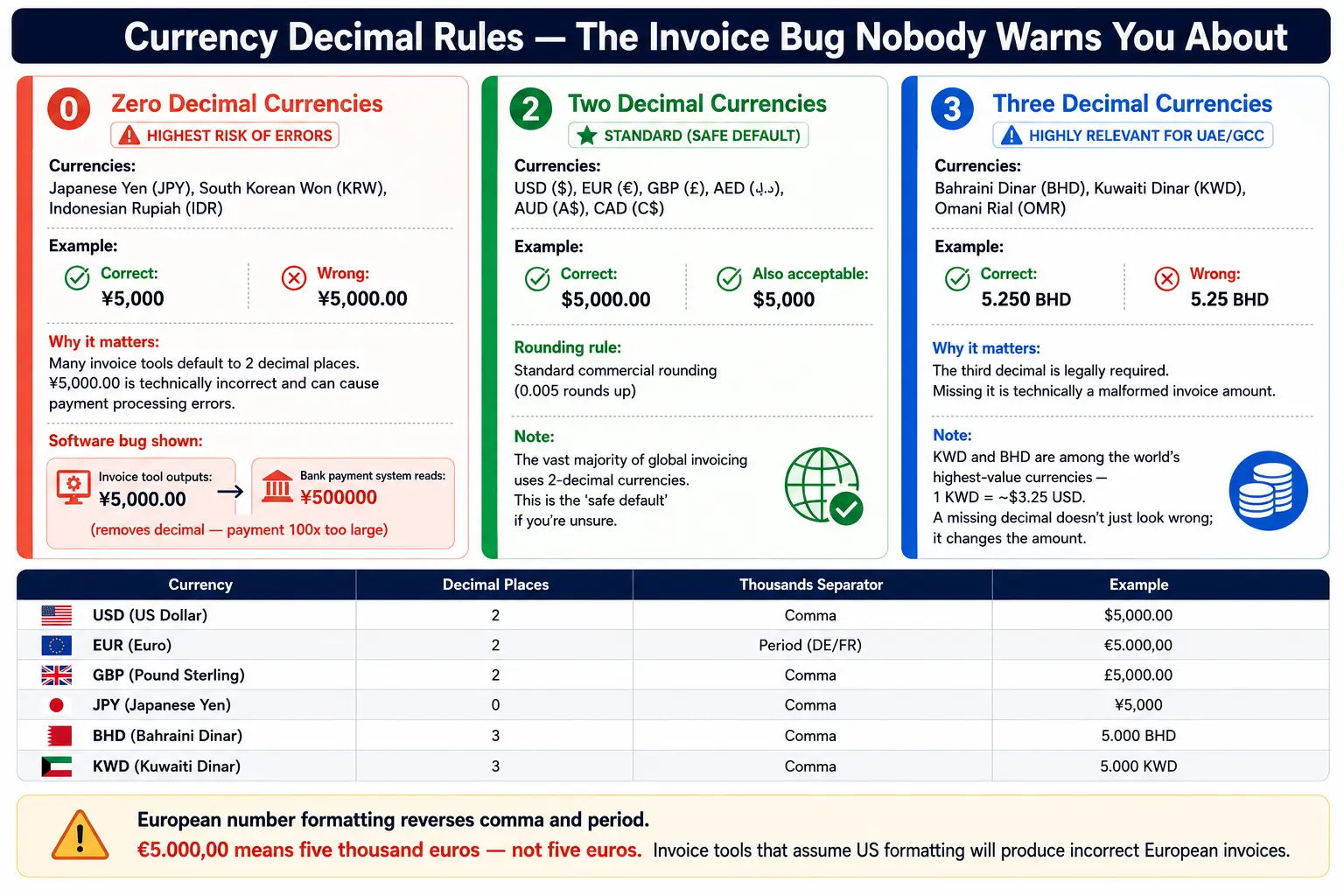
Currencies fall into three groups:
Zero-decimal currencies: Japanese Yen (JPY), South Korean Won (KRW), Indonesian Rupiah (IDR). An invoice for 500,000 JPY should not show "500,000.00 JPY". That trailing "00" is technically incorrect and can cause payment processing rejections in some banking systems.
Two-decimal currencies: USD, EUR, GBP, AED, CAD. The global standard. Most invoicing platforms handle these without issues.
Three-decimal currencies: Bahraini Dinar (BHD), Kuwaiti Dinar (KWD), Omani Rial (OMR). Software gets these wrong most often. An invoice for 1,250 BHD should show "1,250.000 BHD" with three decimal places. Rounding to two decimals creates a discrepancy in the payment record and in your bookkeeping.
If you bill clients in the GCC, check that your invoicing platform handles BHD, KWD, and OMR with three-decimal precision. Some platforms default all currencies to two decimals. That produces invoices with rounding errors and reconciliation problems your accountant will spend time tracking down.
Cross-Border Payment Fees Nobody Warns You About
You send an invoice for $5,000. Your client pays $5,000. You receive $4,935.
The $65 difference is not an error.
SWIFT transfers, the dominant system for international wire payments, allow correspondent banks along the payment chain to deduct fees. Your client's bank sends the payment. It passes through one or two intermediary banks. Each one takes a fee, sometimes $10, sometimes $35. By the time the money reaches your account, $50 to $100 has been deducted with no notification to either party.
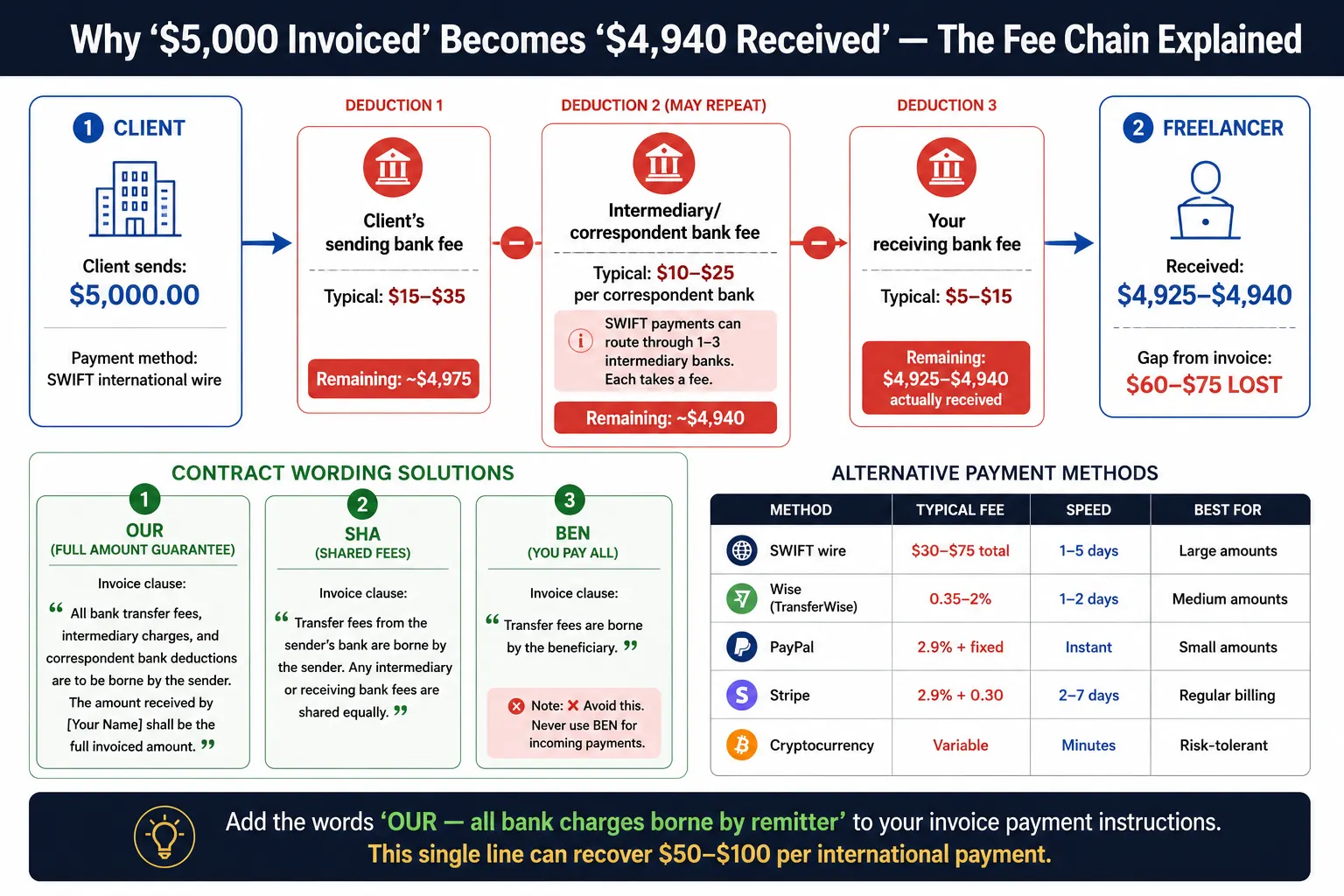
Three ways to handle this:
Add a fee clause to your contracts and invoices. State in writing: "All bank transfer fees and intermediary charges are the responsibility of the payer. The amount received must equal the invoice total." This language shifts the obligation to the client. Many clients will wire a slightly higher amount to cover expected transfer costs.
Ask clients to select "OUR" on SWIFT transfers. This option instructs the sending bank to cover all correspondent fees. Not every banking system offers it, but it is free to request and worth including in your payment instructions.
Use alternative payment rails for smaller amounts. Stripe, PayPal, and newer cross-border payment services often move money at lower total cost than SWIFT for invoices under $10,000. Alfaa supports Stripe and PayPal integrations, which reduces fee leakage on smaller international invoices without requiring clients to use a new payment method.
Recording FX Gains and Losses for Your Books
When you invoice in a foreign currency, you create an FX exposure on your books that sits open until payment arrives. The difference between the amount you recorded at invoice date and the amount that actually lands in your account is either an FX gain or an FX loss. Your accountant needs this separated from ordinary revenue.
Unrealized FX gain or loss is the paper difference between your invoice date rate and the current rate, before payment arrives. It lives only in your records.
Realized FX gain or loss is the actual difference when payment hits your account.
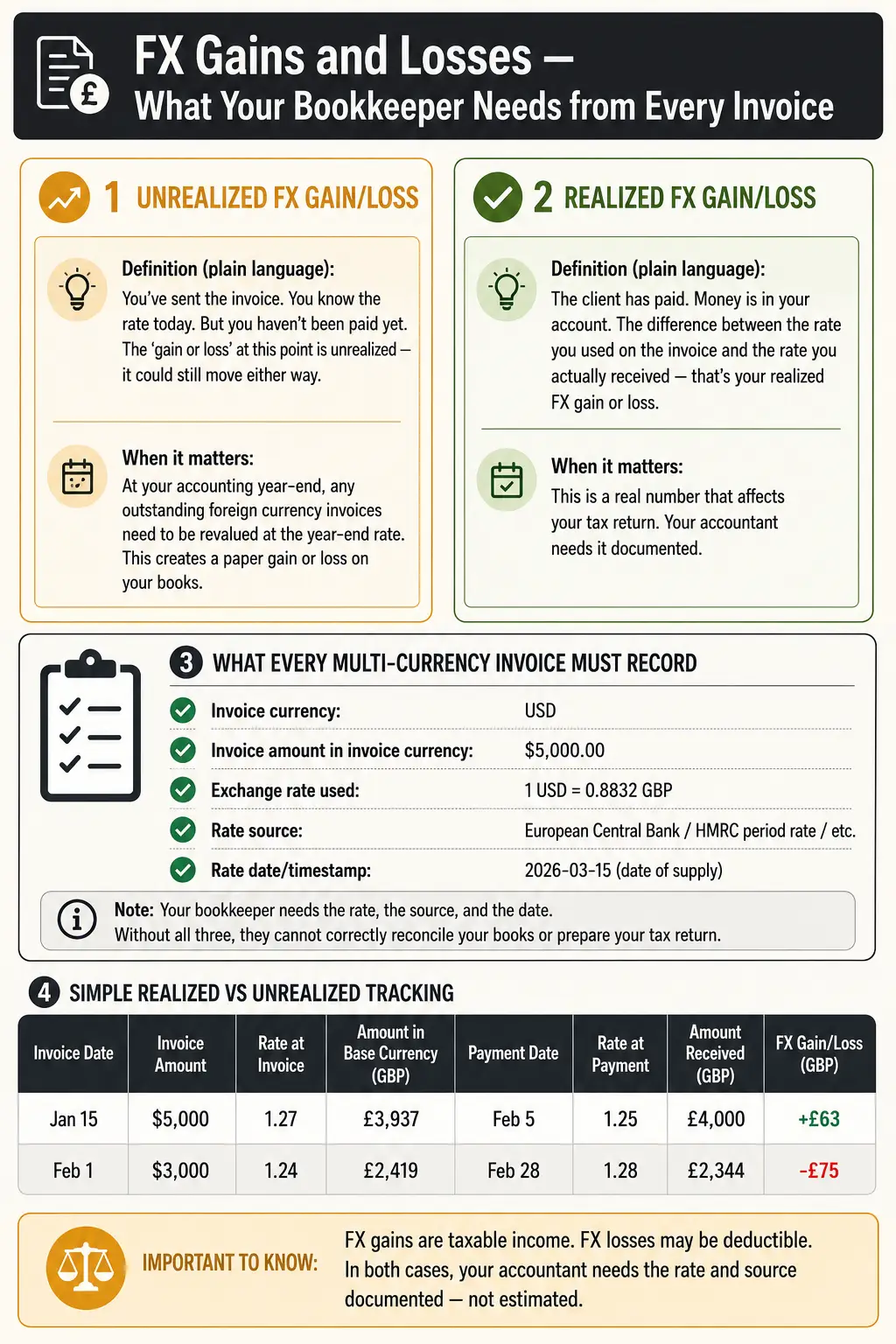
Your bookkeeper needs three things from every cross-currency invoice:
The exchange rate used at invoice date (for example, 1 USD = 0.79 GBP on 1 July 2026)
The source of that rate (ECB reference rate, Central Bank of UAE, XE.com snapshot, or Reuters)
The date and time the rate was recorded
Without these three elements, your accountant cannot properly categorize the FX gain or loss. They may book it as revenue or write it off incorrectly, creating a tax reporting problem at year end.
If you use software that automates invoice generation, check that it records the rate source and date per invoice. Manual invoicing processes miss this step regularly, which is one of the concrete reasons that switching from Excel to invoicing software matters for businesses with regular international billing.
A Simple Framework for Choosing the Right Tool
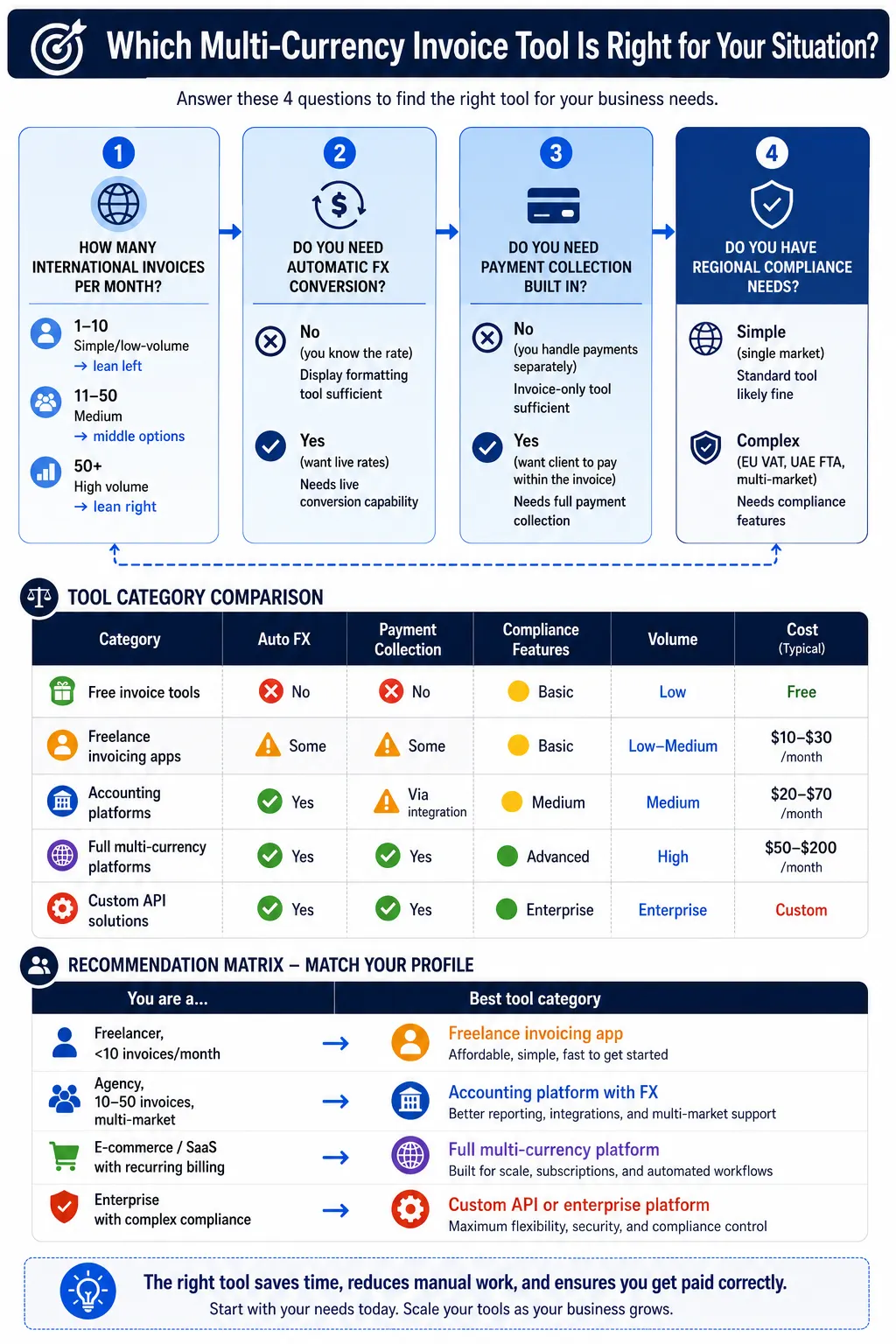
Not every multi-currency invoice generator fits every business. These four criteria help narrow the choice.
Your Situation What You Need
Under 10 international invoices per month Display-only multi-currency with manual rate entry. Simple and low cost.
10 to 50 invoices per month across multiple currencies Live rate integration plus automated currency formatting per client
Collecting payment in a foreign currency Full payment collection with FX settlement and reconciliation
VAT-registered in the EU or UAE Tax-compliant rate recording plus local-currency VAT equivalents per invoice
Four decision questions worth working through:
Do you need automated recurring invoices for retainer clients? The tool must handle currency settings at the client profile level, not just per individual invoice. Manual rate entry each month creates inconsistency. A platform built for recurring workflows handles this at setup and applies it automatically on every billing cycle.
Do you have a team that accesses invoices? Agencies with account managers and finance staff sharing a billing workspace generate errors from shared logins and parallel editing. Team-based invoicing with role-level permissions removes that risk.
Do you invoice while traveling or between client meetings?
A mobile invoicing solution that formats currencies correctly on a phone matters more than a feature-heavy desktop tool you open once a week.
Do you need a full comparison of available tools?
The best invoice billing software guide for 2026 covers the main options side by side with use cases.
For most independent consultants and small agencies billing in two to five currencies, the right tool is a clean automated platform that stores currency preferences per client, formats invoices correctly, exports records an accountant can use, and handles recurring billing without requiring you to re-enter settings each month. Alfaa does all of that, with a 14-day free trial and no credit card required.
Billing international clients is a financial decision you make dozens of times each year. Getting the currency, rate, fee structure, and legal requirements right on each invoice protects your revenue in ways that chasing late payments cannot.
If you want an invoicing platform built for consultants and agencies working across borders, Alfaa's invoice management software handles multi-currency billing, client management, and payment tracking from one place.
Frequently Asked Questions
Yes. Most jurisdictions do not require your invoice currency to match your bank account currency. You can invoice in USD, EUR, or any currency you and your client agree on. Your tax authority requires you to convert to your local currency when reporting income. Keep a record of the rate used on each invoice.
Use the rate from a recognized source on the invoice date. Accepted sources include the European Central Bank reference rate (EU), Bank of England daily rate (UK), Central Bank of UAE rate (UAE), and XE.com or Reuters for general commercial invoices. State the source either on the invoice or in your internal records.
It depends on your jurisdiction. UAE VAT rules require the VAT amount to appear in AED on any tax invoice, regardless of the invoice currency. EU VAT rules require EUR amounts for cross-border EU transactions. US businesses face no federal invoice currency requirement. Check the rules for your specific country before issuing tax invoices in a foreign currency.
You report income in your local currency at tax time. If you invoiced in USD and your home currency is AED, you convert at the rate on payment date or invoice date, depending on your accounting method. Realized FX gains count as taxable income in most jurisdictions. Realized FX losses may be deductible. Speak with a local accountant for the treatment specific to your country and tax period.

Olivia Bennett
Content Writer @ ALFAA
Olivia is a content writer at ALFAA who specializes in invoicing, small business, and productivity topics. She enjoys simplifying complex ideas into clear, practical insights that help business owners save time, get paid faster, and stay organized.