How to Create an Invoice and Actually Get Paid: The Complete Workflow From Send to Payment
By Alfaa Team
Stay in the loop
Get finance tips delivered to your inbox.
Search "how to create an invoice" and you'll get the same checklist eight different ways: business info, client info, invoice number, line items, tax, total, due date, and payment terms. Fill in the fields, export a PDF, and you're done.
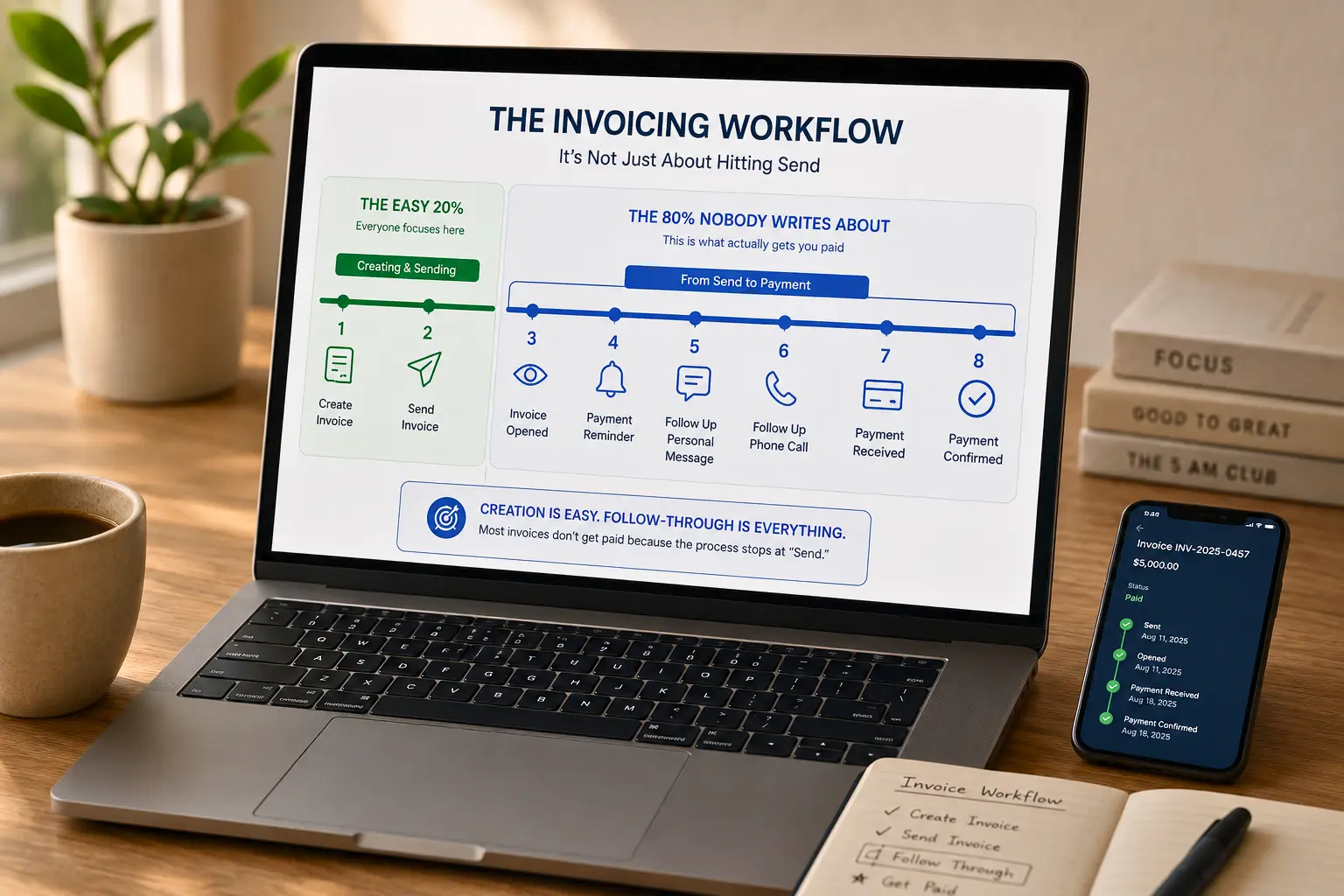
That checklist isn't wrong. It's just incomplete because creating the invoice is the easy 20% of the job. The other 80% is everything that happens between the moment you hit send and the moment the money actually lands in your account, and almost nothing gets written about that part. This guide covers both the fields you need to get right the first time and the workflow decisions that determine whether you get paid in 7 days or 70.
Start with the fields that actually matter
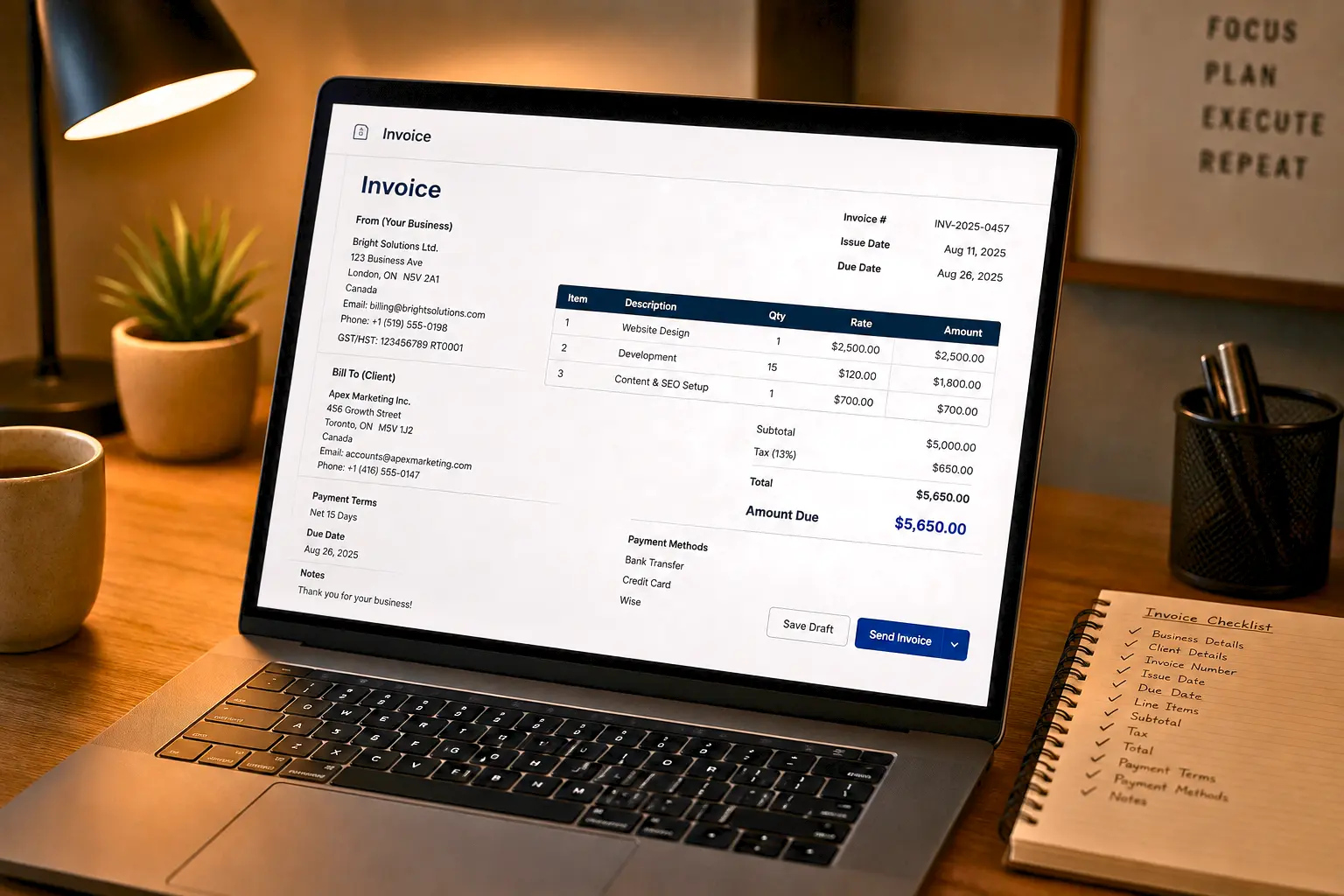
Every invoice needs the same core information, regardless of industry:
Your business details — name, address, tax ID/VAT if applicable, contact info
Client details — legal entity name, billing address, contact person
Invoice number — sequential, never reused (more on why below)
Issue date and due date
Line items — description, quantity, rate, amount
Subtotal, tax, and total
Payment terms and accepted payment methods
If you're still assembling these manually in a spreadsheet or word processor, it's worth reading about the true cost of manual invoicing before you scale the habit any further; the small formatting decisions below matter a lot more once volume goes up.
The parts worth slowing down on are the ones every generic guide treats as a single checkbox: which document you're actually sending, how you structure the line items, and which payment terms you pick. Get those three wrong and the "hit send" checklist doesn't save you.
Invoice, quote, proforma, or receipt? Pick the right document
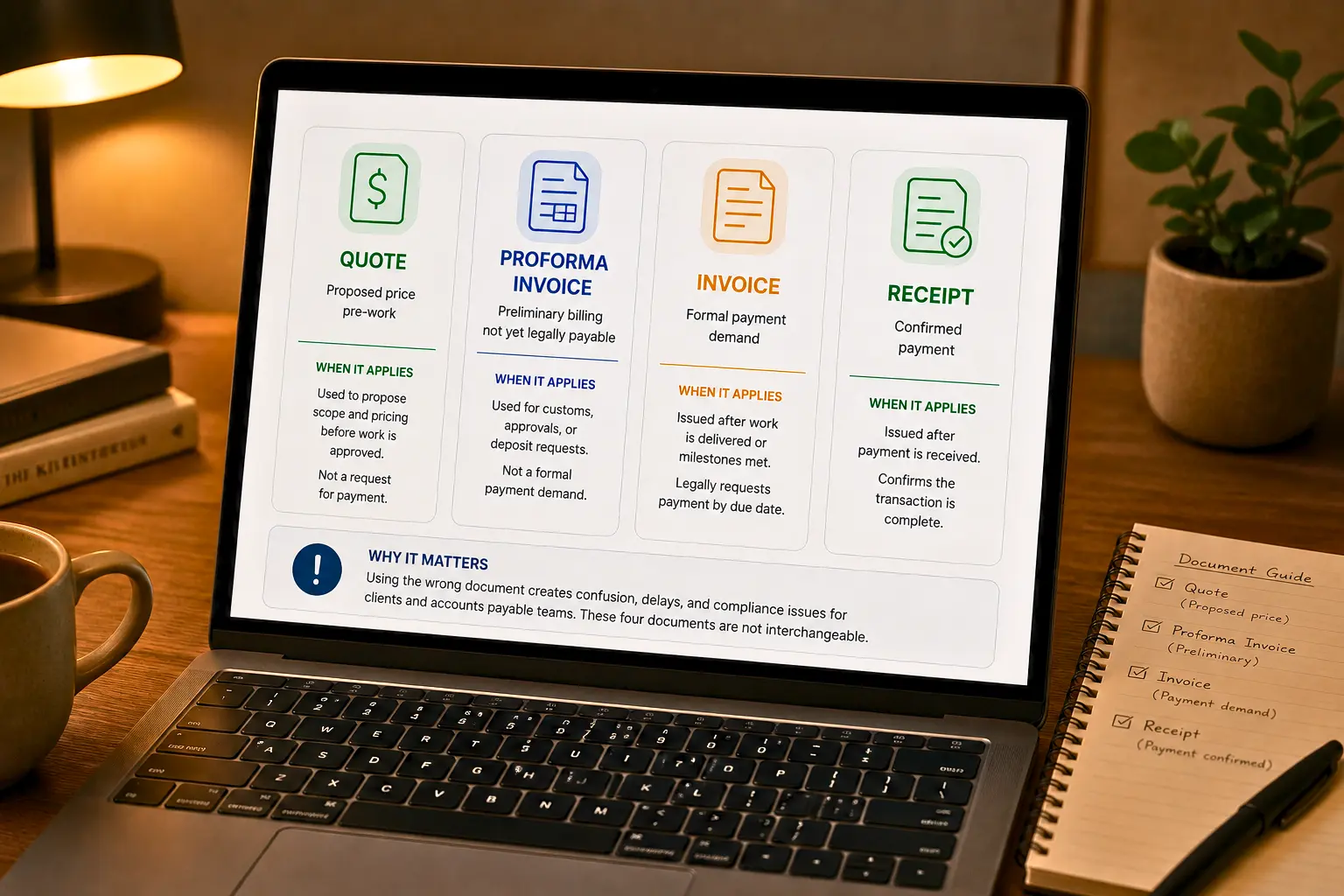
These four documents get used interchangeably by people who shouldn't be using them interchangeably, and it causes real problems, a client who thinks they received a quote (non-binding) when you meant to send an invoice (a payment demand) has a legitimate reason to be confused about why you're following up.
Quote — a proposed price before work starts, not yet a request for payment
Proforma invoice — a preliminary invoice, often used for customs or to confirm order details before final billing; not legally payable
Invoice — a formal, legally binding request for payment for goods or services already delivered (or about to be, under agreed terms)
Receipt — confirmation that payment was already received
For a longer breakdown, see our guides on invoice vs. receipt vs. bill: the key differences and invoice vs. receipt: differences, examples, and when to use each. If you want the vocabulary around due dates, net terms, and the rest, this glossary of invoice terminology is worth bookmarking, and this overview of the different types of invoices covers variations beyond the four above. If you're unclear on what legally qualifies as an invoice in the first place, start with what are invoices.
Structure your line items around your billing model, not a generic template
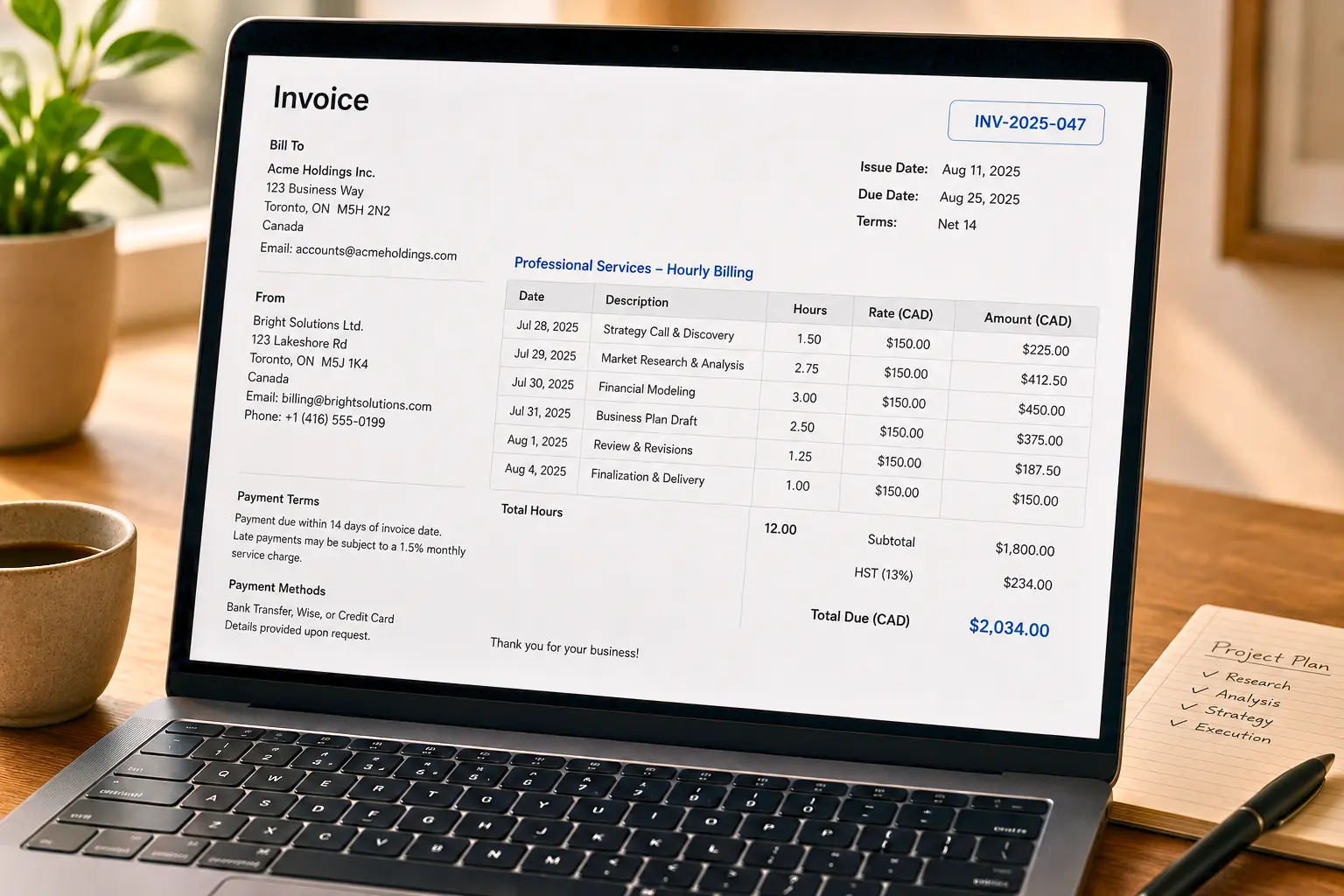
Most guides show one line-item example, a flat product row, and call it done. In practice, how you structure line items depends heavily on how you actually charge:
Hourly/time-based work: List the time period, hours worked, and rate per hour as separate, dated entries where possible. Vague single-line entries like "Consulting — $2,400" invite disputes; a client is far less likely to push back on "14 hrs @ $150/hr, Oct 1–15" because the math is visible.
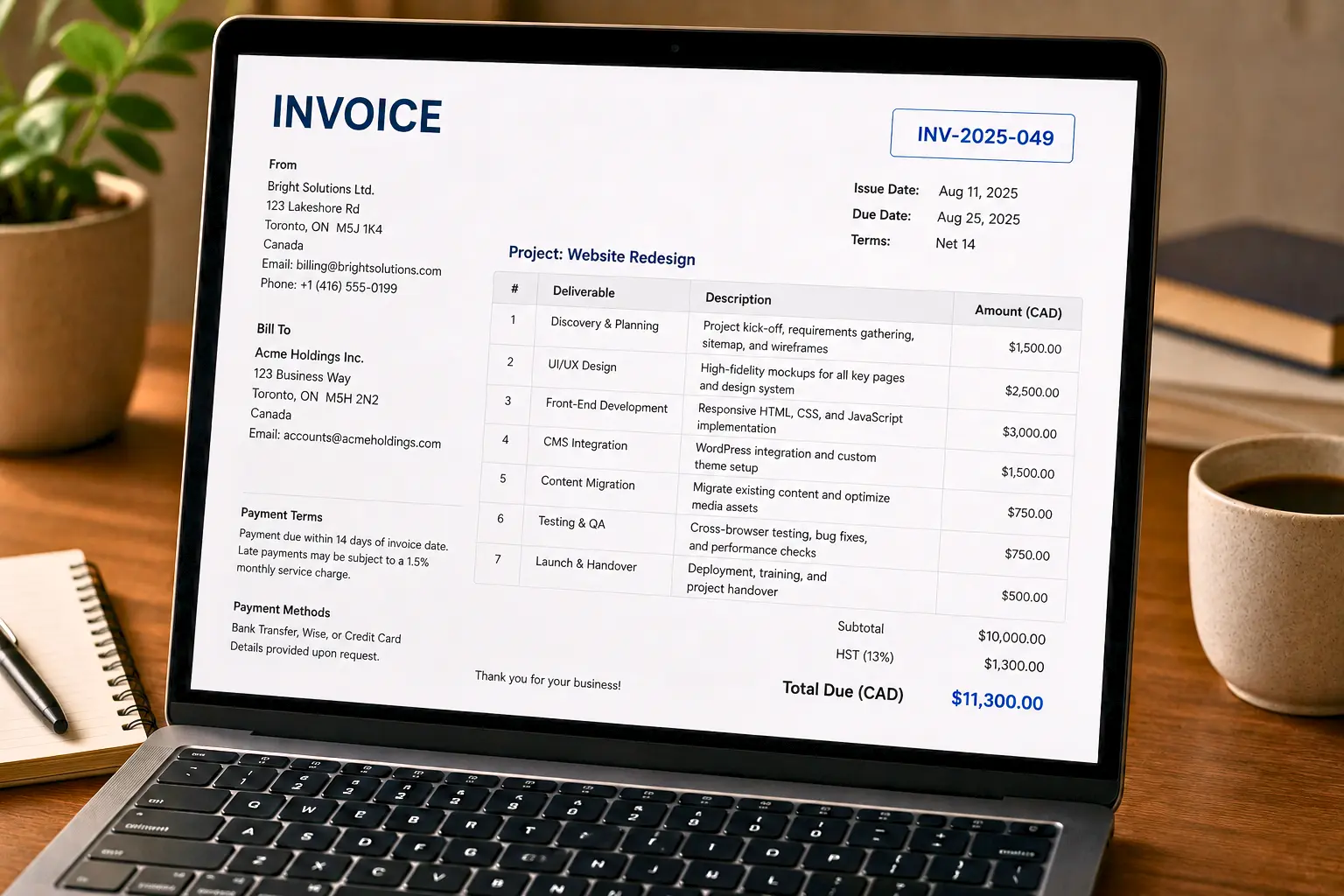
Fixed-fee projects: Break the fee into the deliverables it actually covers rather than one lump sum. This gives the client a paper trail of what they paid for and gives you a reference point if scope creeps mid-project.
Milestone-based work: Each milestone should be its own line item (or its own invoice, if you're billing per milestone), tied to a specific deliverable and date. This makes partial project delays or scope changes far easier to reconcile than a single running total.
If you regularly juggle more than one of these billing models across clients, that's usually the point where manual invoicing starts showing the signs it's time to automate.
Choose payment terms as a cash-flow decision, not a checkbox
"Include clear payment terms" is standard advice. What's missing is how to choose them. Net 15, Net 30, and due-on-receipt aren't interchangeable defaults they're a lever on your cash flow:
Due on receipt protects your cash position best but can strain client relationships if used indiscriminately, especially with larger organizations that route payments through AP departments on their own schedules.
Net 15 is a reasonable middle ground for established clients with a track record of paying promptly.
Net 30 is the default in many industries (especially B2B and agency work), but every day past your own expenses' due dates is cash flow risk you're absorbing on the client's behalf.
The right choice depends on your risk tolerance, how essential your service is to the client, and how much cash buffer you're carrying. Shorter terms plus an automated reminder system will get you paid faster than long terms plus manual chasing. See how automated payment reminders can cut your Days Sales Outstanding (DSO) for the mechanics of that trade-off.
Handling deposits and partial payments
If a client pays 50% upfront and the balance on delivery, don't try to force that into a single invoice. Two clean approaches:
Two separate invoices: One for the deposit, tied to project kickoff, and one for the balance, tied to delivery. Reference the original quote or agreement number on both so the paper trail is obvious.
One invoice with a payment schedule: List the total, then a clear breakdown of deposit amount/date and balance amount/date so the client sees the full picture in one document.
Whichever you choose, keep it consistent per client relationship. Mixing approaches invoice-to-invoice is a common source of confused accounts payable teams and delayed payments.
Recurring invoices need a different setup than one-off invoices
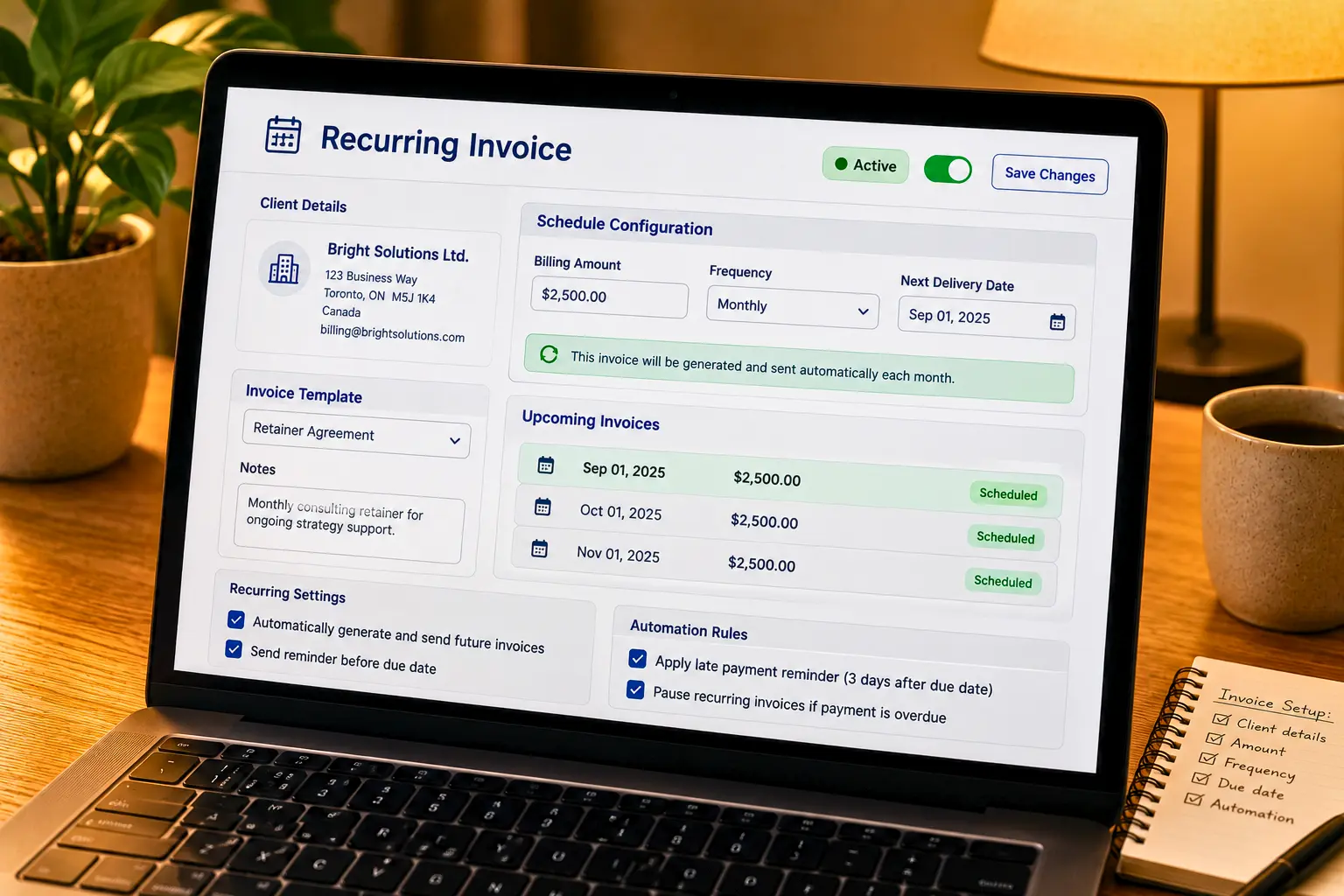
If you're billing the same client on a schedule with monthly retainers, subscriptions, or ongoing service contracts, creating each invoice manually from scratch is where a lot of avoidable errors creep in (wrong amount, skipped month, inconsistent numbering). We cover the difference in depth in recurring invoices vs. one-off billing: which is right for your retainer clients, and if you're ready to set it up, this step-by-step guide to setting up recurring invoices for retainer clients walks you through the process. This is also where automation pays for itself fastest. Alfaa's recurring billing feature handles the repeat generation and sending so retainer invoices go out on schedule without you touching them each month.
What happens after you hit "send"? The part every other guide skips
This is the actual gap. Once the invoice is out, three things determine whether you get paid on time:
1. Know whether it's been seen.
An invoice sitting unopened in an inbox is a very different problem than one that's been opened and ignored. Visibility into open/view status changes how and when you follow up.
2. Automate the follow-up before it's overdue, not after.
Reminders sent a few days before the due date, on the due date, and at set intervals after are dramatically more effective and far less awkward than a manual email you send only once the invoice is already late. See our payment reminder strategies that get you paid without awkward follow-ups, and Alfaa's payment reminder emails and payment reminders features are built around exactly this cadence.
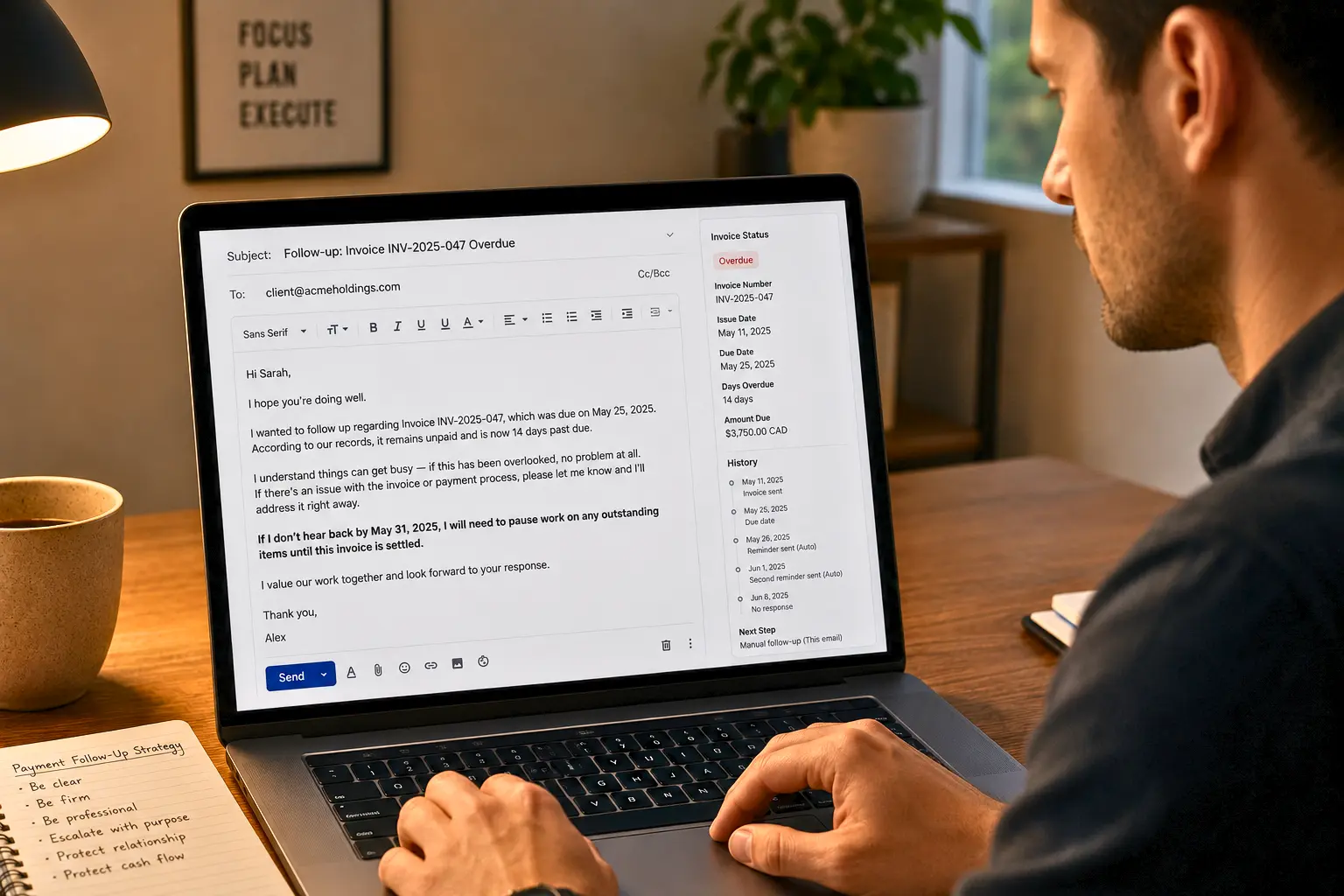
3. Have a plan for when a client is genuinely stalling.
Reminders don't always work. Our guide on what to do when a client is delaying payment covers how to escalate tone without burning the relationship and why you're getting paid late and how to fix it and is worth reading if late payment is a pattern rather than a one-off. For a broader view, see proven invoicing strategies to reduce late payments. Tracking who's paid, who hasn't, and who's trending late across your whole client base is easier with dedicated payment tracking and client analytics tools than with a spreadsheet you update manually.
Correcting an invoice after it's sent
Clients dispute line items. You catch a typo after sending. A client cancels part of an order. None of this should mean deleting the original invoice and hoping nobody notices the gap in your numbering that gap looks bad in an audit and can raise real questions about your records.
The correct options, in order of how invasive they are:
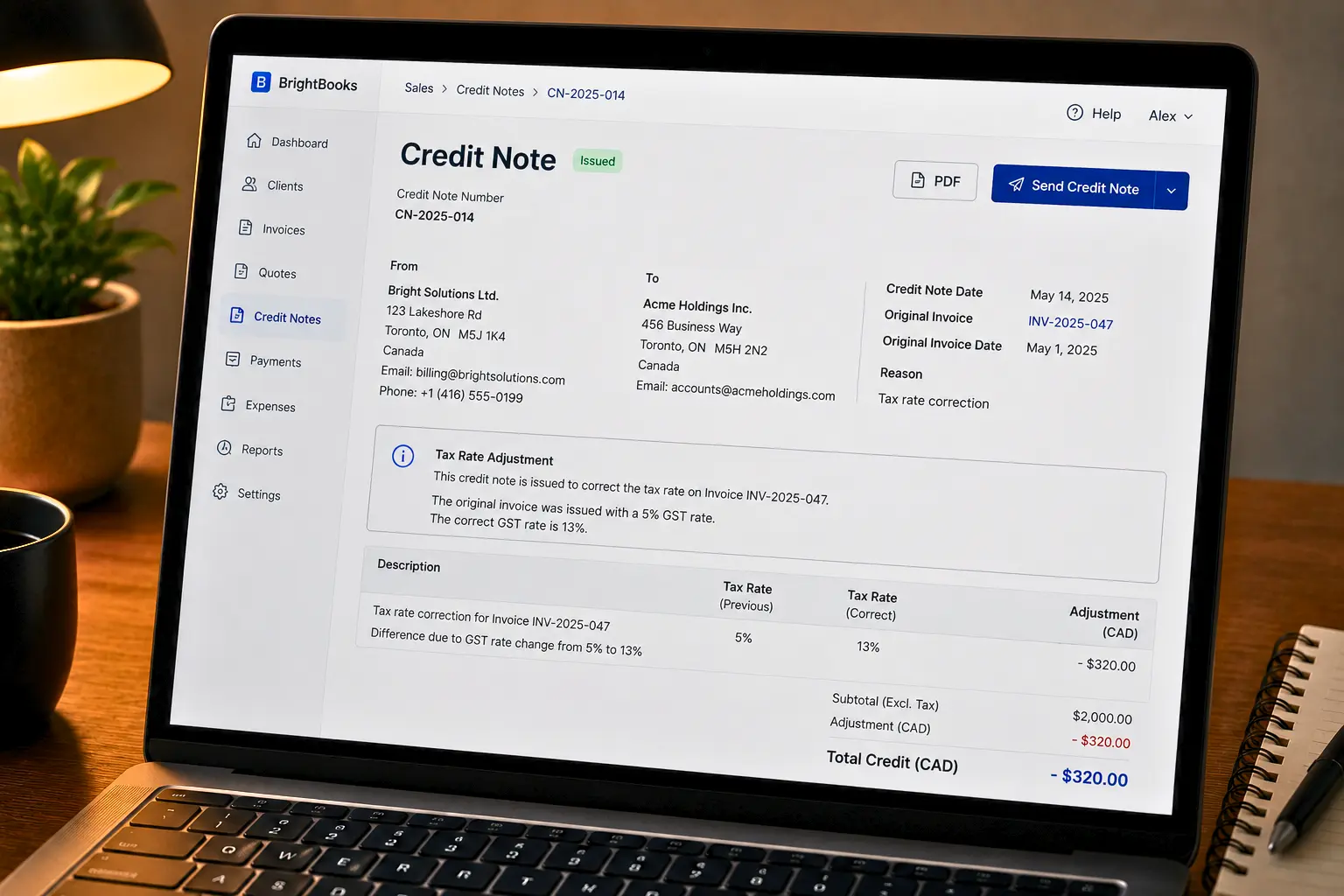
Credit note (credit memo): The standard fix for a disputed or incorrect line item on an invoice that's already been sent or paid. It references the original invoice number and reduces the amount owed (or documents a refund) without altering the original document.
Void the invoice: Appropriate if the invoice was never valid in the first place, sent to the wrong client, duplicated, or created in error and hasn't been acted on. The voided invoice number stays in your sequence (never reused) with a clear void status.
Resend a corrected invoice: Only appropriate before the original has been acted on or paid, and even then it's cleaner to void-and-reissue with a new number than to silently edit and resend the same one.
Whichever path you take, the original invoice number stays in your records. Skipping numbers or reusing them breaks your sequence and is one of the more common invoice mistakes that delay payments and hurt cash flow. See also our full list of invoice mistakes that cost you money.
The tax rate changed after you invoiced. Now what?
If a tax rate was wrong at the time of billing or changed before the client paid, don't just adjust the total on the existing document. Issue a credit note for the tax difference (or an additional invoice for the shortfall) that clearly references the original invoice and explains the adjustment. This keeps your tax records defensible and gives the client a paper trail if they need to reconcile it. If you invoice across borders, tax handling gets more involved see do I charge sales tax on invoices to international clients and the broader invoice requirements by country: a guide for global businesses.
Formatting invoices with a lot of line items
High-volume independent contractors and agencies often need to fit dozens of line items on one invoice without it becoming unreadable. A few practical rules:
Group and subtotal: The related line items (by project phase, week, or category) rather than presenting one long undifferentiated list
Keep descriptions consistent: In format across items so the client can scan rather than re-read each line
Paginate cleanly: If the invoice runs long repeat the header and running subtotal on each page rather than letting the client lose track of where the total came from
This matters more than it sounds like. Once you're sending detailed, itemized invoices regularly, it's one of the areas where dedicated invoicing software has a real edge over a manually maintained template.
E-invoicing: when "invoice" means a data format, not a PDF
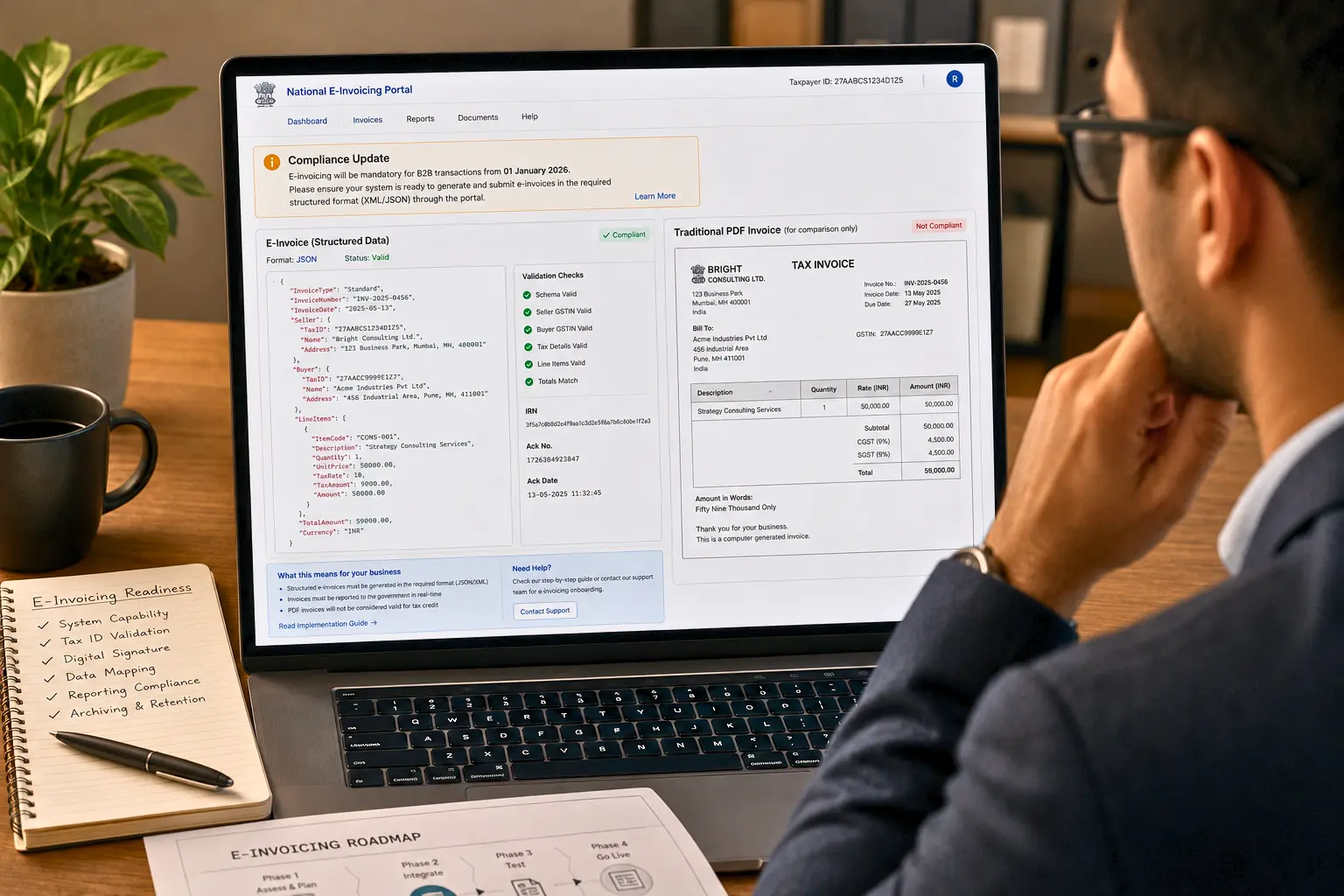
In a growing number of jurisdictions, the definition of a valid invoice is shifting from "a PDF that looks right" to "a structured data file submitted through a government-recognized system." The EU's ViDA (VAT in the Digital Age) initiative and various national e-invoicing mandates are pushing business-to-business and business-to-government invoicing toward standardized digital formats, not just human-readable documents. If you sell internationally, this is worth tracking even if it isn't mandatory in your market yet. Read our explainer on electronic invoicing and how it helps businesses get paid sooner. If you bill clients in different currencies as part of that international work, this guide to multi-currency invoicing covers how to bill correctly without absorbing exchange-rate risk you didn't intend to take on.
The takeaway
The invoice-creation checklist gets you a correct document. It doesn't get you paid. The businesses that get paid consistently and on time are the ones that treat invoicing as a workflow from choosing the right document type to structuring line items around how they actually bill to tracking and following up after sending to correcting mistakes without breaking their records.
If you're doing most of this manually today, most of it is exactly what invoicing software is built to remove from your plate. See the full picture on Alfaa's features page, or start with a single invoice using the free invoice generator if you just need to send one right now.
Frequently Asked Questions
A professional invoice should include your business details, client information, invoice number, invoice date, payment due date, description of products or services, quantities, prices, applicable taxes, total amount due, and payment terms. Clear and complete information helps prevent confusion and payment delays.
You can create an invoice by adding your business and client details, selecting a professional template, entering your services or products as line items, applying taxes if needed, reviewing the invoice, and sending it to your client. Alfaa is designed to let users create and send an invoice in about 60 seconds.
Send your invoice as soon as the agreed work or billing milestone is completed. Prompt invoicing reduces unnecessary delays and gives the client more time to review and pay before the due date.
Payment terms should clearly state when payment is due and which payment methods are accepted. Depending on your agreement with the client, you may use terms such as due on receipt, Net 15, Net 30, or another mutually agreed deadline.
Use a clean invoice template, include your business branding and logo, organize line items clearly, display taxes and totals accurately, and provide straightforward payment instructions. Professional invoices can make your business appear more credible and easier to work with.
Make invoices easy to understand, set clear due dates, provide convenient payment options, send invoices promptly, and follow up when payments become overdue. Automated payment reminders can also reduce the need for manual follow-ups.
Yes. Online invoicing platforms can allow clients to pay directly through the invoice using supported payment processors. Alfaa supports online payment integrations including Stripe and PayPal, depending on the plan.
Use invoice management software to monitor invoice statuses and payments from a centralized dashboard. Alfaa provides visibility into invoices raised, payments received, pending amounts, and revenue trends.
First, check that the invoice was delivered and that the client has no questions about the charges. Then send a polite payment reminder referencing the original invoice and due date. If the invoice remains unpaid, follow your agreed escalation or late-payment process.
Yes. Invoice management software can automate payment reminders so clients receive follow-ups without you having to manually track every due date. Alfaa includes payment reminder functionality on its paid plans.

Olivia Bennett
Content Writer @ Alfaa
Olivia is a content writer at Alfaa who specializes in invoicing, small business, and productivity topics. She enjoys simplifying complex ideas into clear, practical insights that help business owners save time, get paid faster, and stay organized.